I’ve not seen a variable definition like this with a string in parenthesis.
Thanks, Steve, for the GIG file. I just have a small problem: you saved it in GigPerformer > Version 4.7, and I get error messages when trying to load it. Is it possible for you to save it in an older Gig version, similar to how it works in Microsoft Word?
I’m on gig performer 5. Will need to research.
- If I can save for older version
- If functions I’m using are good for older version.
What version are you on?
My Version is V 4.7
I don’t see any options to save or export to prior versions. You would need to copy the script into a rackspace and set the proper block name in your wiring view.
It’s no problem, thanks again!
If you’re a Deskew customer with a license for V4.7, then 4.8.2 is a free update
How about telling us what error messages you’re getting?
From the GP Script language manual:
When you declare a parameter variable for a Scriptlet plugin, the name of that variable is used automatically as the parameter name that you see in the plugin editor or in the widget mapping parameter list. This can cause conflicts if the parameter name you want to use is the same as some other variable or is the same as an existing system function. For example, you cannot declare a parameter variable called “Transpose” since there is already a GPScript system function with that name. However, since it might typically be desirable to use such a word for display purposes, you can optionally include an explicit parameter name in the declaration.
Example:
Var MyTranspose(“transpose”) : parameter -12 … 12
Thanks @dhj ! I didn’t see that anywhere in the documentation.
I think I understand. In your example “MyTranspose” is the Scriptlet variable and “transpose” is what the scriptlet plugin reports to GP? Is that correct or do I have it backwards?
Steve
Exactly - the item in parenthesis will be the parameter name for host automation purposes so that’s what you will see in the widget mapping as well.
As well as conflicts with other variables and keywords, this also allows you to use parameter names that aren’t allowed in variables (e.g, with spaces in them)

Something was mentioned about the syntax in my code:
P1 ("SysexLocalOnOff"): Subrange Parameter 0..1 = 0 // Subrange parameter for 0 or 1
“I’ve not seen a variable definition like this with a string in parentheses.”
Since many of my attempts are generated by ChatGPT, and ChatGPT assumes that GigPerformer is programmed in Delphi (formerly Pascal), it applies Delphi-compliant syntax. Occasionally, ChatGPT is wrong, but sometimes it produces syntax that doesn’t officially match the GigPerformer documentation yet still works in the script.
Thank you, @dhj, I understand
Really? Do you have an example of something that works but shouldn’t?
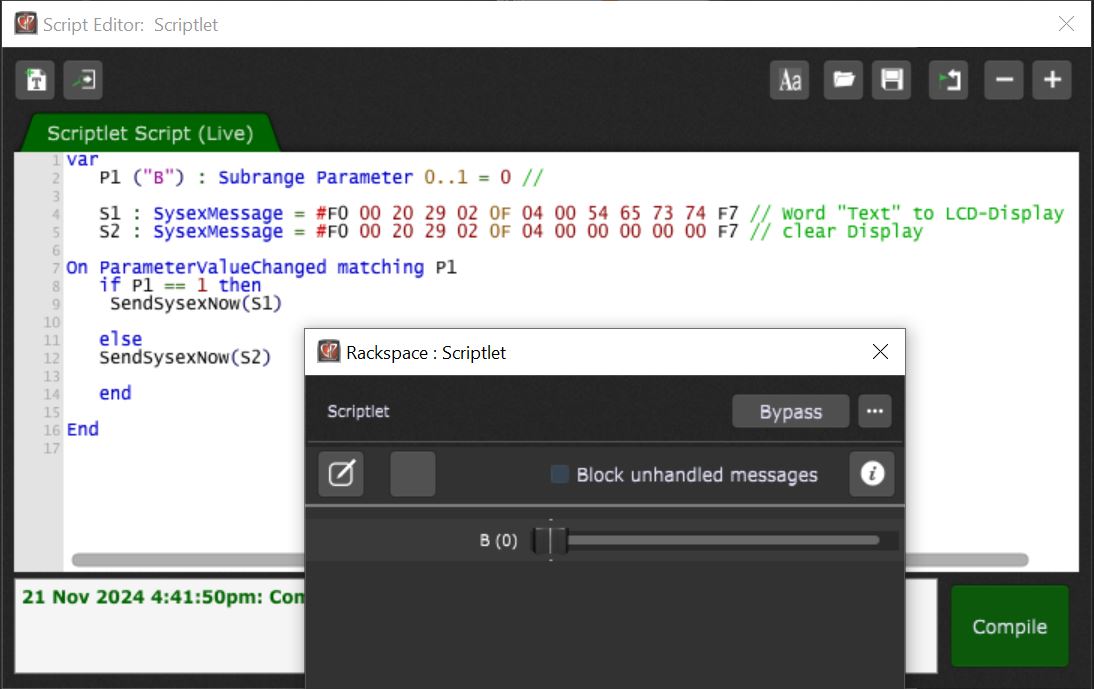
sorry not the word “Text” it is word “Test”
FYI — consider using the StringToHextString function to make this easier.
The example below generates the same result
var
   s : SysexMessage = "F0 00 20 29 02 0F 04 00 " + StringToHexString("Test") + "F7"

   SendSysexNow(s)
The command StringToHexString makes programming easier.
Learned something new again.
Thank you very much!
I have now received the startup sequence from Bome to set my Launchkey into DAW mode and make the pads light up green. A widget named ‘Switch’ with the variable ‘T1’ is on the panel. Now, I want to send multiple commands to my Launchkey in sequence using a button. Unfortunately, I get an error message with the script:
Let me know if you need further assistance with the script!
Scriptlet (Scriptlet) - - Syntax Error in “Main”: Line 11, Col 5: Unexpected or unrecognized token: ‘T1’
Missing ‘(’ at ‘T1’
// GigPerformer GPScript
// This script sends MIDI messages based on the value of the Switch widget's variable T1

var
    Switch : Widget // The Switch widget
    T1 : Integer // Variable to store the value of the Switch widget
    MIDI_OUT : MidiOutBlock // Linked MIDI output

// Main logic triggered when the Switch widget value (T1) changes
On WidgetValueChanged
    T1 = Switch.Value // Assign the value of the Switch widget to the T1 variable

    If (T1 == 1) Then // If T1 (the Switch widget value) is 1
        // Step 1: 9F 0C 7F BF 03 02
        SendNow(MIDI_OUT, MakeMidiMessage(0x9F, 0x0C, 0x7F))
        SendNow(MIDI_OUT, MakeMidiMessage(0xBF, 0x03, 0x02))

        // Step 2: BF 03 02
        SendNow(MIDI_OUT, MakeMidiMessage(0xBF, 0x03, 0x02))

        // Step 3: 90 77 15
        SendNow(MIDI_OUT, MakeMidiMessage(0x90, 0x77, 0x15))

        // Step 4: Change Pad colors (BF xx yy) - without loop
        SendNow(MIDI_OUT, MakeMidiMessage(0xBF, 0x00, 0x01)) // Color for Pad 0
        SendNow(MIDI_OUT, MakeMidiMessage(0xBF, 0x01, 0x02)) // Color for Pad 1
        SendNow(MIDI_OUT, MakeMidiMessage(0xBF, 0x02, 0x03)) // Color for Pad 2
        SendNow(MIDI_OUT, MakeMidiMessage(0xBF, 0x03, 0x04)) // Color for Pad 3
        SendNow(MIDI_OUT, MakeMidiMessage(0xBF, 0x04, 0x05)) // Color for Pad 4
        SendNow(MIDI_OUT, MakeMidiMessage(0xBF, 0x05, 0x06)) // Color for Pad 5
        SendNow(MIDI_OUT, MakeMidiMessage(0xBF, 0x06, 0x07)) // Color for Pad 6
        SendNow(MIDI_OUT, MakeMidiMessage(0xBF, 0x07, 0x08)) // Color for Pad 7
        SendNow(MIDI_OUT, MakeMidiMessage(0xBF, 0x08, 0x09)) // Color for Pad 8
        SendNow(MIDI_OUT, MakeMidiMessage(0xBF, 0x09, 0x0A)) // Color for Pad 9
        SendNow(MIDI_OUT, MakeMidiMessage(0xBF, 0x0A, 0x0B)) // Color for Pad 10
        SendNow(MIDI_OUT, MakeMidiMessage(0xBF, 0x0B, 0x0C)) // Color for Pad 11
        SendNow(MIDI_OUT, MakeMidiMessage(0xBF, 0x0C, 0x0D)) // Color for Pad 12
        SendNow(MIDI_OUT, MakeMidiMessage(0xBF, 0x0D, 0x0E)) // Color for Pad 13
        SendNow(MIDI_OUT, MakeMidiMessage(0xBF, 0x0E, 0x0F)) // Color for Pad 14
        SendNow(MIDI_OUT, MakeMidiMessage(0xBF, 0x0F, 0x10)) // Color for Pad 15
    End
End
There are several errors:
On WidgetValueChanged
    T1 ....
This callback must have this form:
On WidgetValueChanged(newValue : double) from Switch

End
Maybe you’re too much thinking OOP  . GP has some syntactic sugar but isn’t meant to be OO.
So this isn’t right:
T1 = Switch.Value // Blah
It should be:
var d : double = 0.0

    d = Switch.GetWidgetValue() // Blah
But that’s overdoing stuff. You’d better (note the T1 must be a double):
Var
   Switch : Widget
   T1 : double = 0.0

On WidgetValueChanged(newValue : double) from Switch

    T1 = newValue

    If T1 == 1.0
    Then
    // Stuff
    End
End
But if you don’t need to keep the value:
Var
   Switch : Widget

On WidgetValueChanged(newValue : double) from Switch
    If newValue == 1.0
    Then
    // Stuff
    End
End
GP doesn’t always seem to provide clear errors, although this one is pretty spot on. The callback expects (newValue : double) from <some widget>. Instead it gets T1 = .... My advise is to always look also in the vicinity of the location that the error points to.