I’m building a completely new rig with GP. Everything is set up in one room. Once the system is complete, my hardware will always be on the band bus. I can then program new songs using only GP. But what if GP throws up warnings because it can’t find the audio interface or MIDI interface? What’s the right approach in that case? My guess would be: Program the song at home. Then later on stage (when the hardware is also available), import the song and make the necessary adjustments to the live setup on site.
Hmm, on the Mac I keep Blackhole as a “virtual” audio driver.
There’s probably something similar for Windows so that you always have an audio interface and then just change the audio interface.
I use vb-audio coconut to simulate a multi-channel audio interface via ASIO.
Here is a tip: Hacks compilation - #3 by npudar
For audio, macOS users can create an aggregate device: MAC only: Aggregate Device instead Virtual Audio Channels
Windows users can use VB-Audio Matrix Coconut, per the post above.
Okay, thank you. I’ll have to take a closer look at that.
Correct me if I misunderstand the problem but this is nothing to worry about. I’ve been doing it exactly as you described for years.
- Use rig manager for the MIDI part
- For programming switch to the internal sound card. If you check something like “use virtual audio ports” when loading the gig file, the audio routing will be preserved.
It’s just important to begin on the machine that has the actual audio interface so the number of used audio channels gets stored.
Thanks. I won’t be able to address this issue for at least two weeks, as I’m planning my first gig with GP in a week. I still have a lot to do and test. I’ll get back to this thread, though.
I tried this a while ago and abandoned it for some reason.
Do aggregate devices increase latency, reduce stability, or increase processing?
Latency is for sure the greatest latency of the combined devices.
Please make sure to test for your setup and report back the findings 
As far as I could see, this is something that macOS users do on a regular basis for various use cases. An example is this positive experience.
So, I’ve got the audio working. But I also have a MIDI interface in my equipment. It’s usually in the band’s van. For rehearsals, I use a small USB MIDI interface. Is there a guide on how to start Gigperformer so it automatically detects which MIDI interface is connected?
GP only recognizes the band’s MIDI interface when I always plug it in. I can’t get the rehearsal interface to work.
In the picture, the band interface is currently unplugged and the rehearsal interface is plugged in.
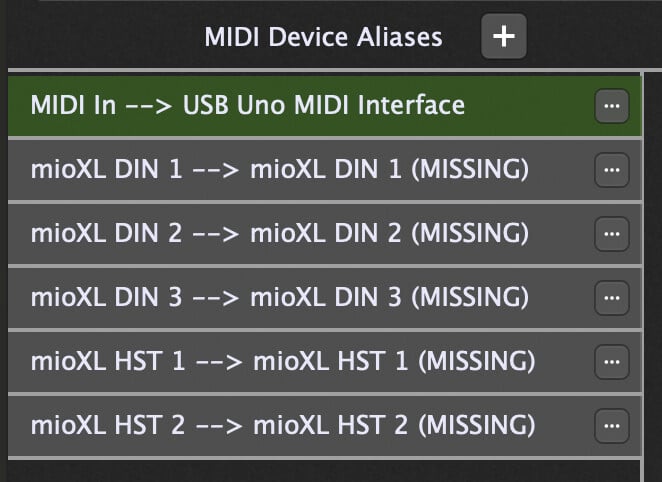
When I restart, the rehearsal interface (USB Uno) also shows as missing, even though it’s plugged in. This is too complicated for me.
Update: I’ve watched a few videos by Brett Pontecorvo. It’s still complicated, but I’ve already made some progress. I’ll continue working on it tomorrow.