Thanks for your feedback. It seems that by solving one bug, Peter introduced another one : any new gig file doesn’t work properly. Don’t use 1.04 for the moment.
2 Likes
Yea I went back to 1.0.3 for now. I really hope they figure this stuff out. I love this plugin!
@DKnight71 - Thank you for the report.
I will try to reproduce it locally and update Peter.
@Dadi any new instance of OP-X Pro 3 1.0.4 for Win is reset to a default patch when the plugin state is reloaded. Gig files which were saved with the previous version are properly reloaded and work fine. Only those created with 1.0.4 are a problem.
You can also easily test the issue this way:
- create a rackspace with an instance of OP-X Pro 3 1.0.4
- choose a new patch
- duplicate this rackspace
=> In the duplicated rackspace, the plugin state cannot be retrieved properly and is replaced by a default patch.
3 Likes
I am about to give this a whirl…i installed 1.04 and switched patches and it worked like a champ…but I have as yet to start from scratch booting up and all that jazz…going to test it right now…
I have 4 patches now with OPx in them…2 were made in the gig file when i was using 4.7, and 2 have been added since opening then gig file in 5.0 and i ran it thru the ringers last night after putting OPX1.04 in and all seems well so far… I have about 50 more patches/racks to make with probably 30 of them using opx (just a guess) So i will update once complete…
1 Like
I cannot be more clear : don’t use the 1.0.4 for Win version of OP-X Pro 3 !!!
I asked Peter, the OP-X Pro dev, to remove the download of this version. It is now clear that any new patch made with this version won’t be recalled properly, only patches made with an older version will work.
David - I’m just letting you know that the 1.04 version WORKS for me…the patches recall just fine…are you saying that if I build something in 1.04 that there’s somethign coming down in 1.05 that will prevent that from loading?
Are you sure they work? I ask because mine appear to work as in the correct patch shows in the GUI, but if you play the sound, it’s always the default patch for me.
Mine do work…I’m not even looking at the gui - i’m just changing patches and hearing them change properly…
OK, did you test this ?
For me it works also this way, but, if you save it and reload, the patches are lost. You can only load an older file made with an older version than 1.0.4.
so i just booted up my microsoft surface from scratch, and powered on the key largo.launched Gig Performer. Took a rack space that has a single OPx (for the song Runaway by Bon Jovi - but it uses a patch out of their presets that I tweaked and saved in my user space), Duplicated that patch and it mirrored just as I would have expected it to…the runaway patch works like a champ. So I took another rackspace that has 2 instances of OPx running in it - for the song separate ways - one uses the patch out of their presets that I also altered and saved to the user area, and the other patch uses a completely different patch I built from scratch for the bottom, and also saved in the user space…also has a wavestation patch int here too that’s causing another issue (for another thread).
OPx performed exactly as I expected it to in 1.04. Change patches, copied and pasted rackspaces, the whole 9 yards, Shut it down, loaded blank gig file, reloaded original Gig file that I am working with and it all seems to be working well.
BTW -I did go to Sonicprojects and saw that 1.04 is removed…(FYI)
Ok I can confirm that the issue still persists. I ran it open and closed probably a dozen times or so, but it was when I went to start making songs that I noticed the problem happening. It never failed me if I switched between individual patches in the rack space. The minute I went into Song mode and started adding rackspaces in and song parts and assigning them, is when OPx went “haywire”. One time it showed blank but played the proper patch, another time it showed the proper patch but the sound was like a default Sawtooth sound. . It still works if i don’t use song mode though…don’t know if that helps.
In fact it is even worse than before, that’s why I suggested to Peter to remove 1.0.4 until he can fix the new issue introduced by this beta version. I hope he will find a solution soon.
I was told by SonicProjects that using OPX3 with predictive loading either off, or set to 1 will still work…that’s going to get a test run tonight.
Predictive loading with depth 1 is, well, is not predictive loading as there is no predicted loading done in advance, so no immediate switching. But anyway, this trick “works” with 1.0.3, but 1.0.4 has a very different issue which is not related to predictive loading: the patches initiated with 1.0.4 cannot be loaded again.
this trick “works” with 1.0.3, but 1.0.4 has a very different issue which is not related to predictive loading: the patches initiated with 1.0.4 cannot be loaded again.
Yeah this is a problem and a weird one at that because looking at OPx, everything loads positionally , shows the patch name, and the parameters appear to be proper, but the sound being produced is like a default “nothing” So I’m curious - does this happen in the other versions of OPx as well- not revisions, I mean ECO, LC or MTX? I’m also intrigued by the fact that they have revision updates that appear to address this issue before:
Version 0.0.9 Beta:
- fix for crash upon saving presets having a too long name
Version 0.0.8 Beta:
- fix for preset list not returning to correct bank upon closing and re-opening GUI
So just another little follow up here…
I ran with 1.04 last night for a little bit - the patch recall issue only happens for me in Song mode. If I am just looking at my rack, and switching between rackspaces and variations,n it loads all day without an issue. The minute I get into Song mode is when the patches don’t recover - and THEN it IS in my rackspace.
So I went back to 1.03 and set predictive to 1 and it’s running as I expected now, without the predictive loading but honestly - at this point that doesn’t bother me. Also, for future reference, the .txt file tells you where the vst3 file and the presets file is stored - and in the one that’s in the user folder, there’s a license file (txt file) you can just copy out and back in if you have to uninstall and reinstall a different version and then not have to type in your credentials again as it will remember…(just trying to save those of us who use this, a little bit of time)
Just saw this on the OPx Site:
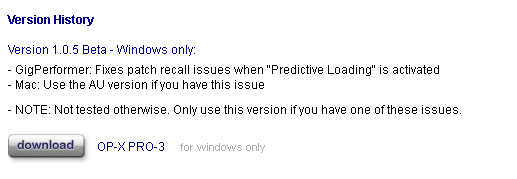
gonna give it a spin here in a couple hours…
I’m gonna give it a go.