Latency jumps but why?

I use 2 instances. My analog guitar sound in one, sending via GP relayer the audio to instance two where it gets converted to midi by midiguitar 2 for my synth sounds. This works great, without virtually any latency between the guitar and synth sounds with my “test” setup where the main (first) instance only contains a few plugins.

Changing out the main instance where I have a lot more plugins loaded (2nd instance stays exactly the same), suddenly there is a HUGE latency (this is where it gets weird-at least for me) not for the instance I just changed out, but the other one for the synth sounds, that I didn’t change at all! The main analog guitar sound is still working with virtually no latency, but the synth sound is delayed a lot! Nothing changed, same interface, same routing, same everything, only more plugins in the main instance for the guitar audio, which stays sounding fine but for some reason introduces huge latency in the second instance.

The audio in block is in the global RS of the main instance where I have it routed DIRECTLY to GP relayer #1 (that goes to the second incense). The rest of my audio signal is routed parallel going to all my plugins in my local rackspaces and back to my GRS to the main audio block out.

The second (synth) instance receives the audio via the GP relayer, goes to midiguitar 2, the midi then goes to whatever plugins then out via GP relayer #2 back into the main instance to a mixed where the synth and analog sounds get mixed.

I use an IK stealth pedal interface (main instance), which is single client and use asio4all in the 2nd instance. But like I said, with all the routing and midi and audio blocks being exactly the same, there is no detectable latency when the main instance is virtually empty (only 3 or 4 plugins), but when I load up my regular main instance, which is the same exact configuration except with lots of plugins, the latency in the second instance synth sounds, becomes delayed, nearly unusable. So the extra plugins are only in the first instance (where the latency remains great), and in the second instance (where no change took place at all) is where all the latency increases a lot. So the audio route remains unaffected, but the audio connected to midiguitar 2 to convert to midi signal gets delayed, even though it is directly connected, not after the additional plugins.

IK asio buffer size is set to 128 and the asio4all (in second instance) is 96. No pops or clicks. I tried moving midiguitar 2 to instance 1 (for midi conversion and then send midi via GP relayer) but it made no difference.

Any ideas/suggestions why this is happening?

Edit: all plugins not in use are bypassed. I only use high quality plugins such as Kontakt, Arturia, Meldaproduction, Valhalla …

Maybe try bypassing the plugins one-by-one to see if one of them is the culprit?

I’ll do that but I still would like to understand what is going on? The audio in is directly connected to the GP relayer, so it’s not after any plugin. The signal “should” flow into the second instance regardless what is happening to the other path of the audio chain in the first instance. Clearly I’m am not understanding something about how this all works together and why the audio-to-midi is the only path being affected?

I would start brand new gigfiles in each instance, build up the simplest mix of things possible that replicates your routing, and see if you experience the same problem.

At some point you will either find “when I do [some specific thing] the latency jumps” or you’ll find out that it doesn’t.

Your description seems pretty thorough, but it’s a bit complex, which makes it hard to speculate about what might be causing the issue.

Esch plugin with latency influences the Overall latency.
It does not matter if the plugin is in the actual audio path or not

If everything got extra latency (overall latency as you put it), that would make sense! But how come my audio path does not get any increased latency at all, only the audio to midi path?

You can run MIDI Guitar standalone: [blog] Clever ways to optimize your plugin usage - #2 by npudar

I’d try first that.

In the instances way, in the second instance, I’d try with a different driver – FlexASIO or ASIO2WASAPI to see are there any improvements.

Also, in this particular setup, I wouldn’t go with the buffer of 128, but 64 (if possible).

I personally work with 128, but I use simple setups, there is not much things going around.

Have you looked at the midi monitor? Maybe there is something triggering a huge amount of midi data that is causing a bottleneck?

Although I don’t know anything about “midi loops” I’ve read Paul and DHJ’s posts where that has come up. So, just throwing that out there.

Oops, I just replied in the other thread, but I mean to reply here… :wink:

I would like to try this, I checked the links but none of them addressed, how do I get the audio to Midi Guitar 2 in standalone with a single audio client interface? I don’t see the GP relayer as an option to get the audio into MG2.

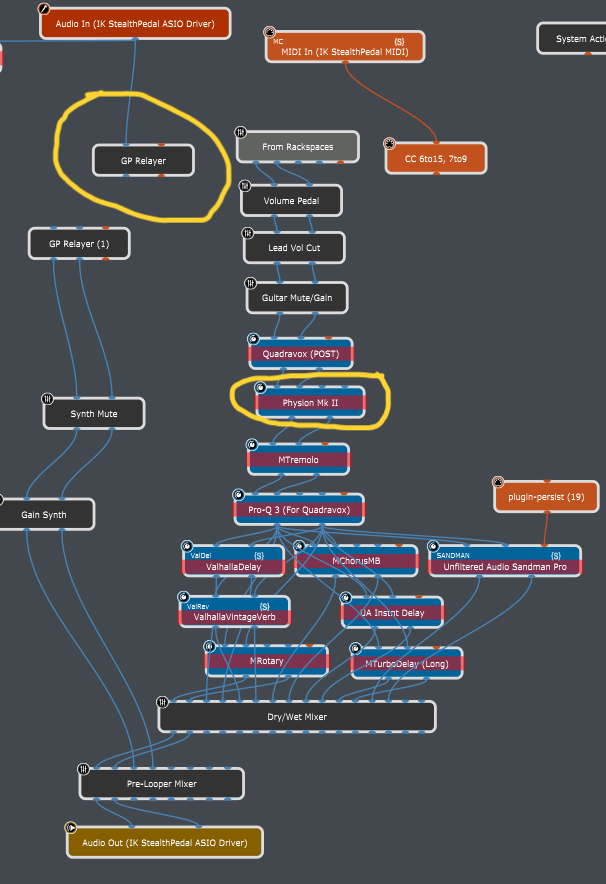
Wow guys! I am very surprised by my findings so far. It seems Eventide’s Physion MKII was a cause of at least 90% of the added latency, but here is what is very surprising to me, that it was causing this latency WHILE TH PLUGIN WAS BYPASSED!!!

The upper yellow highlight is showing where the audio is exiting the main instance and going to second instance for the synth sounds. And those synths sounds were being delayed by the Physion MKII plugin in its bypassed mode.

I wouldn’t have believed that an audio signal that is on a totally separate signal chain, can be delayed (by hundreds of ms) by a plugin that is not only on a different signal path, but is also bypassed!!! Mind blown! Especially because it’s a big name like Eventide!

I’ll investigate further, to see if there is anything else causing any latency, but I can totally work with what I got so far!

So it’s not as simple as “Eventide is causing latency in a totally different signal path” (which it was!!! BUT!!!..) upon creating a 3rd signal path via a new pair of GP Relayers sneaking it into my second instance that way, it is NOT causing a mess when being processed there. So when it is sitting in signal path A, it will create major latency in signal patch B, but if its sitting in signal path C, everything is fine. Here are some visuals for easier understanding:

Does that make any sense? I would love to understand what’s going on and why?

I suspect the issue is in the first instance at the global rackspace, after(!) the audio from instance B (the synths) is received back by the first instance then it is mixed with the audio chain of Eventide and so its latency is compensated to the higher latency of the chains.

This is also explaining why you have no latency if you move Eventide to the second instance.

Yes, latency is calculated even for bypassed plugins.
Whenever a latency is changed then the internal audio graph is recalculated, and audio buffers memory are allocated according to the latency size.
So, in order to support bypass/un-bypass during runtime then the latency needs to be taken into account even during bypass.
Furthermore, changing the latency of mixed chains during runtime might cause audio artifacts which is also problematic.

I really appreciate you taking the time to think it through and providing excellent feedback! What you’re saying makes sense, thanks for the explanation as to why there is much added latency even when the plugin is bypassed and you’re absolutely right, only when the 2 sound paths were connected that the crazy latency was introduced. But check this out, they are still connected, but the latency is gone!

I would be tempting to conclude that as long as the MG2 and Eventide were in the same instance together, somehow the math with the latency calculations were better. BUT! Its not that simple. I did put the Eventide plugins into the 2nd instance and connected them to the same audio path where the synths were. Latency was just as bad. Its not until I created the above scenerio, where they are sitting in the 2nd instance, but the audio is routed via another set of GP relayers and brought back to the main instance, where they get all connected together anyway, so I’m not sure why this way the latency is much better?

The latency is compensated only with direct audio connections between the blocks inside the wiring view, not between instances which are independent to each other.
As Eventide is not directly mixed in your latest snapshot so there is no latency as expected.

In wiring view of the second instance, if Eventide would be mixed and connected to GP Relayer that sends the audio back to instance 1, then that audio will have the latency compensated.

I think this is basically the same thing @Florian was describing in My latency hack (it’s cheating! :grimacing:) - Tips and Tricks - Gig Performer Community

I think you can even utilize this within a single instance by putting the plugin that you want to “isolate” from latency compensation into the global rackspace rather than a second instance.

And it’s been a long while since I’ve done it, but there’s also a VST wrapper out there somewhere that simply reports whatever latency you tell it back to the DAW/GP. In this example you’d put your Eventide inside of that wrapper, then set the wrapper’s reported latency to zero, and you achieve the same “ignore this plugin’s latency” effect.

There are two GP relayers. They both get the audio from instance 1 and both send audio back to instance 1. It all gets mixed together there, as shown in my last screenshot.

Problem is, in this case, everything is in the global RS. To further complicate matters (as I tried to describe it in my last post), even when I put the plug in the second instance and connected it to the outgoing audio path, it’s still delayed the synth sounds. But if I created a new in and out via the GP relayers and put it into the second instance that way, that way, no latency, even though ultimately they were all connected together in the main instance anyway.

Ha! Very interesting!

Thank you for sharing this! This is exactly the same thing! I don’t need to send it to the 2nd instance at all! Very, very cool!!!

I remember when reading that thread I was thinking, “very clever” and also thinking “so maybe GP should have a built-in plugin block that does the same thing (tell the latency compensation mechanism to ignore this path) without the overhead of sending and receiving through Relayer.”

Then I figured it’s probably such a low overhead operation and so few people would use it or understand it that there are surely better things for the developers to work on.