Yet, it can really make a mess of things. I’ve been playing with this LOOOOONG annoying latency when using Midi Guitar 2 / Synth sounds for probably 2 years! I had wrongly assumed the problem was MG2! I had to eliminate using it for any staccato like playing or any tight cuts with the band b/c the delay was just too obvious. I feel like I have just been freed! LOL
If you connect a plugin with a latency to your audio chain writing view then it is delayed as expected.
GP Relayer doesn’t report latency of the remote instance, therefore there is no delay.
Yes, but that too was in a GP Relayer loop. So I don’t understand why it was reporting the latency there, but not the other GP relayer loop.
Again, as I wrote above - GP Relayer doesn’t report latency of the remote instance.
This is why instance A is not adding the delay after the audio is received back from GP Relayer.
A general note - when a plugin is reporting a latency (you can inspect the plugin’s latency at the yellow tooltip popup while hovering with a mouse over the plugin) then the host application is delaying the other plugins in the graph to align the timing with that plugin (this is called latency compensation).
In the case here, GP Relayer don’t know and don’t care who is connected on the other side, and so it is not adding additional latency.
If you ask why the second instance is not delaying the audio then probably that plugin with the latency is not connected to the specific GP Relayer that sends the audio back.
But that’s just it! They are ALL connected to the same mixer in the end. Anyways, I appreciate your time, its probably me! I’ll get it eventually! LOL
For latency calculation it matters “how” they are connected and “where” in the graph.
As I wrote earlier, a delay will be applied only for plugins mixed with a wire to the plugin that has a latency.
You talked about several use cases, Eventide in the first instance, Eventide in the second instance etc…
Let’s take it one step at a time.
What is the one case that you don’t understand?
Please send here the snapshot of both instances A and B and I’ll inspect them and explain.
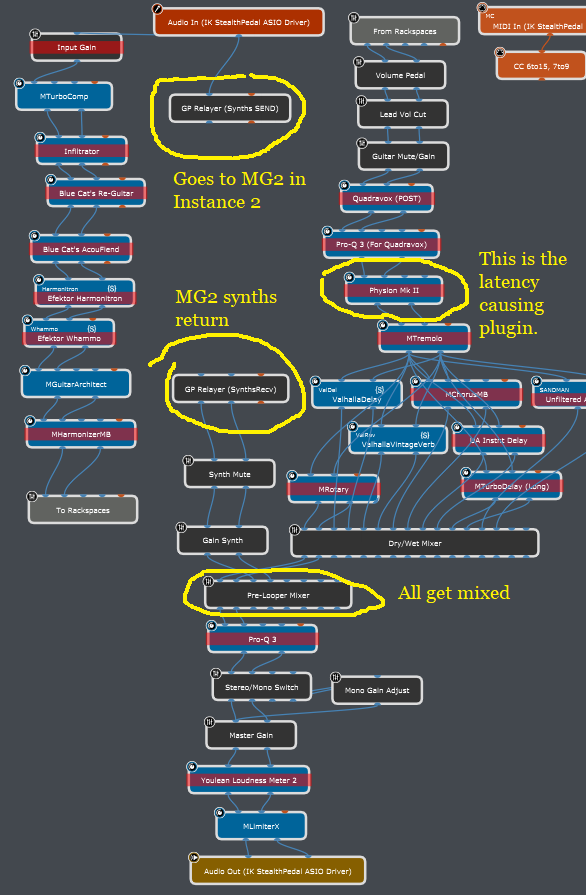
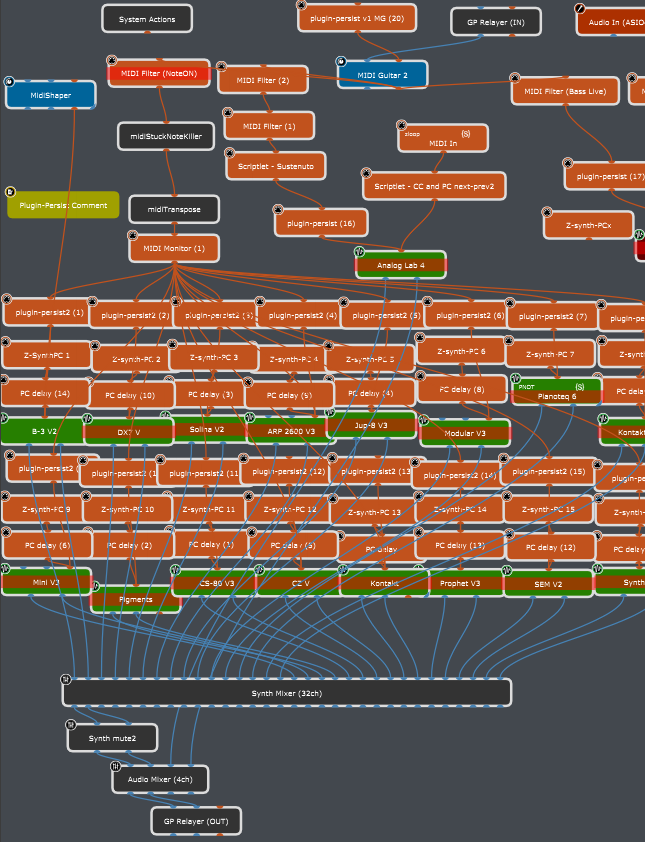
This is in instance 2. This causes a delay too. I guess the reason is it is connected with a wire to the synth sounds, BUT the entire thing is “inside” the GP Relayer loop, I would have expected it not to…
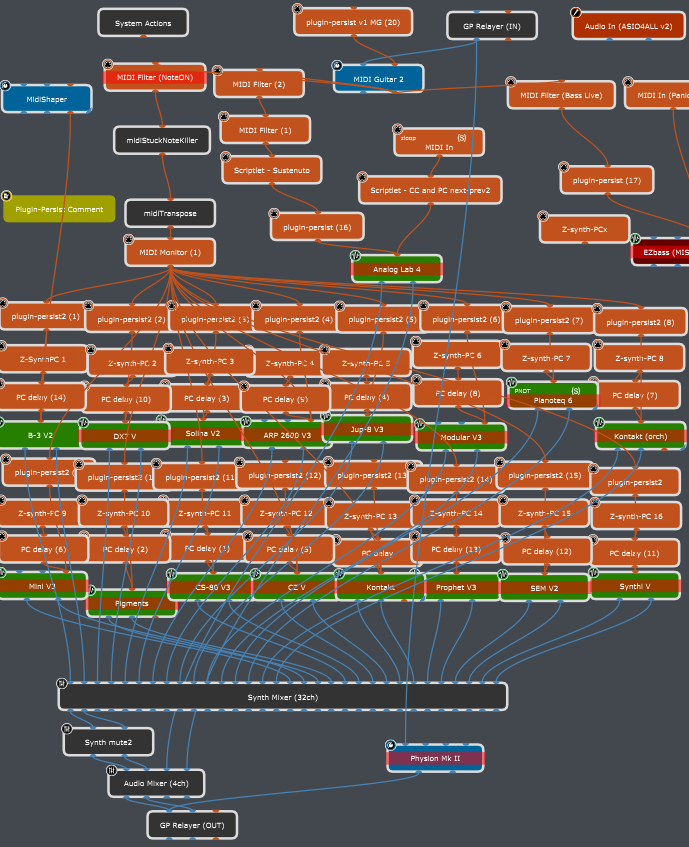
This is back in Instance 1, if I put it right before the GP relayer that is going into instance 2, it is causing extra latency.
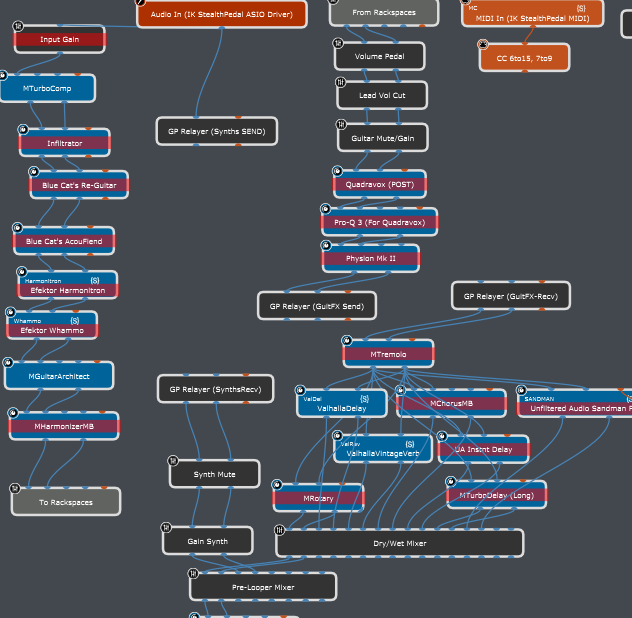
@Dadi I’m not in a position to test this, but have a look at the thread referenced below.
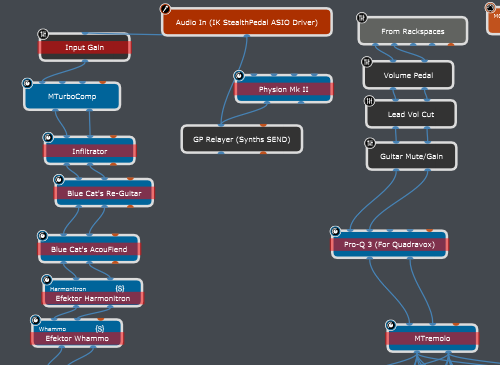
If I’m interpreting that correctly, the latency compensation is different between the two signal paths in the image below.
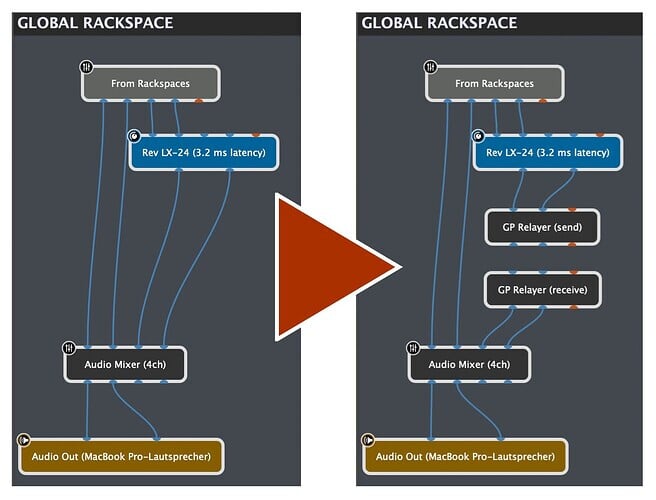
By sticking a Relayer send/receive into the signal chain on the image to the right you’re able to remove the 3.2ms latency compensation from the delay compensation calculation.
Maybe that’s not correct, or maybe that’s a bug, but based on that post (which I haven’t tried to confirm or refute) this is a simple way to “trick” GP’s latency compensation into ignoring a signal path. (I’d like to think of that as a feature, not a bug.)
This is actually correct and it is a nice workaround, In the left image the block “Audio Mixer (4ch)” is delayed (compensates) to 3.2ms,
It means that the audio from channels 1 and 2 from “From Rackspaces” is delayed.
In the right image the block “Audio Mixer (4ch)” is not delayed at all because there is no wire from LX-24 to it (GP Relayer is not a wire).
@ztones ,
This is very confusing, you posted three posts each with complicated and crowded wiring, with a lot of text.
It is very hard to follow.
Please make it simple:
Please post only one(!) “real use-case” that is confusing you.
Share 1 image of instance A and 1 image of instance B
(Eventide should in instance A or in instance B, not both).
And for this use-case please describe what happens that contradicts your expectation.
There are 3 scenarios (three different ways of connecting everything). You already answered the first scenario earlier today. That’s why I went ahead and posted the next two scenarios. If you want to look at only one, Lets look at this one. I suppose the question I would have about this one is, everything here is within (or inside) the GP Replayer “containers”, yet still causing the extra latency.
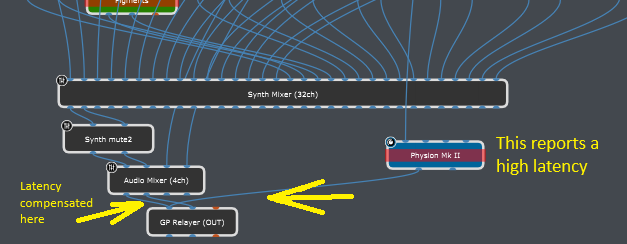
In this case you put the Eventide in instance B, just BEFORE(!) GP Relayer Out,
So, the audio coming from Audio Mixer (4ch) is delayed to be synced to Eventide.
The link below is a video of a different system (Waves LV1) has a good visual explanation of how latency compensation works in any plugin host, including Gig Performer.
eMotion LV1 Tutorial 6.3: Extras – Delay and Delay Compensation
Now you have me curious about how this actually works with Relayer in the chain.
I drew out two different signal paths in the diagram below. It’s the same circuit, but the one on the right has a Relayer send/receive pair added after the plugin with the long latency.
I wrote a latency inside each of the plugin boxes. Next to the wires I wrote what I think the latency compensation would be for each path. My understanding is the compensation for each path will be calculated such that each path ends up equal when they enter the bottom block.
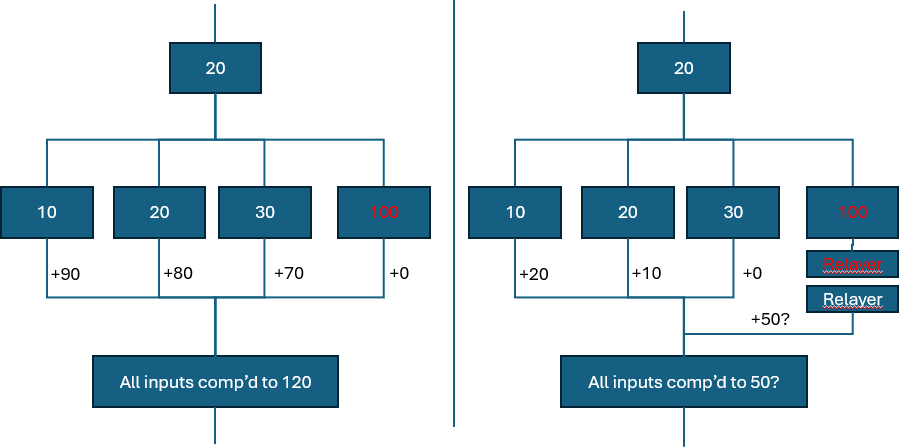
The one on the left seems pretty straight forward. The longest path to the bottom block is the 120 path that goes through the 100 block on the right. So the other paths have the indicated amounts added such that they all have a total of 120 latency entering the bottom block.
On the right diagram the Relayer back-to-back send and receive is placed, which I understand reports 0 for that path. So heading into the bottom block, does that Relayer path get compensated by 50, because that’s what the other inputs of the bottom block are?
Or would it be zero because the algorithm says “I have no idea what’s going on in that path so I won’t try to compensate.”
Exactly, it will be compensated with 50.
Each node connection is added with the amount to match the maximum latency of the other connected nodes.
I/we’ve been focusing on why my eventide plugin has been causing the latency in the synth audio path. We concluded that because when that audio came back into Instance1, it was then connected to the same mixer that the Eventide audio path was connected to. Fair enough!
But I forgot to ask the flip side of that (the very thing that was confusing me), which is why did it NOT cause any additional latency in the actual audio path it was sitting in? In the picture below, the offending plugin (Eventide in my case) was sitting in the orange audio path. Yet, the orange audio signal path was NOT affected at all! No additional latency! Only the green audio path was being delayed. Why only the green, not the orange? Or why not both?
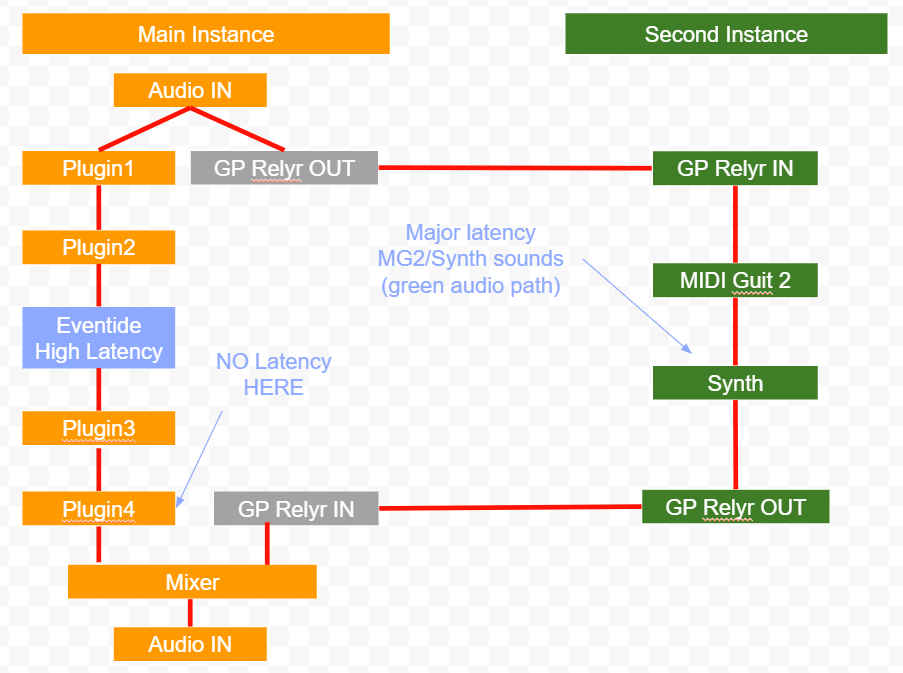
In my case, the orange is my regular guitar sound. The green is the synth sounds. When Eventide was part of the orange audio signal chain, the guitar had no detectable latency, but the synth sounds arrived VERY late. When I took the Eventide out of the chain, the synth aligned with the guitar very nicely. So the guitar regular signal was never affected.
Without knowing the latency of the different plugins or the latency you’re actually getting, it’s hard to say. I’ll take a guess, though.
Let’s say all your orange plugins have 2ms latency. Let’s say your Eventide and Midi Guit 2 both have 100ms.
Your mixer is going to attempt to compensate the GP Relayer IN with the Eventide side. The Eventide side is going to be calculated as 108ms (4x2ms + 100ms). It’s going to see the GP Relayer side as 0ms, so it’s going to add 108ms to it thinking that will even them out.
In reality your Midi Guit 2 is adding 100ms also, so your mixer is going to add 108 to that 100 (because it thinks its zero) and it’ll be at 208. What you hear as “major delay” would be the difference between them, which would be the Green side delay.
I’m just guessing, though.
Understood, not knowing the exact numbers we can only guess. Your math makes sense, but that I think we can agree that whatever that number is, I should be experiencing some level of noticeable latency even on the orange (guitar) signal path, right? But that is not the case.
Here are some facts:
1: My guitar signal was extremely responsive (I’d say 3-5ms) even when Eventide was connected within the orange audio path. That would suggest that the Eventide plugin’s latency cannot be more than 5ms right?
2: When I disconnected (no wires) Eventide, my synths sounds tracked very closely with my guitar sounds. Lets say under 20ms latency. So we can safely conclude that MG2’s latency is no more than 20ms (approx) right?
3: So based on these, when eventide is connected to the orange line as shown, the mixer shouldn’t really compensate more than 25 ms right?
For some odd reason, wrong! That is not what’s happening. With Eventide connected, the orange (guitar) signal is under 5ms and the green signal (MG2) feels like at least 100ms! But we just established that neither Eventide, nor MG2 or anything withing the green audio path comes even close that! So WHERE does it come from? If it is coming from Eventide (which would be the logical conclusion since only when Eventide is connected does latency jump on the MG2 side) how come nothing is added to the orange side that it is actually wired to???
Guys, this thread has reached its end.
Take some time going over the explanations already given.