Oh. That’s really long. But it actually describes exactly what I want, and that this could only be solved with a scriptlet or internally within GP. I’m pretty much alone in wanting this, so there won’t be any GP development for it. The only thing left is to find someone to script it for me.
I’ve already talked to AI about it a lot beforehand, always hoping to get another useful tip.
Thank you anyway for your input. I’ll keep looking into it. The last resort will be to post in the script thread to find someone to program it for me.
var
d : Discrete Parameter "1/16", "1/8", "1/4" = "1/16" // Discrete named parameters
l : Discrete Parameter "1/32", "1/16", "1/8", "1/4" = "1/16" // Discrete named parameters
delay : double
duration : double
//Called when a NoteOn or NoteOff message is received
//Note: this will NOT be called for NoteOn/NoteOff messages if you have explicit
//NoteOnEvent/NoteOffEvent respectively callbacks defined
On NoteOnEvent(m : NoteMessage) matching [C4..B4]
Select
d == "1/16" do delay = 60000.0 / GetBPM() / 4
d == "1/8" do delay = 60000.0 / GetBPM() / 2
d == "1/4" do delay = 60000.0 / GetBPM()
End
Select
l == "1/32" do duration = 60000.0 / GetBPM() / 8
l == "1/16" do duration = 60000.0 / GetBPM() / 4
l == "1/8" do duration = 60000.0 / GetBPM() / 2
l == "1/4" do duration = 60000.0 / GetBPM()
End
SendNow(m)
SendLater(MakeNoteOffMessage(GetNoteNumber(m), 0), duration)
SendLater( m, delay)
SendLater(MakeNoteOffMessage(GetNoteNumber(m), 0), delay+duration)
End
the parameter d is the setting for the delay the 2nd note is sent
the parameter l is for the length of the 1st and 2nd note
The scriptlet is not yet optimized, but is shows the idea
Hey cool, did you program that especially for me? Thanks.
Yes, the idea is absolutely right.
I’ve already tried it and attempted to modify it. I now have your template. May I contact you again if I get stuck? I can only try things out based on your programming, since I don’t understand any of it.
Here is another one from @dhj , one of GP’s developers.
The above is in the Scripting category of this community. This was posted Feb 2024, so the developers definitely had this type of effect in mind awhile ago When I was thinking about all of this, sometimes the biggest problem is trying to figure out what we are exactly looking for, even if we know what it sounds like!

Make sure you read the replies to @dhj’s post. @edm refers to a plugin from pizmidi, which is linked to another post about that and others developed by him. (I think?)
You are going to have to do some digging, or ask around. Or they may be lost to time, who knows. Here are couple more links, there are others but will leave the search to you.
WRT scriptlet, I was referring to the @dhj script that has a link to it in the post above. As he said, it one of the more trivial efforts in the grand scheme of things. At the end of they day, GP provides the tools to do this yourself, and add as many features or whatever you need for your use case.
And here is a paid VST that specifically says it does MIDI delays. But MIDI Lab is overkill if you only need note repeats with tweakable velocity and gate which you can do in GP with scripting.
If I, or someone else, doesn’t happen to find a suitable scriptlet here, I’ll probably have to find someone willing to program it for me. I don’t think I could manage it myself, especially since I’d have to learn how to script.
So, my search continues. Thanks for the tips here. I wasn’t familiar with the VST from Midilab. It really looks too oversized for me.
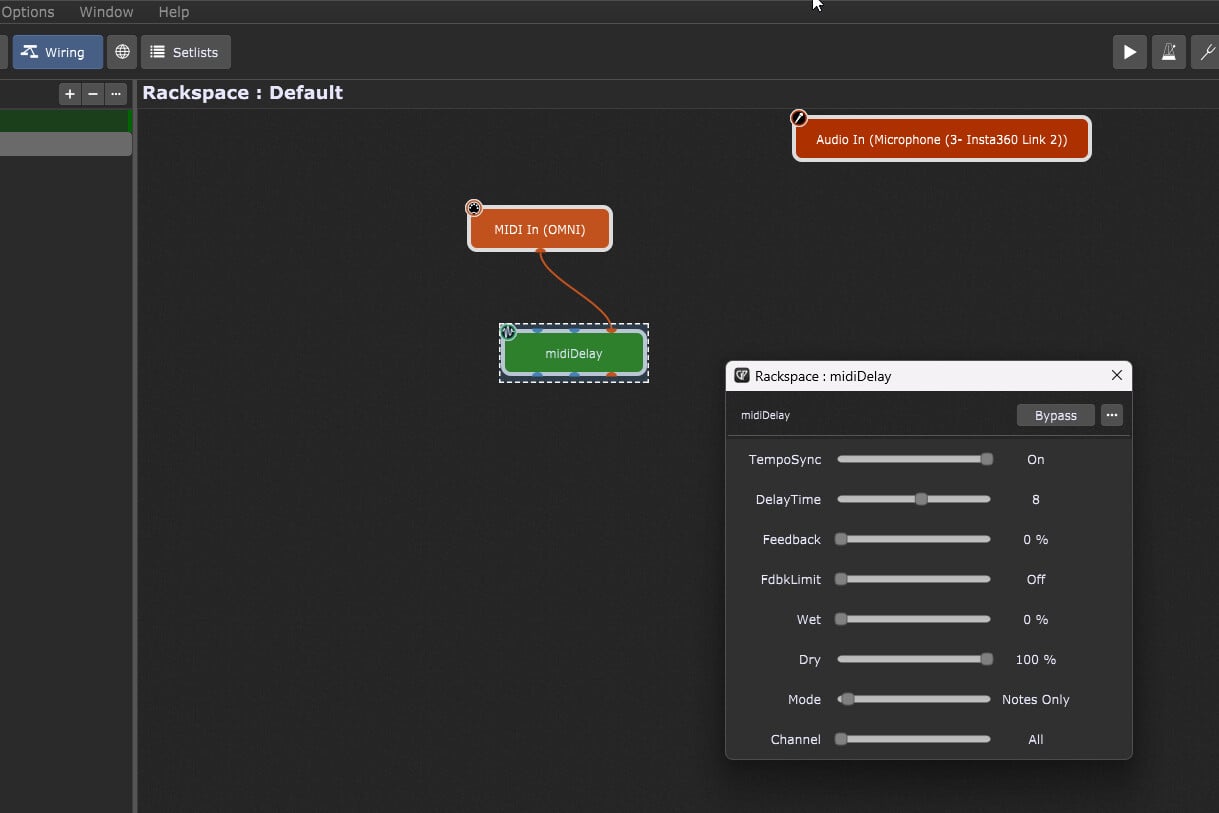
You could always download and experiment with the Pizmidi plugins. All the links you need to find everything including the developer’s manual that explains how to use each plugin and set the *.ini file (if necessary), plus create presets, is available through the links provided in this conversation. I downloaded all the Pizmidi plugins and loaded the MidiDelay plugin, so it is doable. I haven’t actually tried it, but that is part of the fun of exploring. See the below screenshot.
I’ve now loaded the plugins. I’ve put the MIDI Delay plugin into the VST folder. Unfortunately, GP can’t validate it. You have a Windows computer—I have a Mac. Maybe that’s the reason.
I also have other VST plugins that are faulty. Since I’ve switched to AU now, I don’t care. I’ll just leave them marked as “failed” in the Plugin Manager.
Yes, I tried it and replied to you. It’s going in the right direction. I just tried the PizMidi plugins, but they don’t work on Mac. The plugin has a promising interface where you can adjust some of the note values.
If it doesn’t work on Mac, I can tell you what I would like the Note Trigger script to do.
I’ve taken another look at your script. I’ve now realized that I need to bypass Note Off in the MIDI In section; then it works perfectly for my current applications.
I don’t think I need all the options PizMIDI offers right now.
Perhaps this will help others as well. Would you mind posting it on the “Useful scripts and Scriptlets” page?