Hi, I’ve just started using Gig Performer, and I have a Stream Deck mk2 that I wanted to link to it. The install was very easy (on Mac) and it all seems to work great, but I’m not sure if I’m missing something to do with the “Songs” action.
I can add 5 songs to a page on the Stream Deck, which then shows the first 5 songs in my set list. And it correctly highlights the currently selected song. I was hoping that it might cycle when I switch song, so that the currently selected song is always in the first (or ideally middle) position, but they don’t change - it always shows the first 5 in the set list in order. So I had thought perhaps I could then have 5 songs on each page in the Stream Deck with lots of pages to show the entire set list, but if I add a second page and add 5 songs to it, it’s always still the first 5 songs in the set list.
I don’t know whether I’m doing something wrong, or it isn’t working correctly or if I’m misunderstanding the functionality. Any help would be appreciated!
I’m evaluating the Stream Deck plugin, and I must say, it looks very promising. However, I would wish that it could display the title of the current song, previous song and next song on 3 buttons. Now, it always displays the first 3 songs on my setlist, which isn’t very useful.
@timothyschoen Have you thought about making this code open source, so that others could chime in? I would be happy to help.
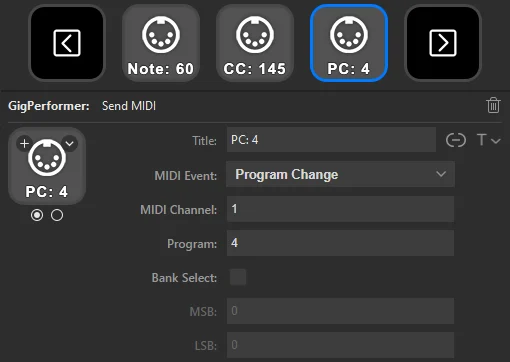
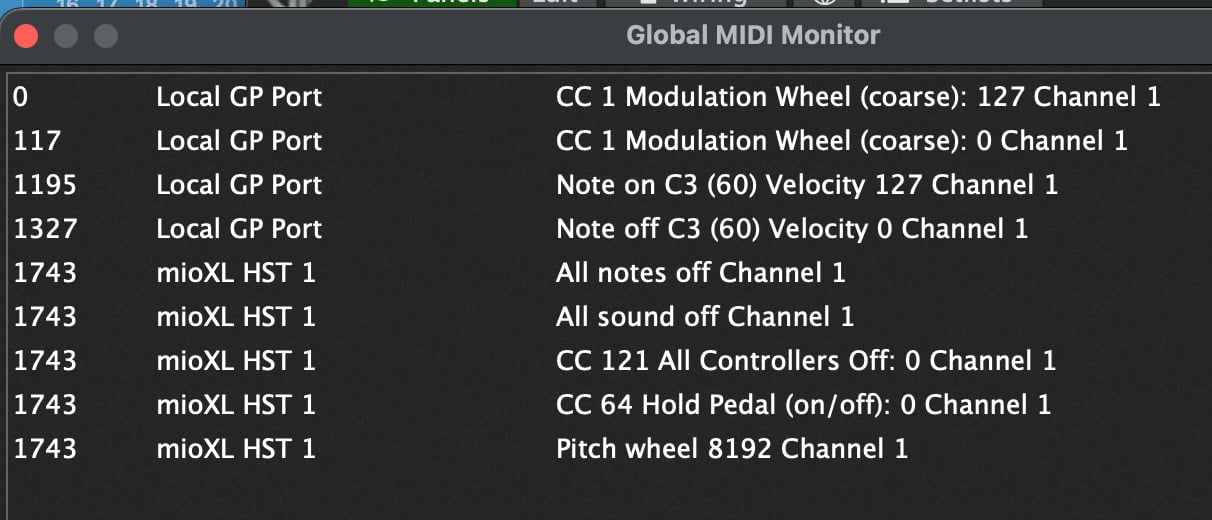
I’ve been reading through this thread because I connected a Streamdeck MK2 for the first time today. It’s currently connected directly to my computer. The program change command is important to me right now, but it’s not working. In the Global MIDI Monitor, I see the panic command, notes, and control changes being sent, but no program change. What could be the problem?
The next question is whether I can operate the Stream Deck without a direct connection to the computer (as I already asked in the thread below). The only connection would be via a CME Uhost Bluetooth device. This supplies the Stream Deck with power and should send the commands from the Stream Deck to the computer via Bluetooth. The icons on the Stream Deck should also remain visible.
Okay. I probably don’t need Control Change. But am I the only user who needs ProgramChange? It’s hard to imagine that no one has registered this bug yet.
I’m now using the Stream Deck to switch between certain Rackspaces and also for sound samples. Is it normal and correct that the Stream Deck sends these on the local port?