I wanted to share a recent issue I encountered on Windows that might help others facing similar problems with MIDI devices.
Symptoms
Virtual MIDI ports (e.g. loopMIDI) suddenly not detected
MIDI ports missing (e.g. Gig Performer or similar applications)
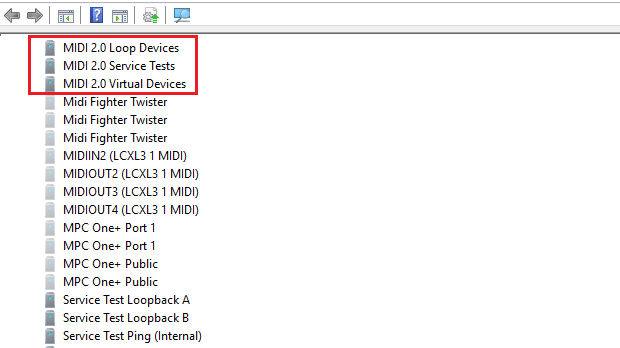
New unexpected devices appearing, such as:
MIDI 2.0 Loop Devices
MIDI 2.0 Virtual Devices
MIDI 2.0 Service Tests
Windows Event Viewer errors like:
Device settings were not migrated
References to MIDISRV or MIDIU_*
Before assuming devices are broken, verify their status:
Open Device Manager
Locate entries like “MIDI 2.0 Loop Devices”
Right-click → Properties
Check Device Status
“This device is working properly”
Errors present
Important:
In my case, MIDI 2.0 devices showed migration-related errors in Event Viewer (e.g. “Device settings were not migrated”), even if some devices appeared installed.
This indicates:
corrupted or incomplete device migration
inconsistent MIDI system state
Possible Cause
Recent Windows updates introduced MIDI 2.0 (Windows MIDI Services).
In some cases:
Device migration fails
Ghost/corrupted MIDI entries remain
Conflicts occur with legacy MIDI (1.0)
What Worked for Me
1. Clean hidden devices
Open Device Manager
Enable “Show hidden devices”
Remove:
Greyed-out MIDI devices
MIDI 2.0 entries (MIDIU, Loop Devices, etc.)
2. Reinstall loopMIDI
Uninstall loopMIDI
Reboot
Reinstall as Administrator
This reinstalls the teVirtualMIDI driver and rebuilds the MIDI stack.
3. Reboot and test
Recreate ports in loopMIDI
Restart your software
Verify MIDI ports are visible again
Additional Notes
loopMIDI installation may restart the Windows MIDI service (midisrv)
Final Result
MIDI ports restored
No more migration errors
If you see “Device settings were not migrated”, don’t ignore it
It often means the MIDI system is in an inconsistent state
I’m glad it could be useful.
The “funny” part is that just yesterday I ran into a very similar issue on another PC with Windows 11, but this time related to audio device enumeration. In that case, the device associations were incorrect: my MOTU M2 audio interface and XPIANO88 were not being enumerated properly, which caused recognition issues.
I had to manually clean up hidden devices to fix it — just like I did today with MIDI.
At this point I’m not even sure it’s related to a specific Windows update. It might instead be caused by accumulated/“stale” device entries and endpoints that remain in the system over time, eventually leading to incorrect enumeration or associations
The permanent fix for this is being working on by Microsoft and various venders. As far as I last checked the fixes will probably be rolled out by the end of April. With that said, Microsoft has published some work around in the interim. The work around is pretty involved. It involves LoopBE, LoopMIDI, an many AkaiPro devices. Also I notice other software that creates their own virtual ports have issues too.
I wanted to chime in here as I have a similar issue and a work-around.
I have been liking the new Windows 11 MIDI stack, and the new Windows MIDI and Musician Settings app (that you get off Microsoft’s github) has been great.
I have a mioXL and use rtp MIDI over ethernet. After the new MIDI stack was installed there were issues with rtp MIDI in Windows in the iConnectivity community. The new Windows MIDI app allows you to restart the windows MIDI service under the Global MIDI Settings tab. After the MIDI service is restarted the rtp MIDI channels re-appear under teVirtualMIDI driver. You can see if it is there under MIDI Devices And Endpoints tab. From what I understand so far it has to do with the order in which the rtp MIDI and Windows MIDI service is loaded and is being worked on.
Hopefully, if you are missing MIDI devices, virtual or otherwise, in the new MIDI stack, a restart of the Windows MIDI Service might restore functionality.
 “This device is working properly”
 Errors present