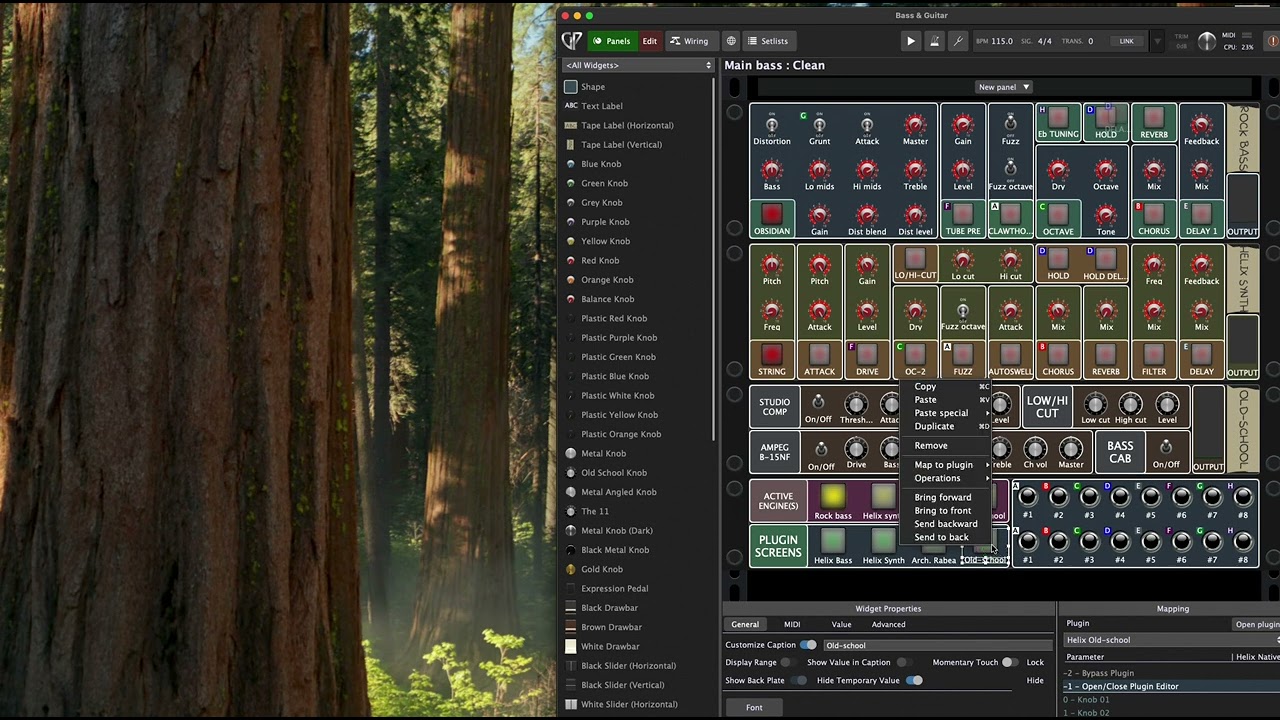
Been having a recurring issue with GP ever since I started using it around January: Sometimes a widget will just stop controlling its chosen plugin parameter.
If I change the parameter directly inside the plugin UI, the widget state will change, so the “connection” is obviously still there in some way, but changing the state of the widget will not change the parameter in the plugin.
Restarting GP doesn’t help
Reverting to the previous saved state doesn’t help
Removing the parameter binding of the widget and re-binding it doesn’t help
The only fix I can find is to copy the widget, bind it to the same parameter, and just deleting the original one.
At first I thought this was an issue in Helix Native, which is my main plugin where I control parameters through widgets. That’s where it happened most often, and that plugin also has a slightly unconventional setup when it comes to available parameters and the way they’re bound to actual controls inside the plugin.
But I’ve seen lately that it also happens with other plugins (Neural DSP Archetype Rabea for one), and sometimes also even with the function that opens/closes a plugin editor, which doesn’t even control a plugin parameter at all - That’s a pure GP function (I would assume).
I only have GP for Mac, so I’m not sure if this happens on Windows, but it definitely happens on both my machines (M1 Macbook Air and M2 Pro Mac Mini) and with both my audio interfaces (Focusrite Scarlet 4i4 Gen 3 and Arturia Minifuse 1).
Running the latest version of GP (always upgrading whenever a new version drops), and this bug has persisted since at least january.
Still running the previous version of Mac OS (Sequoia) - I’ve seen many comments about general performance issues with the newest version (Tahoe), so I’m not upgrading until they’ve released a couple of patches at least.
I can try, but this behaviour is super random; it might happen like once per week or even less, so I’m not sure I have it in me to just randomly jam on one of the templates for hours and hours just to see if it happens again.
However, I do have a slight hypothesis that this happens more regularly if I just leave GP running for a long time (like overnight or maybe for several days), which I definitely sometimes do if I’m recording and just want to have everything loaded and ready to go whenever I get a few minutes available. So maybe I can load up a default template and just leave it running.
I’m actually going on vacation for a week tomorrow, so I’ll see if I can remember to just boot up a default template tonight and just leave it running until I get back.
I can also try the refresh function next time it happens, but I suspect that won’t do much. Like I said, when I change the plugin parameter inside the plugin UI, the widget actually does change.
Yes, latest version of GP and previous version of Mac OS, as stated in the first post
I can see that. And I should actually preface that: I’m running the latest version that GP has notified me about (which was a few weeks ago I guess; the version with improved touch support)
When this fails (randomly), how are you adjusting the widget? With a mouse or via a MIDI controller? And when you have this failure, do all widgets fail?
Both. I have a MIDI footswitch that controls some parameters, and others I control with my mouse. Both are prone to failing. Some of them are linked to other widgets, some are not. Some of them belong to radio groups, others do not. It looks like it can happen to any widget type.
No, just one at a time, and it looks like it’s pretty random which one it is. Sometimes it’s a knob, sometimes it’s a switch.
All wired. And the widget itself changes its value, so it’s not a connection issue. It’s just that the corresponding value inside the plugin doesn’t change.
In other words, the knob moves and the switch activates, but the plugin parameter stays the same.
This makes no sense to me, there has to be something else going on. The fact that changing the parameter changes the widget means the mapping is still there. One reason for thinking this is because otherwise we would be getting tons of reports from customers….but this is the first time we are hearing about this Granted, someone has to be the first but still….
Is this happening with every plugin or with a specific few plugins?
Are you doing any scripting? Are you doing any widget scaling? Do you have multiple widgets mapped to the same parameter?
I don’t use a lot of plugins, but looks like it’s happening with all of them. And it also happens with the “Open/close plugin editor” function, which isn’t even a plugin parameter but a GP UI function.
Yes, I do some scripting, but nothing that affects all of these widgets directly (at least not most of them). Most of my scripts are in the global rackspace, fetching active rackspaces and variations in order to set some widget labels there, and those widgets are not mapped to any plugin parameters directly.
I’ve used stepped curves on a couple of widgets, but in general they’re all either 0-100 or 100-0, straight lines. No obvious correlation that I can think of.
Ok, I managed to reproduce it right away - When I opened my main rackspace it was already broken, and it was for an Open/close plugin button (meaning it looks like it has nothing to do with the plugin itself).
I recorded a video of what happens.
You can see me click the switch labeled “Old-school”, which is supposed to open an instance of Helix Native.
Then I go into edit mode and press “Open plugin” from there, and the plugin opens just fine. You can also see that the switch lights up, so it’s detecting that the plugin screen has opened.
Then I duplicate the switch widget and map it to the same function (Open/close plugin editor)
Now you can see that the new widget works perfectly, but the old one is still broken (even though they both light up when the editor opens)
Video link:
I checked - No it does not sleep. It only turns off the monitor.
Are you saying there‘s a complexity limit for rackspaces?
I can try that when I get back from my vacation next weekend, but it can take days or weeks before I see these things fail in my regular rackspaces, and I probably won’t create a simple rackspace for testing this and using it for an extended period of time just to try to make it fail.
These are my band and recording setups; they are the ones I use every day, and they’re complex for a reason.
In a rackspace with (let’s say) 50 widgets, one random widget might fail every week or two. So if the statistics scale, I would expect to see a failure on a rackspace with a single widget only after a year or more.