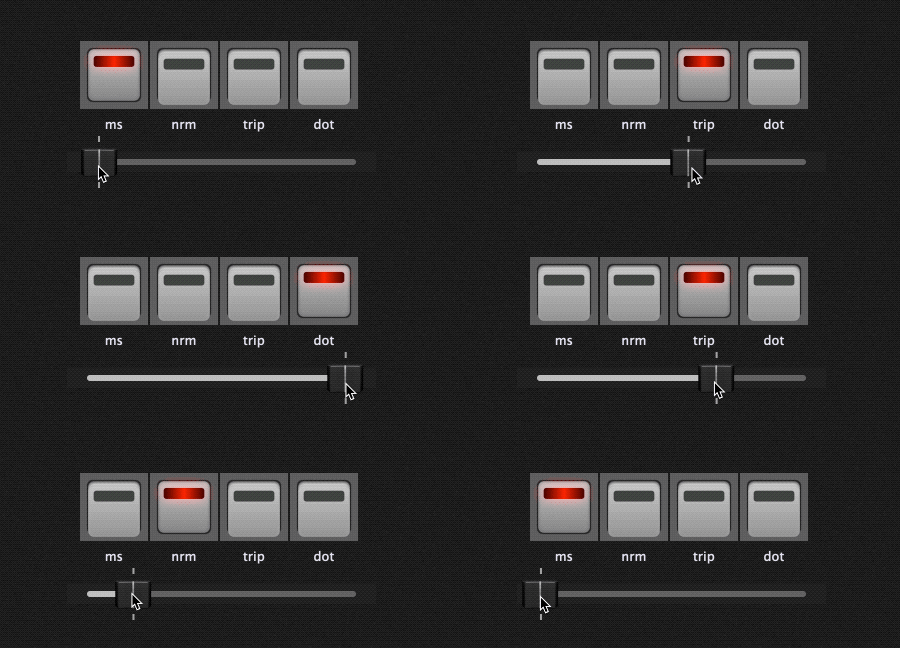
Hey everyone, I am fairly new to GP and have been enjoying it thoroughly, however I am having an issue with a widget.
I posted a question on facebook and one of the admins did help by linking two articles discussing on the topic on how to scale widgets to jump to values within a plugin.
I will explain my situation, I am trying to setup a widget to change the modes for the Deelay VST, I would like for a fader to scroll and switch between ms, nrm (normal time), eigth, and eigth note triplet. I saw a topic on the thread about a fader switching between pre-amp settings within a plugin similar to my setup. However, I am lost at how to set that up for my widget. If anyone can help that would be much appreciated.
There may be other options, but for me - this requires a script. This rackspace uses the VST3 of Deelay (free version). Deelay.rackspace (74.4 KB)
The script was fairly simple: scaling the slider value to a range of 0 to 3 (which selects one of the 4 widgets). Note that I have also set these widgets to be in a radio button group, so you can click on them directly as well.
The script is one directional only - so it will select the mode button based on the slider, but the slider won’t move if you select one of the mode buttons.
Var
   MODE1,MODE2,MODE3,MODE4 : Widget
   MODESLIDER : Widget
   MODES : Widget Array = [MODE1,MODE2,MODE3,MODE4]

On WidgetValueChanged(newValue : double) from MODESLIDER
    Var modeIndex : Integer = ScaleRange(newValue, 0, Size(MODES)-1)
    SetWidgetValue(MODES[modeIndex], 1.0)
End
Would a radio group work for this?
That ensures only one of the widgets is selected.
Then making sure that the values of the widgets are matching the values of the parameter you are controlling.
If it’s separate parameters (not just different values of the same parameter) then you can try using widget groups to make sure that when you move one widget the others also move.
But it sounded like you were describing the different values of one parameter, so radio group might be it.
In this script we varies fader values so buttons are activating but I want this inverse i.e by activating buttons I want to fader changes to different values parameters
I had cobbled together a widget solution to send a program change at six different positions using a rotary knob on my keyboard. The solution worked, but it wasn’t very elegant. Now I’ve found your script, tried it out, and modified it to have six buttons. I’m not using them to switch an effects block, but rather to cycle through a vocalist’s programs. Each button has a program change assigned to it. It all works perfectly when I slide my MIDI controller slowly. Then the vocalist’s six programs cycle through. If I’m too fast, the vocalist gets stuck and ends up on the wrong program.
… Now my question: Is it possible to program a delay so that the button only becomes active after a certain time (e.g., 0.5 seconds) if no data is received from my MIDI controller? Then, while I’m operating the controller, the data would be present at the slider, but only when I stop moving would GP activate the buttons after the set time (e.g., 0.5 seconds). This way, I could switch directly from Program 1 to 6 without GP sending the intermediate programs to the vocalist.
This is on our list for a future update but no idea when it will get done. In the meantime, it can be implemented through GPScript by setting a timer and resetting it if the widget changes during the time.
I’m in need of a similar script like this one. I don’t need the slider, just the 4 widget LEDs to switch between the 4 of them by inputting 4 notes coming from my FCB1010 MIDI foot controller. Example of notes are: E1, G1, G#1, A1 The widgets will imitate the (Style) Variation LED switches 1 to 4 on my Roland E-80 Arranger. So that I could see on which variation I’m on by looking at GP rackspace. I can switch from variation 1 to 4 of my E-80 from my FCB1010 pedal (by sending the notes mentioned above). Any help most welcome thanks…
To confirm - you don’t want the LED widgets to control anything? They are just communicating your keyboard state? If you you likely won’t need a script. Have you tried setting four widgets to the same radio group, and learning them to the note messages you mention above?
Hi, I tried doing 4 widgets and radio linked them with a 1 but did not use the learn. The problem is that I’d like just only 1 widget to light at a time when choosing just 1 with midi note. I try your suggestion and see.
Yes, thank you, I managed to build a rackspace with the 4 LEDs I needed to represent the Variation state of my Roland E-80 styles. I have a Behringer FCB1010 attached to control my Yamaha Genos 2 and I use the pedal to select the variations from 1 to 4 of the styles of my Roland E-80 that is connected also. But I only play the Genos2 and use the FCB1010 pedal.
Should anyone need to see the rackspace let me know I try to upload it if I can.