The sustain pedal on rehearsals

Hi folks,

My rig works well at home , but every time I m on rehearsal the same bug, the sustain s pedal doesn’t t work on both keyboards . I don t understand what s goin on …. I just move the same rig without changing anything, even usb cables are plugged in the same place…

Different keyboards? Each might require sustain pedals with different polarity?

Does the sustain pedal with the “problem” keyboard behave the opposite of normal (sustains when not pushed down and bo sustain when pushed down)?

Does the sustain pedal have a polarity switch?

Hi jeff1

Not at all ……… the SAME RiG…. I just move it from home to rehearsal’s studio …
Does gig performer use the location ? :crazy_face:

And do you use different Keyboards?
How looks your setup in rehearsal and studio?

Sorry folks I can t find other words … I use the same rig including keyboards, cables, . I just pack everything move to the studio unpack, replug …

How looks the global MIDI monitor when you play the keys and press sustain?

Fine, the led blinks green and the cc is 64, but it s not assigned as it was ( pedal a to keyboard 1 ) and ( pedal 2 to keyboard 2 ) I have to reassigned it

So a hardware issue?

Maybe

You are using USB-Midi right?
Are you on Mac or Windows?

MacBook Pro ( Ventura ), and no I’m using midi through usb

The 2 keyboards are a Komplete kontrol 61 mk1 and a Komplete kontrol 61 mk 2

Are you using Rig Manager?
It is a known issue that USB-Ports are not always exposed to any Software (DAW or Gig Performer)
as the same device.
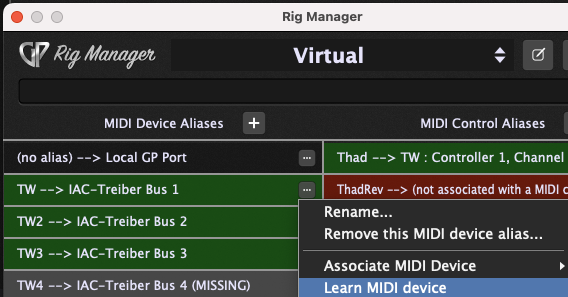
Therefore you should use Rig Manager and in Rig Manager learn you keyboard to the corresponding
MIDI Device Alias

Even if the rig doesn’t change ?

USB-Ports change all the time when you start your Mac

There is a Blog describing this behavior.

1 Like

So I have to create a whole set up in the rig manager including every keyboard and every pedal , even the faders… ?

No,

In Rig manager you define the MIDI Alias
In the wiring view you use that defined Alias as MIDI In

Now after starting up Gig Performer learn the MIDI Alias from your keyboard.
In your use case select the MIDI Device Alias and learn your keyboard - just play a note on the corresponding keyboard.
And then use the next MIDI Device Alias.

Bildschirmfoto 2022-12-30 um 08.50.40

The rig doesn’t change, but for sure something changes in your rig even if it is not obvious to detect what (two identical keyboards exchanged, two identical keyboards mixed up by the OS because of an identical MIDI port name, MIDI port name changed or whatever…)

The advice of @pianopaul is definitely the good one, make the effort to use Rig Manager, I am pretty sure it will help to solve your issue and also to determine what changes in your rig. :wink:

3 Likes

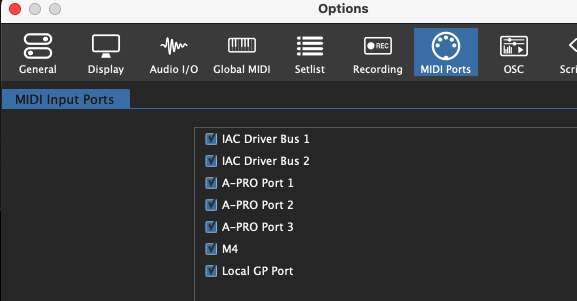
Can you please post a screen shot of the MIDI Ports displayed in options?

  1. Are you using both keyboards at both locations?
  2. Are you plugging the pedal into the same keyboard in both locations?

screenshot_6527

[Deleted]