Hi Guys, is there a way to get system audio into GP? I am using Stage Traxx 4 on my Mac but cannot work out how to get the audio from it into GP so I can assign midi controls for my mix control. I’m using Focusrite Scarlett 18i16. I have read somewhere that I will have to use something like Blackhole audio to aggregate to my Scarlett. Also, most tutorials highlight the way to get audio into a DAW but I want it the other way around to get audio into GP. I have looked at the manual but I cannot find this option explained apart from the built in SAFP etc.
With the Scarlett 18i16 you could do something similar as I do with my 8i6 - no need for Blackhole etc.
System Sound goes typically to Playback 1/2 and software loopback on Scarlett
set your Mac system sound to Scarlett 18i16 USB
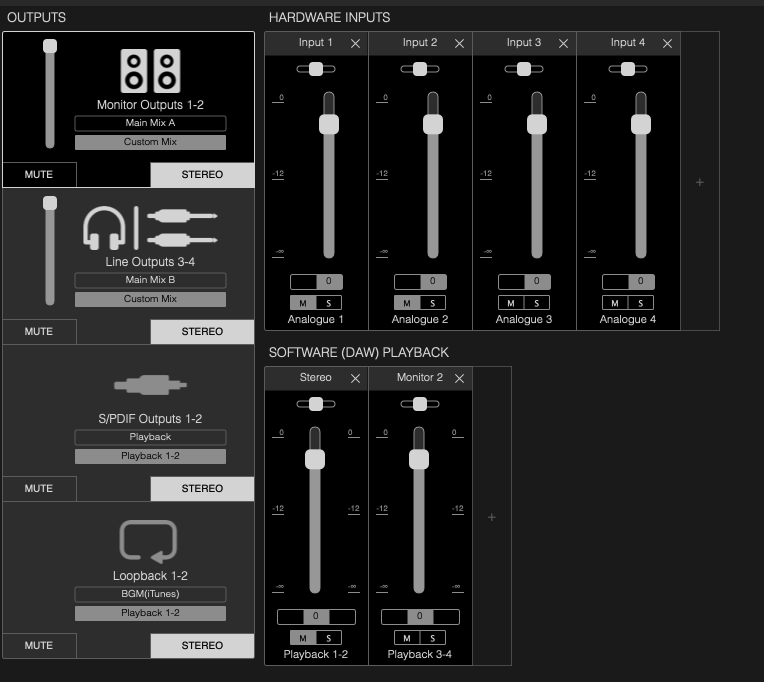
create a Focusrite Control Preset which enables Software Loopback and provides physical output for your Gig Performer output. This output routing mix should not provide any “Playback 1-2” - just mute it / turn the level down in Focusrite Control
get the system sounds via the loopback input (in my case Input 9-10) within GP
send your GP output to your desired output, but not the first pair (1/2) - I use 3/4 and 5/6…
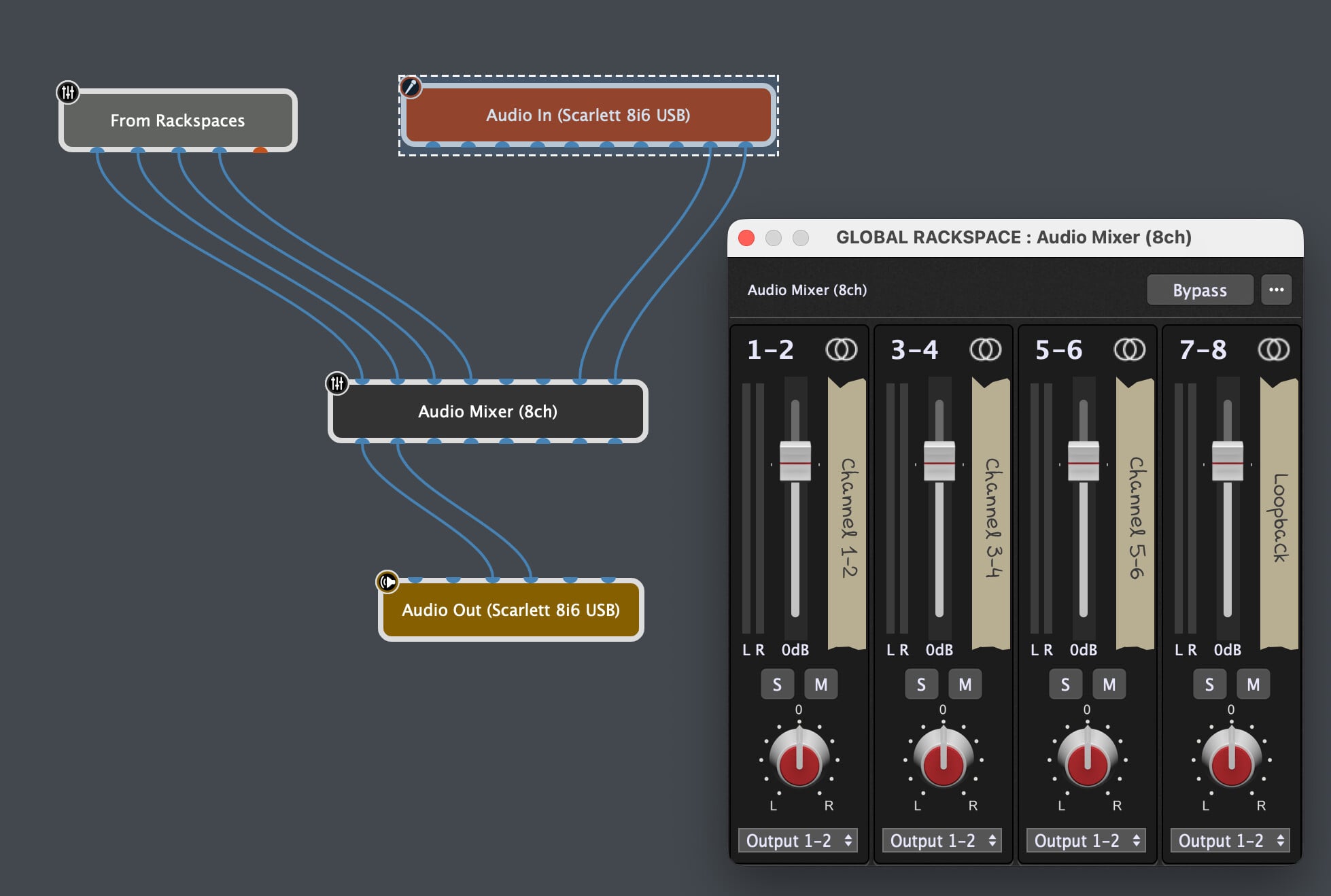
Currently away from my gigging MBP, but should look like this - ideally in the Global Rackspace
Thanks. Thats even better, I’ll look into that. I get pops and crackles with BlackHole on my MBP M1 1TB/16GB RAM. They’ve updated to Control v2 so it now looks a bit different but I’ll try to translate it. Is there any chance you could add the gig file here please so I can play around with it? I got a bit confused on bullet point 3, create a Focusrite Control Preset part.
I think so, I added BH 2ch to my Scarlett 18i16 thinking that was the only way to get system audio into GP. I quickly abandoned it because of the popping noises. I think tripleB’s comment and solution above is the way I should be using it but I’m a bit confused how to set up this option.
I really like using Omnibus by AudioMovers. It is very easy to set up, let’s you save configurations, and handles all of the settings you might need to adjust on your behalf. I use it everyday for routing system audio.
Thanks Brett, I’m a GP novice and making new ground takes me a while to learn. I’m a solo singer guitarist using backing tracks for Stage Traxx which I love and I’ve looked at a few videos of OMNIBUS. If it’s a virtual patchbay, is it like BlackHole? I had pops and crackles trying to use that which wasn’t successful for me so I abandoned BlackHole. I may have to watch more tutorials to look at OMNIBUS or try it out and see.
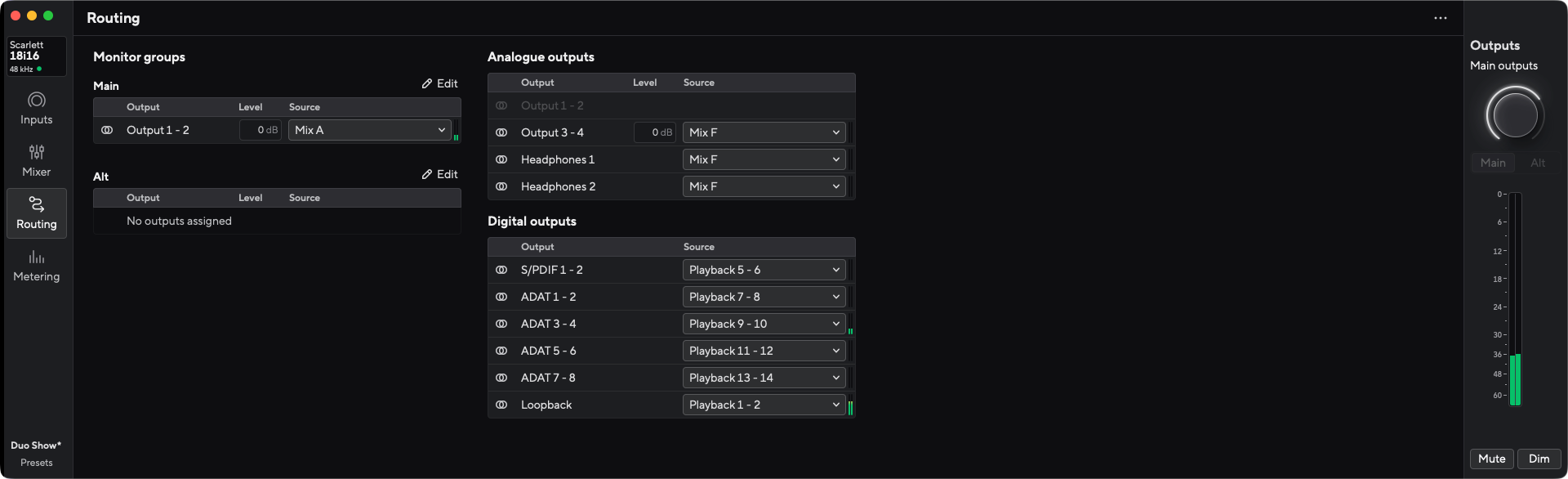
I have looked and tried many combinations in the routing page of the Preset settings of the Scarlett 18i16 but just cannot get it to play sound out to the outputs. Can’t seem to get the right settings work. Any advice is appreciated.
Omnibus is a virtual patchbay app that is very flexible and useful if you need to create aggregate devices or route audio between different sources and destinations, and the MacOS audio setup isn’t quite enough to reach end goals, or is causing a lot of repeat setup if parts of the audio chain are connected / disconnected. It could be thought of like a much more flexible and feature rich version of black hole.
I used to use it when I was using a first gen Scarlett 18i20 and needed to be part of AVB network, but didn’t want to reconfigure the network every time I plugged the Ethernet cable in and hopped on the audio network. I now use a Motu interface that has AVB built-in, and prefer hardware here.
Omnibus did a couple things I really appreciated though.
It would restore an aggregate device’s configuration as physical devices would connect and disconnect. This is really helpful if you need to be quick but have a more complex routing just work at rehearsals and gigs.
The virtual patchbay interface felt pretty intuitive for routing from different sources and destinations. It’s point and click and very quick.
Made it possible to route between GP Instances before the GP relayer was an option. This is still a valid approach to routing audio between multiple instances if needed.
What I didn’t like:
It adds additional latency and requires its own buffer. Wasn’t a big impact in majority of scenarios but is important to be aware of.
It installs its own driver and creates its own aggregate devices, not MacOS aggregates. If you don’t remove these before the trial ends, you’re kind of stuck with them in the system audio options.
One other option that might be worth considering is just routing the apps / audio sources you need into GP instead of all of the system audio.
Loopback falls into a similar category as Omnibus and works by creating it’s own aggregate devices, but is not nearly as feature-rich as Omnibus; it’s also less expensive. If the only thing you need is to route Stage Traxx into GP, this might be another option to trial and see if it works.
Thanks, I’m hoping that tripleB’s comment above can be expanded. Thought I’d try this option first, so far I have not had any luck, but that’s because I’m on a learning curve. I suppose I could trial Loopback to see if it works how I want it.
I have just setup the trial version of loopback and added it as an aggregate to my 18i16 and unfortunately the CPU in GP went from 15% to 45% and I had to reset the audio buffer from 64 samples to 256 to avoid pops and clicks. I could feel the latency under my fingers on the guitar. I have a MBP M1 1TB/16gb RAM and feel it cannot cope at the lower latency I prefer. Unless I’m doing something wrong but this config is not something I can use unfortunately. I presume OMNIBUS would be similar. I’m wondering if a MBP M5 would work better, but if there’s anything or any advice anyone wants to provide I’m willing to try. Thanks.
I assume the 18i16 is 4th generation and you are using Focusrite Control 2 (I’m on 3rd gen and the older version of FC) - nevertheless:
When looking at the manuals I would go this route
Set you macOS System output to USB 18i16 (1-2 if it can be selected)
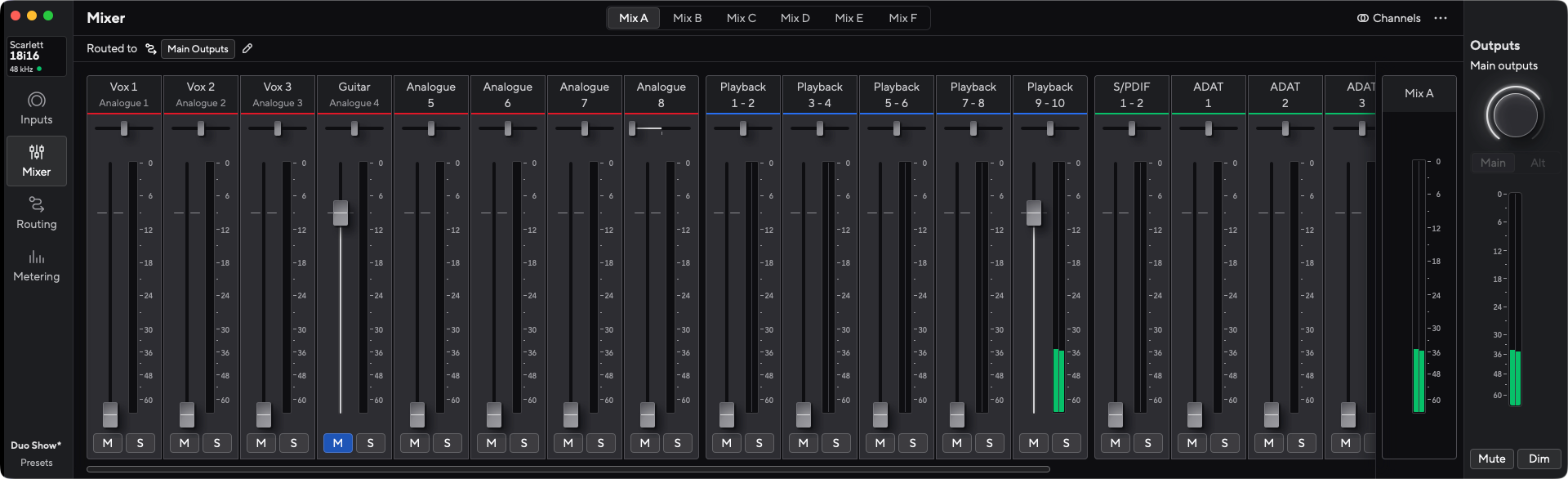
create a MIX F in FC2 which has only Playback 1-2 linked as an input and fader set to 0db
set the MIX F destination in routing to loopback only
create/modify Mix A: Unlink/disable Playback 1-2, add Playback 3-4 to the mix and set it to 0dB
check/route Mix A to your Main out
In GP just build a routing as shown in my screenshot above:
wire your GP Output to the outputs 3-4 - leave 1 + 2 open (they would run to loopback and cause a feedback…)
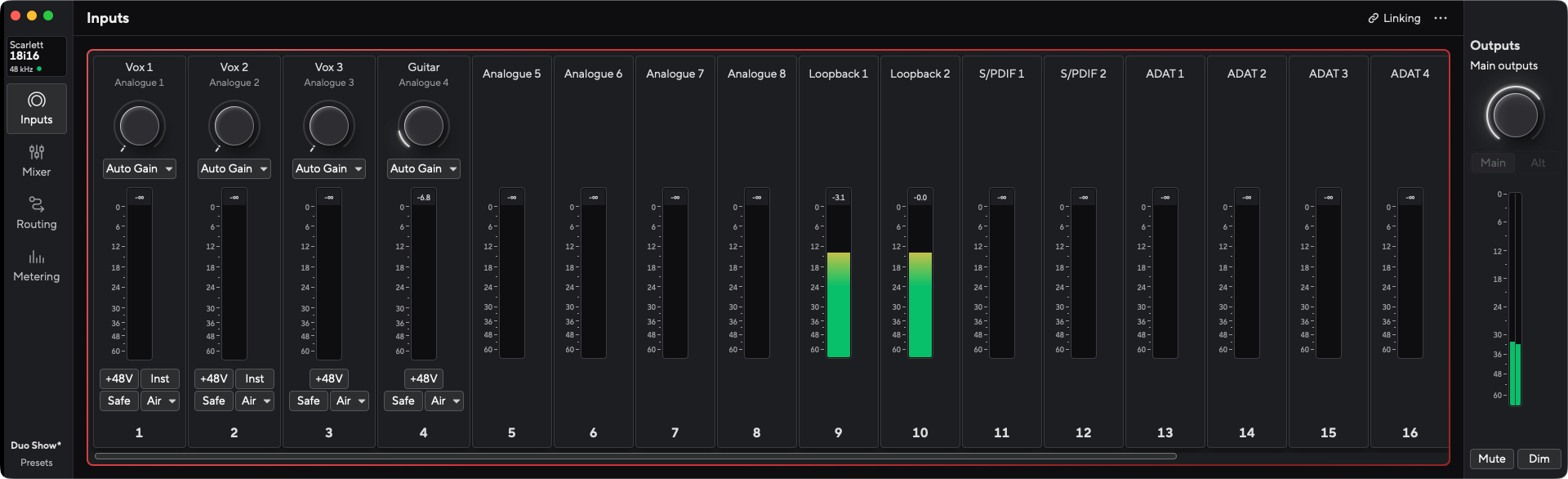
accorduing to the 18i16 documentation input 9-10 is your loopback input (same as on my 8i6)
If you run e.g. Apple Music in this setup in you should see input activity on 9-10 and hear it through the combined GP and FC2 routing in your main speakers
HTH
BBB
PS: to all others: there’s really no need for @baz to install blackhole etc. or create an aggregate device - with this Scarlett there’s everything in place!
PS2: @baz if your Stage Traxx 4 has an own audio interface setting you have to select USB 18i16 as output already here! Also take care on same sample rate setting!
Thanks for your help, much appreciated. I’ll check this soon. I’m looking forward to trying this out. Both BlackHole and Loopback caused popping. I’ll also have to check if I ticked the box for drift compensation as @npudar suggested. I’m away for a few days but I’m still not sure if my MacBook is capable for this so the focusrite option is hopefully going to work
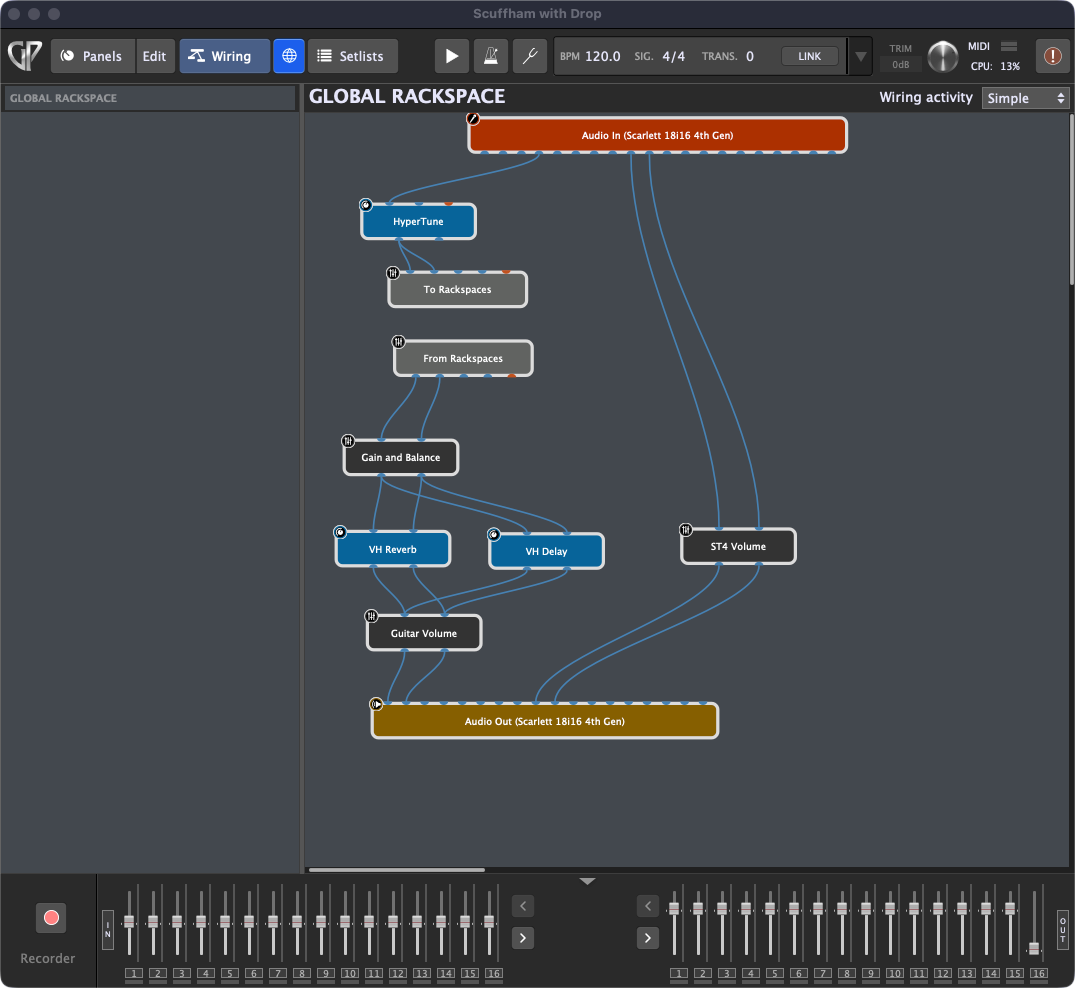
This is how I current have the Scarlett 18i16 connected to GP. The problem is I’m getting the guitar on input 4 going through to the ST4 volume as well. Not sure how to separate that.