I did manage to get the play and stop to work but not the song select. I think I forgot to save my work and now back to square one 
With song select you mean to select the track in SAFP?
1 Like
I have finally got the song select, play and stop to work properly. It was the midi 1 - 128 & 0 - 127 mismatch. For some reason I had to use an external midi monitor to sus the problem as th GP5 midi monitor didn’t show the data but the green midi light in Setlists showed activity. Could this be a bug?
What MIDI monitor?
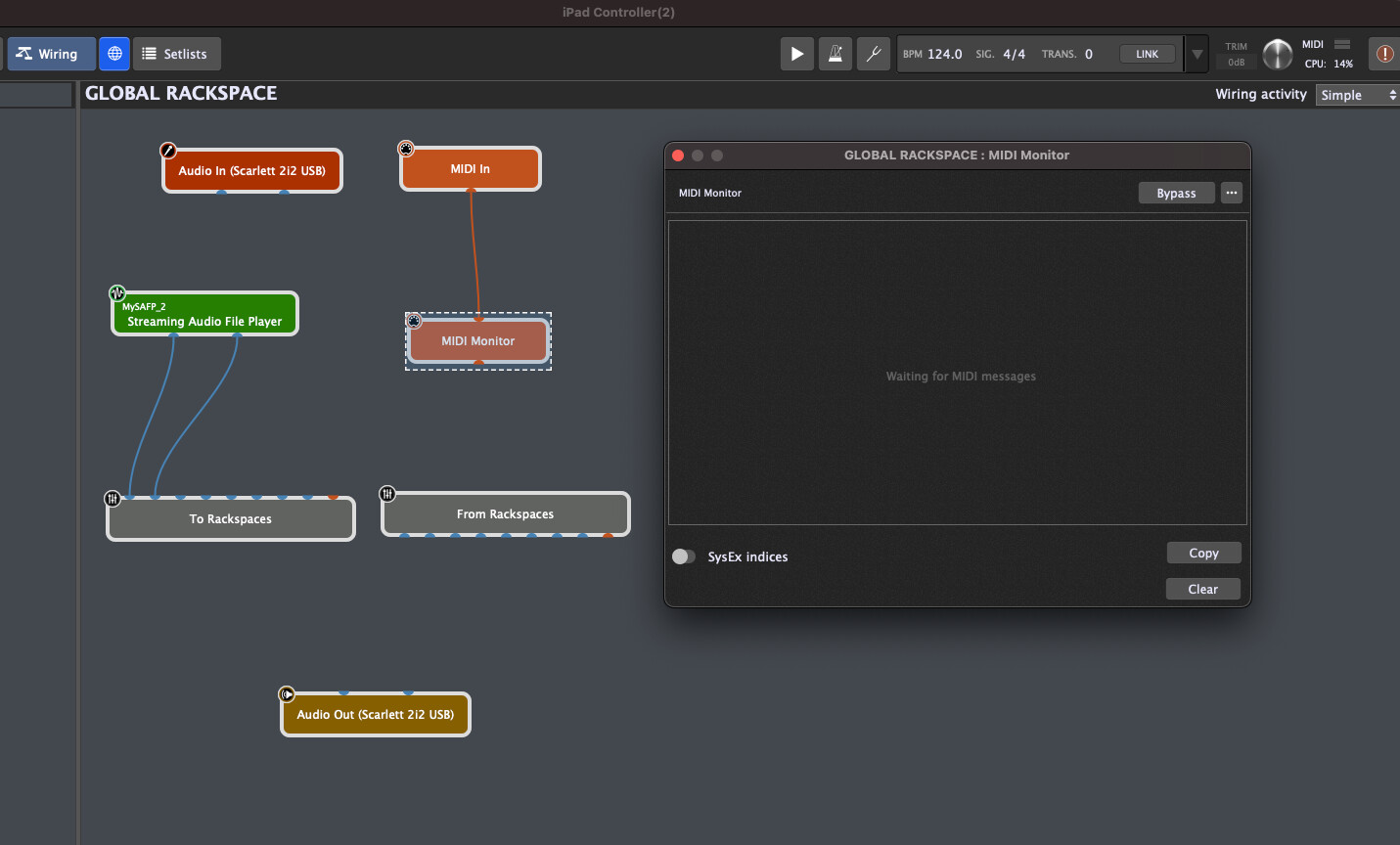
You have to open the global MIDI monitor window
The usage of this window is documented in the user manual.
That is a build in Midi Monitor plugin and it only sees whatever messages are sent to it from a connected block.
This is specifically documented in the user manual here .
The global MIDI Monitor window shows everything coming into Gig Performer from the outside world and this is specifically documented in the user manual here.
Again, I would strong encourage you to check the documentation more thoroughly.
1 Like
I have checked out the midi monitor in the global rackspace, it just doesn’t see what the snoize midi monitor sees for some reason. I have read pages of the manual too. I’m sure there’s some little button I have not clicked or something stupid like that. GP5 is a great piece of software and for me I have to play around with trial and error to get things done. I’m fairly tech savvy but there’s things that get skipped or I misunderstand in the manual. It’s well written and thanks for that but I do need the trial and error aproach with the aid of the manual. I’m still getting used to the way it works, everyday is a step closer. I’ve spent weeks on this project, I have now achieved what I wanted. There will be more questions I’m sure - Thanks guys.
I have a new problem. I have set up markers to switch rackspaces in songs. I know I cannot switch rackspaces whilst in setlist mode as read from an old post from dhj in another thread, so now I go into Panals or wiring mode and now I cannot use my ipad to trigger the start, stop and select song. Does this mean I have to use a foot midi controller to switch rackspaces or maybe my ipad to send midi messages for switching rackspaces?
why not witch a song when you are in setlist mode?
Setlist view and rackspace (panel) view are different/complimentary. You cannot select songs/song parts when you are in rackspace view just like you cannot select rackspaces/variations when you are in setlist view.
That’s just not how GP works. Perhaps you should explain what you are actually trying to accomplish.
1 Like
As a live singer guitarist I use my iPad using Stage Traxx 3 for lyrics and to start stop and select songs in SAFP which I finally have accomplished. I just thought I could use markers to switch rackspaces as that appears to be an option within the marker actions of SAFP.
It’s not a big problem because I assume I can send preset PCs to GP rackspaces via my iPad or midi foot controller whilst in Setlist mode (I hope)
Just checked, it can’t do the rackspace switching while in Setlist mode as I use the PCs 0 - 127 for song selection and play. I could switch to Panel mode and it will switch rackspaces I suppose but then I lose the ability to start, stop and select from my iPad
Maybe I should set up different song parts in setlist mode to switch rackspaces, maybe that’ll work?
That item is there because you can use a global SAFP in both rackspace view and setlist view.
You can, subject to the constraint that the PC number (in combination with bank select) will not go through to a plugin if there is a variation or song part that has the same PC number and bank.
1 Like
So would I have to say assign PCs 0 - 99 for 100 songs, leaving me 27 PCs for Rackspaces? Could that work? Was that what you was explaining above? Could I say use midi channel 16 to do that or would it just look at the PC and ignore the midi channel? I notice when I create a new song it automatically assigns a number which I guess is the PC for that song.
Usually I wouldn’t want to use more than 10 rackspaces, Would this work in paractice?
You should spend some time understanding songs and song parts. Once you’re in Setlist view, you’re only going to be switching songs and song parts. Make song parts that use the rackspaces you want. You won’t need any PC assignments for rackspaces because those rackspaces will be recalled within song parts instead.
2 Likes
First, please follow the advice of @edm11 he is totally correct - you need to understand the GP paradigm rather than trying to force GP to work some other way. And you should not be assigning PC numbers to songs. You assign PC numbers to song parts and then your song parts have an action that will select the appropriate song, no PC number involved there)
So if you want 100 songs, then create 100 songs in setlist view, each with 1 song part.
But just for the record — a program change generally has three parts, two bank numbers (each of which goes from 0 to 127) messages followed by a PC message. The bank numbers default to 0 which is why you think there are 127 values (although actually there are 128…..the values go from 0 to 127)
So, when you bring banks into the picture, the total theoretical number of choices is actually 128 X 128 X 128 which is actually 2,097,152
That is over two million values. That’s probably enough for everybody!
3 Likes
Thanks to edm11 and dhj for your descript replies.
I tend to learn better playing around trial and error. I have read section 7 of the GP5 manual but there’s some parts I don’t fully understand. My preferred learning method is visual and not to read, but I guess I’ll have to read and re-read until I absorb it.
I’m using backing tracks in the SAFP and would like to set markers with actions to change rackspaces. I initially set out to set my iPad up to select, play and stop the SAFP tracks, I have achieved that now.
Thanks for all your help, I guess it’ll take a bit more time for me to get to grip with the markers and rackspaces.
Thanks.
…and ask people on the forum 
2 Likes
Yes that too, thanks for your help as well. Much appreciated.
The support here is great 
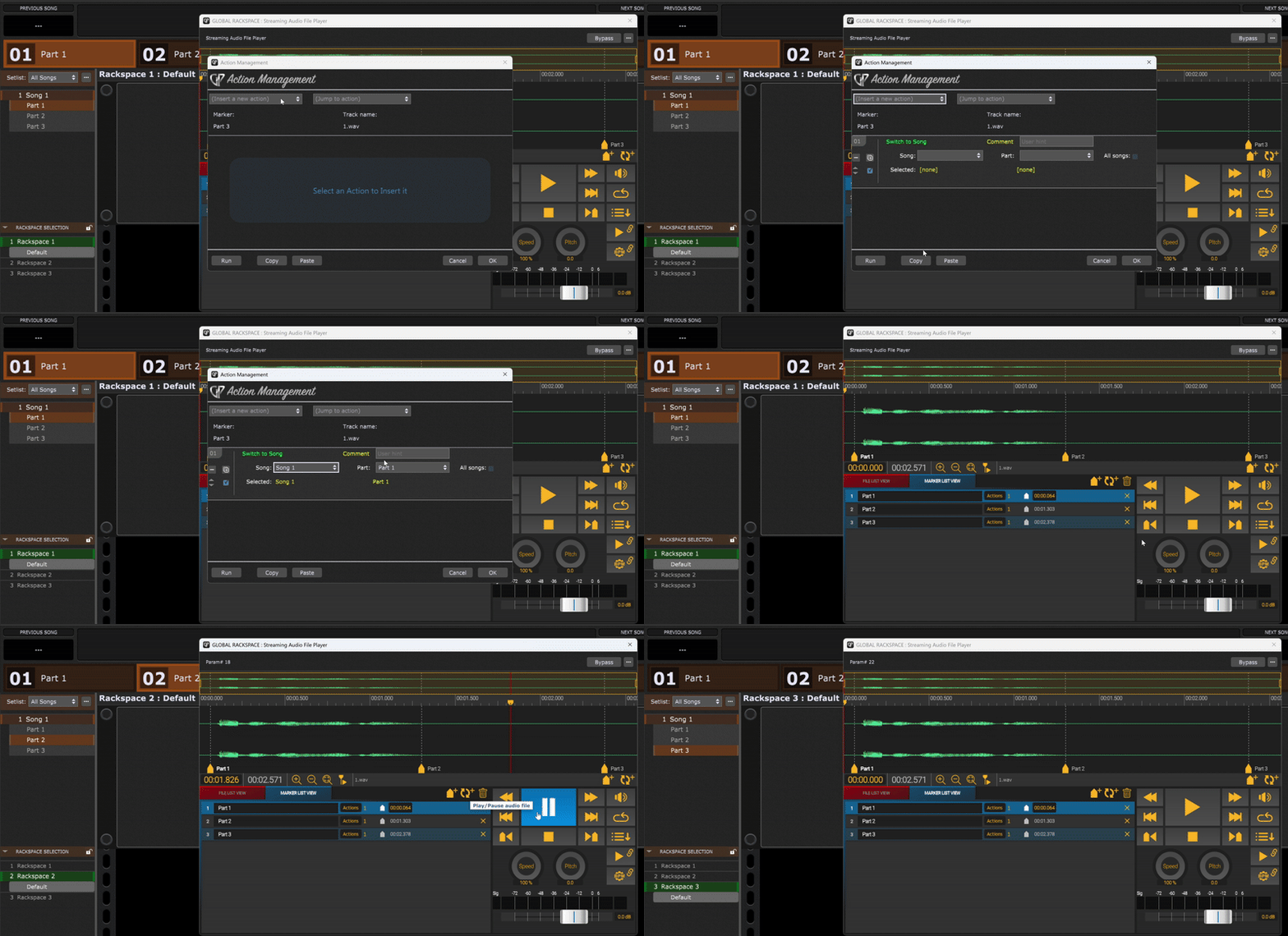
When working in setlist mode, you want to use the ‘Switch to Song’ action in SAFP to switch to another songpart (which your desired rackspace/variation is mapped to)
2 Likes