What would be the best way to ‘force’ aftertouch to be applied on one of my MIDI In blocks - all the time? Whilst my keyboard has aftertouch, I would like one of my MIDI In blocks to think that I am playing every note with aftertouch, when in fact, I’m playing quite lightly. I’m not talking about polyphonic AT simulation, just regular old school stuff.
And it is channel aftertouch, not polyphonic aftertouch.
Many of the GForce presets I use have a great vibrato when AT is applied. I could reprogram them to trigger that all the time by default, but it would easier if I could do that at the MIDI In block layer.
I do not have any clue how that should be doable as like the name says it is aftertouch.
After a note on message is received by the plugin the aftertouch message has to be sent to the plugin.
Isn’t channel AT independent from played notes? I think it behaves like some arbitrary CC#, and probably could be controlled with just a simple widget connected to the corresponding parameter of the midi in block…
Aside from any AI-phantasies i just did a brief test, and things work exactly as i assumed…
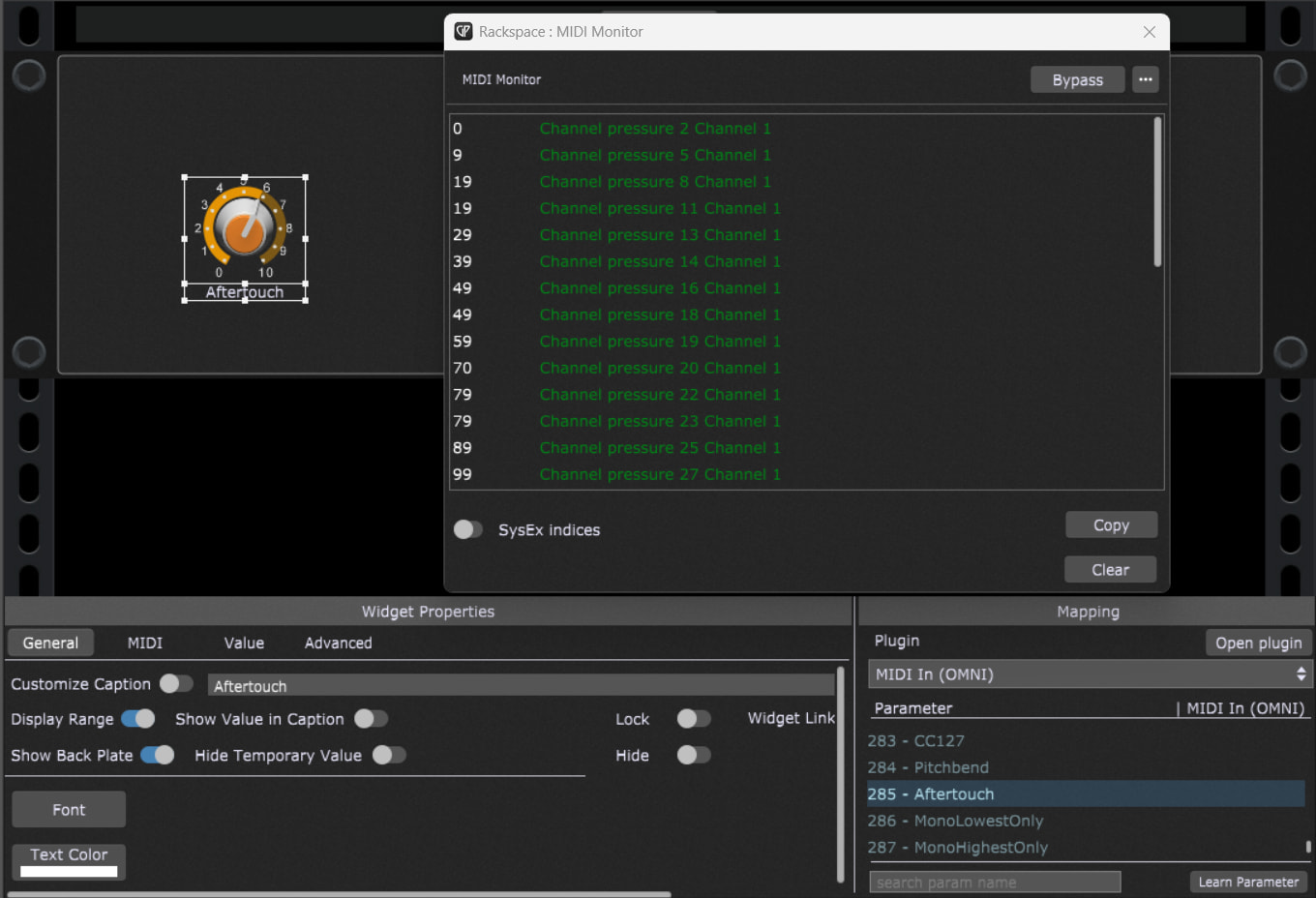
I just connected a midi monitor to a midi in block, then used a widget and mapped it to the aftertouch parameter of the midi block… that’s it.
Hardware wise the channel AT is produced by one pressure sensitive strip which lies under all keys of the keybed (one for all). If it is squeezed, it produces a value between 0-127 like any other controller (but it is handled seperately from the CCs). Having a look at the midi protocol, there is no note-value within a channel-AT message - just the channel and the AT-value.
One might think that it is somehow connected to a played note, but actually it isn’t!
This assumption might come up because one has to press a key first before the key can touch the AT-strip, but if you’d manage to drill a hole somewhere above that strip and put some pressure on it (i.e. with a thin stick or a screwdriver), you would just get a clean and isolated AT-message without a note being played before.
This work’s totally diffrent for poly-aftertouch which is always connected to a particular note..
Just have a precise look at the screenshot, especially the widget properties, more specifically the plugin and parameter section on the right hand side.
I’ve done that, still not getting automatic AT. (AT only when I trigger it manually by pressing harder.) Not sure what I’m doing wrong - sorry - I don’t use widgets too often.
I assume the MIDI Monitor block is purely to check (visually) that the channel pressure message is being generated, and is not required to create the effect.
I bet that you’re playing a keyboard and as soon as you release a key aftertouch value of zero is sent out. Setting a widget to some value just sends a single AT value out. It’s not sending continuous messages.
You could try blocking incoming AT messages but frankly the whole thing is a silly hack. Adjust your presets to just leave vibrato on!