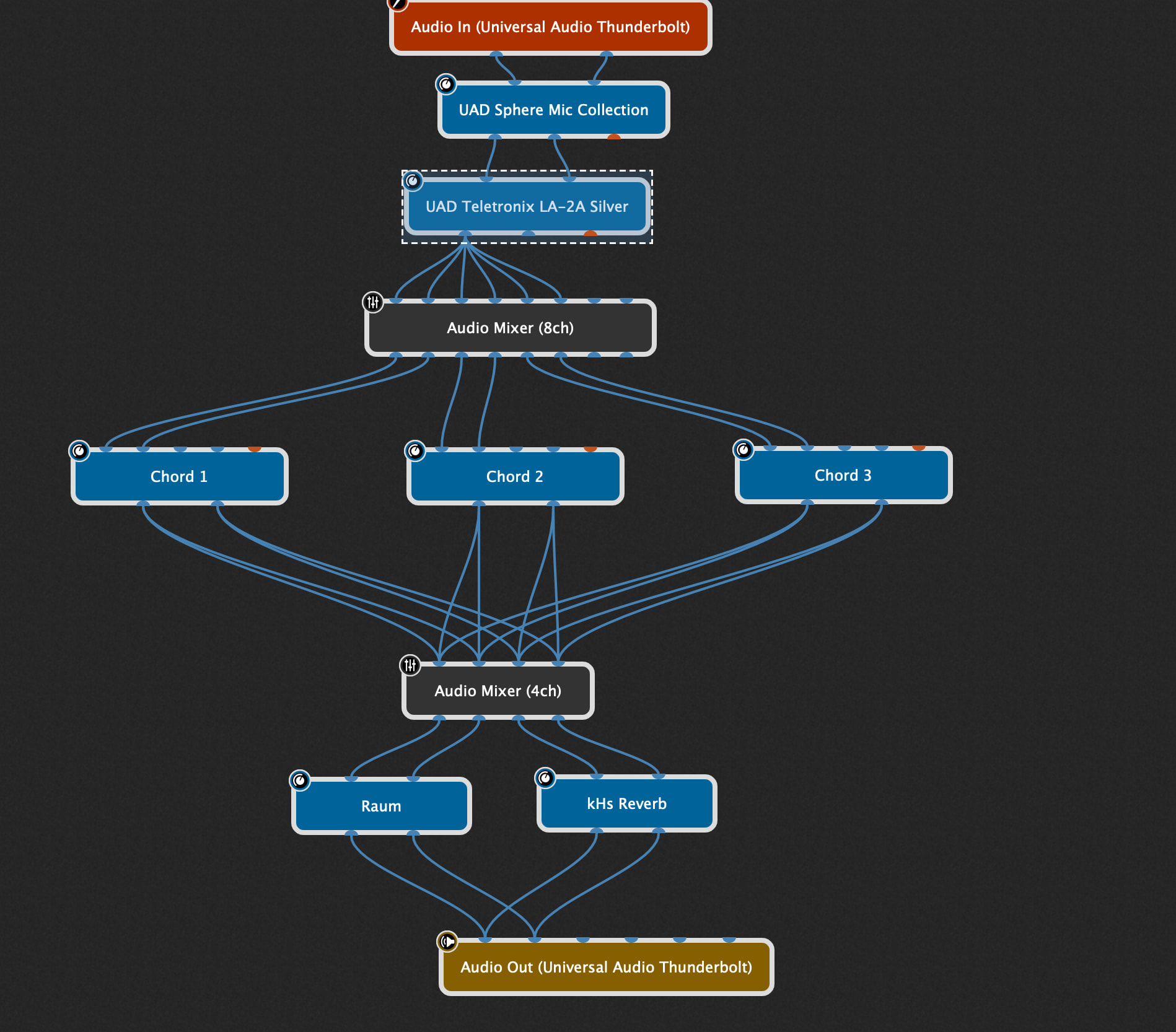
As you can see, the outputs from the mixer are going to Chord 1, Chord 2 and Chord 3.
(each one of these is a Kilohearts Snapheap with a bunch of simple Pitchshifters in parallel. It allows me to play juicy chords on my trumpet).
I only want one of these Chords to play at any time. So I need to mute two of the three outputs of the mixer. So these are three settings, or variations, perhaps?
I have a Morningstar MC6 pedal (which I’m struggling with - I’ve only had it a few days) and I want to find the most sensible and simple way to have one stomp button for each of the three settings.
Any simple, practical and clear suggestions would be greatly appreciated.
(There are two reverbs. I have found a GREAT use for the “freeze” function using a sustain pedal - the second reverb kicks in when the first one is busy being frozen - it’s a fabulous effect (and it’s what the second mixer controls, via a pedal - output-mute-swapping). I could put an audio clip of it in action here…)
Variations will usually always be the best option, as you can change multiple parameters (via widgets) at the same time.
One comment: if you’re never going to run multiple of your chord plugins at the same time, then they could potentially be wired in series. You would then bypass the two you’re not using (via widgets/variations).
I don’t like variations. My solution would be to add 3 button widgets to my control panel for that rackspace. Set them up in a group where activating one turns the other 2 off. Have them control the mute on your mixer for each “Kilohearts Snapheap”. Then simply use MIDI learn for each widget so each is assigned to a stomp button on your controller. Stomping one button turns it on and the other two off.
I’m assuming everything else you have is the best way to handle what you are trying to do. There are lots of ways to do similar things in GP.
Very helpful. Thank you.
I’ll have a go at doing exactly that.
I’m curious, though. What don’t you like about variations?
I tried to make some but when I edited one, the other previous one changed, too, so they were exactly the same.
I guess the whole point of them is that they are different in some way - but mind refused to be different.
A song variation could use an entirely different rackspace. If I were to play something like foreplay / long time, the organ changes enough it might warrant a variation. However, even on that one, I can have 2 organ instances and switch between them using a widget. So, I don’t really need variations for anything I can think of.
I’m slow at learning new songs. I have to play them several times a day for several days to learn them. I like to have a play along track in the streaming file player ready to go to avoid having to look up the track elsewhere. I like using GP to trigger start and stop and volume and such for that track. If you have it across 2 variations, when you switch variations, the file play just stops. Not helpful for what I need to do. And then the variation selector takes up screen space. I just haven’t found pros to outweigh the cons for my needs.
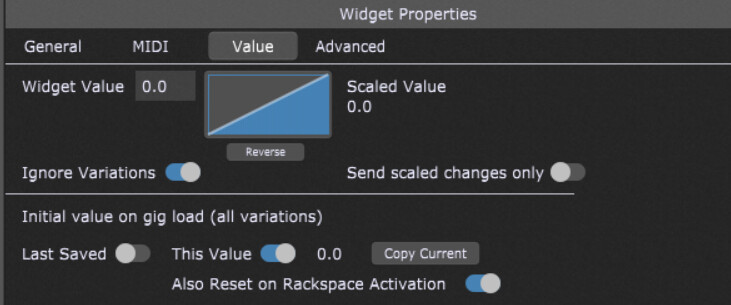
Assuming you have a widget attached to the “Play” function, you could configure your widget like the image below to prevent it from changing when you change variations. Note the “Ignore Variations” switch. There are also other options below that you can adjust to control the behavior. In this case it’s always set to “off” when you open the Gig (so it doesn’t immediately start playing) and when you change Rackspaces (because maybe you want it like that, but maybe you don’t.)
As rank13 said above, what changes between variations is the widget values stored.
In your particular application I’d start by using variations because I think it’s a simple and instructive way to start.
Create three button widgets that are linked to the Solo buttons on one of your mixers. Either solo the top mixer so only one of the Chord plugins is receiving audio, or solo the bottom so that only one makes it through to the final mix.
Then create three Variations, and in each variation have a different one of those Solo widgets turned on.