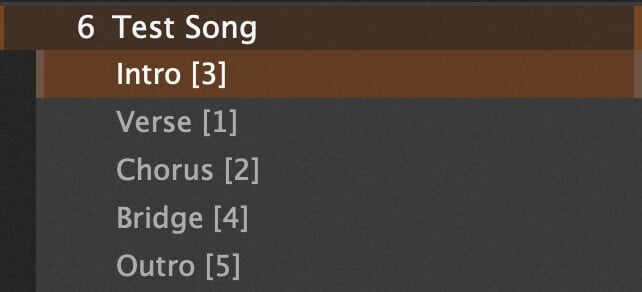
What he described in his words I would describe as “not using the concept of songparts at all, but rather ‘tones’ instead of songparts.”
So the idea is button one (for example) is always “clean tone”, button two “gritty”, button three “lead” or whatever. Those have no direct correlation to songpart order in terms of sequence during a song. It would be up to the user to label them as such in their Songs. The reason he wants the Song to be able to start on whatever “songpart” the user wants is that if it starts with a “lead” sound and that’s button three then it needs to start on the third songpart.
I think you already covered that with the “*” at the end of the variation name. (I think that’s how you did it.)
I think his remaining issue is being able to set widgets so that some are will be “remembered” across songpart switches and others won’t. Because GP isn’t built this way I don’t think there’s a simple solution for it. What he’s asking for is further complicated by the fact that changing songparts can change rackspaces, so to the extent you tried to build a widget list whose values should be preserved across songpart changes you have the inconvenient reality that those widgets may not exist across songpart changes. Not an insurmountable problem, but it’s a whole lot more complexity to build into an extension.
Dealing with that could be simplified by requiring such widgets to be placed in the Global rackspace, and to the extent they need to exist in different local rackspaces forcing the user to make those links from Global to local rackspaces themselves. But now we’re at a level that gets quite complicated for the user.
That’s exactly it. But for the second issue, I think rank13 had an idea for it in his switcher he made.
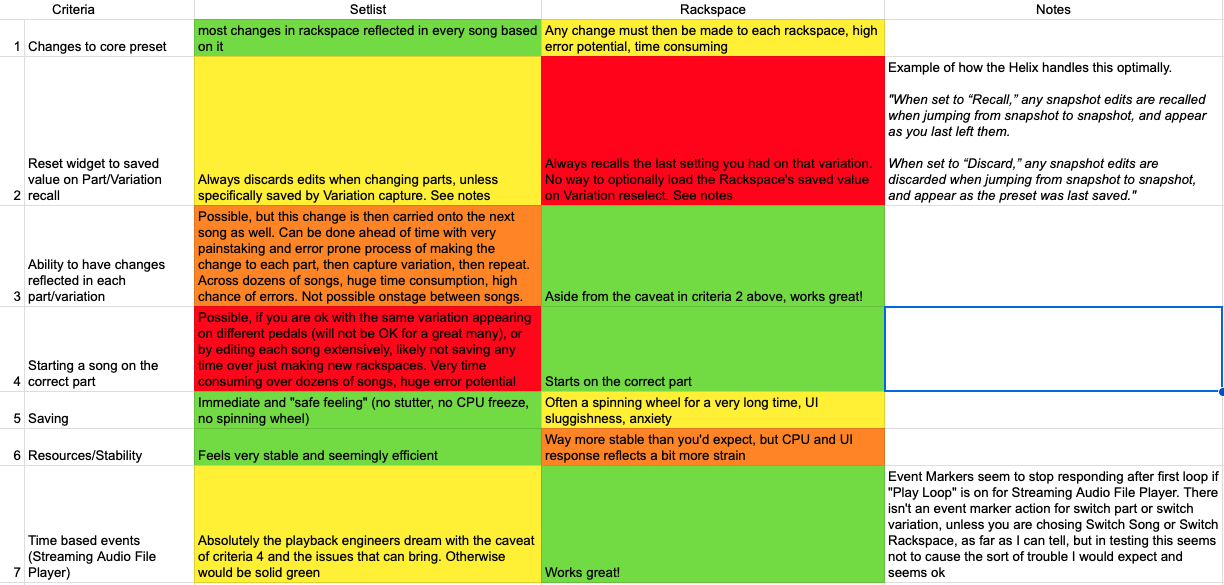
I REALLY would rather use setlist mode, because of being able to make changes to all songs based on that rackspace instead of making a change to each rackspace when needed
The second issue in setlist mode has to do with the second entry in this pic, we are in “recall” mode, but many times I’d like it to behave in “discard” mode
If I understand item (1) correctly, then you’re not talking about resetting inidividual widgets - you are referring to the entire snapshot. Is that right?
But it sounds like you just want either the snapshot (which means all widgets) to be remembered or the snapshot (which means all widgets) to be reverted
Yeah that is right. Some modellers further allow something like ignore variations, so say you had a widget set to ignore variations, the only time that widget would be reverted to the saved value is on reloading that song.
This is for something like a last minute pitch drop, say the singer was struggling that day, but normally, you’d want the pitch set to the saved value. It would be set to ignore variation as when you change snapshots, you would still want it at the newer pitch
Murphy’s Law unlocked…We loaded a bad profile and apparently crashed it in front of the Sweetwater guys, but that’s about exactly how I always expect these to go.
@dhj Any thoughts on if these options could be implemented? When a widget is modified, how should its value be set when changing to another part?
Option “Recall”: any snapshot edits are recalled when jumping from snapshot to snapshot, and appear as you last left them.
Option “Discard”: any snapshot edits are discarded when jumping from snapshot to snapshot, and appear as the preset was last saved."
I just ran into a new problem with rackspaces, having so many songs as separate rackspaces really affected the gig file load time, I was looking at nearly three minutes to bring in 22 songs. I know three minutes doesn’t sound like much, but onstage that’s a few eternities. If there could be some way to make Setlist mode work well for this application (allowing the pedals to stay in their current order regardless of which part starts first, ignore variations working on a per song basis) that would be ideal. Gig file loading time is a lot shorter when its just a few rackspaces
By this do you mean the “discard/recall” widget changes as you move back to the same variation, which you’ve been requesting? Or the actual “ignore variations” widget setting that means variation changes have no effect on the widget value?
Most GP users would accept this as part of normal setup time. Is it really a showstopper?
If your system crashed in the middle of a song, I can see how 3 minutes would be an eternity. But during setup?
If Rackspace mode gives you this behaviour, then there’s no reason why you can’t order your song parts the same way e.g. they don’t have to be in chronological order. I also provided a simple method of ensuring the correct first song part is chosen in the extension you’re testing (adding an asterisk to the end of the song part name).
If you want the best of both worlds: song parts in chronological order AND consistent mapping between footswitches/widgets and the song part that is selected - would you agree that some form of user configuration/song setup would be required? If so - what would be your suggestion?
One option I see, working within what is capable right now in GP and with extensions, is to add a suffix to the song part names for the corresponding footswitch number:
This might do, but seems like there would be some issues keeping it straight and for when song parts are meant to share the same variation. I’d love to be able to assign a variation to each part for instance, though maybe this could work.
In cases where its not meant to switch alongside backing tracks or whatever timeline event based switching its following, its probably nowhere near as tricky, but I’m really not sure the smartest way to go about this.
Ideally, you could have whatever song start on the sound (variation) you desired, regardless of its order in the song, and if you need to take over manual control, those variations should optionally be able to keep their positions on the pedalboard
If this is doable, do you think there could be a way for ignore variations to work as well? Or maybe a force reload of the rackspace on song change, but not sure if that would break the variation captures
That’s why just having a single “Next” footswitch seems so much easier!
But I suppose if I were to build this into an extension, if you had multiple parts linked to the same variation (therefore same footswitch number), then the extension could choose the next part with that number i.e. it would assume you are moving forward through the song.
A next/previous switch wouldn’t really work for a lot of people who just want to pick their parts manually. It makes sense for something with event switching, but in the event anything goes wrong during the song, they’d need to be able to pick their desired sound.
And really, that’s just for people intending it for setlist/song use the way Gig performer intended. Many (most?) guitarists are just going to want the same sort of functionality they have from their existing pedalboards, which, except for in the super dinosaur all analog 1980’s pedals scenario, definitely all allow you to have your scene/snapshot/part/variation switches where you want them completely independently of which of those parts are supposed to be active upon the loading of the preset
I’m starting to think there may be a need for a third mode…Rackspaces/variations, Setlist/Songs/Parts and pedalboard mode so as not to break any of the existing paradigms.
The load time in Rackspace mode is not the end of the world (its actually shorter than the famously long fire up time of one of the current flagship modelers), but not having the ability to recall saved values when choosing parts is a real problem, a very big one
One challenge with Rackspace view is that there is no clear distinction between ''Editing" and “Performing”. And when you are saving, you are saving the entire gig file, not just the current rackspace or variation.
This poses a question of how ‘recalling’ the saved variation value for a widget will impact a user workflow/experience, if you are editing your rackspace and actually want to change a widget value for a previously saved rackspace/variation. You would need to remember to save the gig file before changing variations, otherwise your change would be lost.
The closest related setting in GP currently is where you set an explicit value for the widget, and can reset to this value when you open the gig and/or switch back to the same rackspace.
It has been requested by users a few times to add another option to ‘Also Reset on Variation Activation’.
I think this would be very reasonable. Its something the end user would encounter, ask in facebook or a forum, and have it quickly sorted on what to do. It would give us all three modes from the chart in the OP. Recall, which we currently have in Rackspaces, but not in Setlists (I think). Discard, which we have in Setlists, but not Rackspaces. And snapshot ignore, which we have in Rackspaces using “Ignore Variations” but not in Setlists, as in Setlist mode, ignore variations does not reset on song change
@rank13 I think your idea, if I got it right, about adding something to the part name in a song to say that that should be the part the song starts on on load, if that’s possible would be great. What would be left after that is to have ignore variations somehow work in Setlist mode, but that is much less of a problem