Setlists vs Rackspaces for the average Hardware Modeler Expat

Like most of my posts, this is really aimed at my company’s goal of bringing the Helix/Kemper Stage/AXE FX/Quad Cortex/Headrush player to the computer world.

I keep going back and forth on whether to use Gig Performer in Rackspaces mode or in Setlist mode. There are pros and cons to each, ranging from perfection beyond the hardware modeler’s wildest dreams, to what seem to be actual show stoppers for some (possibly many, possibly most hardware expats).

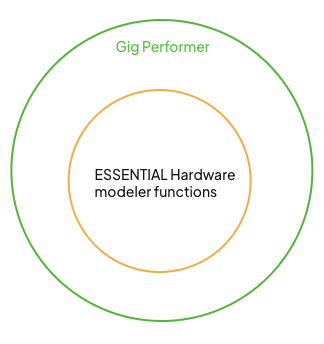
Ideally, in a Venn Diagram, every software function a hardware modeler can do (and of course ESPECIALLY the ones relied on for every show) can be done by Gig Performer. Furthermore, there are countless functions Gig Performer can do that hardware modelers just can’t touch.
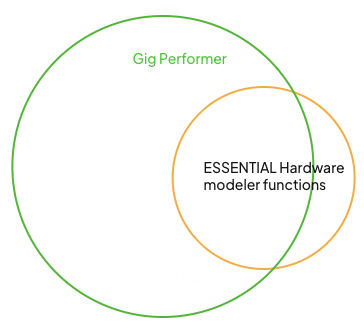
But as far as I can tell so far, there are a few essentials I just can’t quite get working inside Gig Performer. While many will compromise to varying degrees on some of these criteria, many will not, and I’m trying to bring them all inside the circle to avoid it looking like this:
I’m working on a spreadsheet to work through these one by one and will update it if need be.

Edit: So far, everything I have tried with rank13’s extension is working in Rackspace mode, I still have more to test, but I think it can handle this mode as well as it does the Setlist mode

I am still needing to check for a way to switch Rackspaces similarly to the way my Song Selector script switches songs

Green = great. At least as good as what the best hardware modelers can currently do

Yellow = it should work. Not super happy about it, but probably more than OK

Orange = this will be a cutoff for a lot of users and some will find the situation acceptable and others will see this as a showstopper. Definitely not ideal

Red = showstopper. Hopefully there is a way around this. Falls outside of the Gig Performer circle on the Venn Diagram
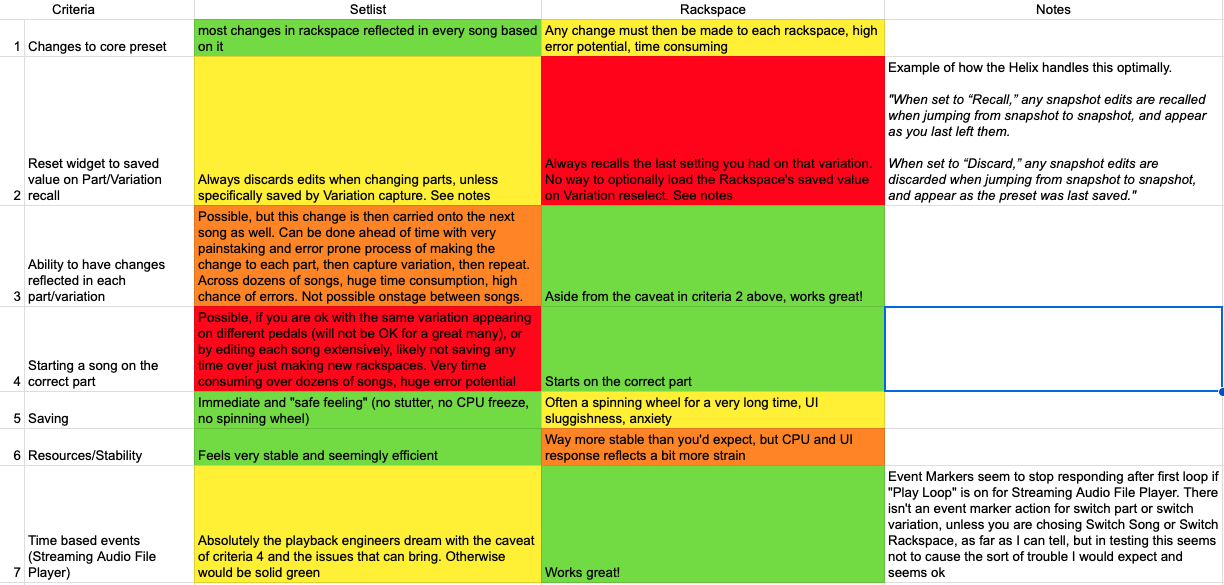
My conclusion at the moment, is that sadly, right now, and of course it could be pilot error, but there is a red box in both the Setlist mode and the Rackspace mode, so I am stuck on exactly which direction to go.

I welcome any ideas, as you guys seem to have figured a pretty good way out of most of my issues so far!

Did I solve the red box in Setlist mode with the latest update to the Grid Selector extension? Or are you seeking native GP functionality?

oooh let me check!

It still seems to swap the pedals if I swap the parts, but I think your added widget mode might do it…I’ll try when I’m more awake

Yes it will. I was referring to being able to control which song part is activated when you first select the song.

You would need to forgo the idea of having sequential song parts, and order them based on your pedal order. The current implementation of the extension is a WYSIWYG, where the order of the parts on-screen matches the order of your pedals (via the ‘direct select’ widgets).

If you still want them in sequence (e.g. Intro, Verse, Chorus etc), but also still have the pedals follow a specific order (e.g. pedal 1 is always ‘clean’), then the only way I can think of implementing this is to have some sort of keyword added to your song parts.
e.g. Intro [Crunch], Verse [Clean], or, alternatively, these keywords are in the variation names.

I would then use those keywords to map the part to the corresponding widget. I could also remove the keyword from what is displayed in the selector.

1 Like

Wait, can’t I just not assign variations to parts? Let me try that. I was thinking I could make some new widgets to pick rackspace variations, but I really can’t see any native way to call a variation without also calling the song part. Maybe there really is a decent scripting way out of this, but it may be best to just bite the bullet and use rackspaces instead.

I wonder if there is a scripting way to get around not being able to reload stored variation settings on variation reselect for criteria number two using rackspaces

It would require every widget to have a handle manually specified in its widget properties. If that was in place, I think this could be achieved.

So are you thinking there could be a line in a script for each widget you are worried about that could reload its saved values on variation change? Then it could be commented out if you didn’t like the behavior?

I was thinking more about having it part of an extension, and then a preference to switch between the “discard” and “recall”.

I think that would be beyond epic. For those who want the pedals to remain in whatever state ignoring variations, they could actually just use the ignore variation switch!

Hmm, I think this would be a showstopper. I can’t detect that this setting is active via the extension SDK.

I just meant for those that wanted that particular functionality, they could just enable it natively in the editor and there’s no need for anything from the script for that so it seems like we could have whichever of the behaviors we’d want

I’m kind of flooded prepping for NAMM, but hoping this type of behavior will be possible once the real world is back under my feet! I’m kind of stuck for now as neither Setlist mode nor Rackspace mode will really work well for our needs at the moment

I personally still think Setlist mode will offer the greatest flexibility.

1 Like

Me too, I’m just worried about the downsides

What downsides?

Mainly the inability to separate parts from variations, and the “ignore variations” issues, though that second one is likely solvable by what rank13 is working on. For the parts and variations link thing, rank13 has an idea, but it may be a bridge too far for a lot of the potential users

With the NAMM show only three days away, I finally got a usable version of the software we want to show, so dying to get this working well on the hardware. Probably won’t be in time for the show, but certainly soon after.

I really want to be able to pick a direction, setlist vs rackspace and drill down on turnkey solutions. Not at all sure which will be more viable as the current answer is “neither”, but so much hope in this thread.

It’s always going to have the greatest chance of success if you aim to work as closely within the GP structure as possible.

That is: use rackspaces/variations as your “sounds” (building blocks), and songs as where you bring these together.

The benefit of song parts following the chronological order of your song also means that a minimal pedalboard with one “Next” switch would allow someone to easily step through the song. No tap dancing, no cognitive effort to think about ‘what comes next’.

If you focused on song mode for the moment, please let me know some detailed practical examples of a required workflow that is still not possible.

One thing I can definitely see is that there is no “Recall” functionality when switching parts. But in your experience, is “Discard” the most commonly desired mode (which we already have)?

For song mode, I absolutely have to separate parts from variations. And in a way that won’t be too tricky for the average guitarist, also it will have to do the ignore variations thing properly and reset on each song, but I think you already have that potentially covered

I might have to find your other posts, as I still don’t fully grasp your target state.
I will list a few things here to see if they resonate with you:

  • IMO song parts are best left in chronological order, as there could be scenarios where having the simple ability to progressively move through the song will be advantageous (e.g. a single footswitch for ‘Next’; SAFP timeline-based actions to automatically move you forward through song parts).
  • The extension SDK allows me to obtain the name of each variation that’s linked to a song part. That would allow, as an example, to be in Setlist mode, but have the Grid Selector display the variation names instead of song part names (or both names if space allows). I could also only display the unique/distinct variation names, if the same one is used in multiple parts. For example, if you use the same variation for each of the ‘verse’ parts in the song, the Grid Selector could just show it once.
  • To be in Setlist mode, but to show the part names (or associated variations) in a different order, will need some mechanism to understand the desired order. One proposal was to have a keyword used in the variation names, which the extension would use to set a preferred order. This sort of thing would be tricky if songs didn’t follow a specific pattern of e.g. one clean variation, one crunch etc. Otherwise the extension may need some sort of UI to allow the order to be set for each song and store that data separately (this starts getting complicated/risky).