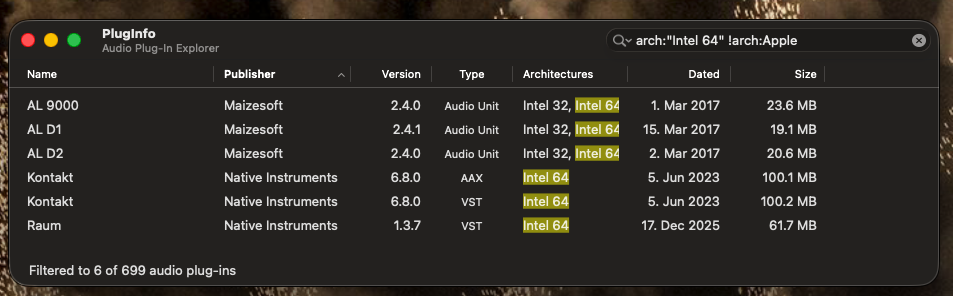
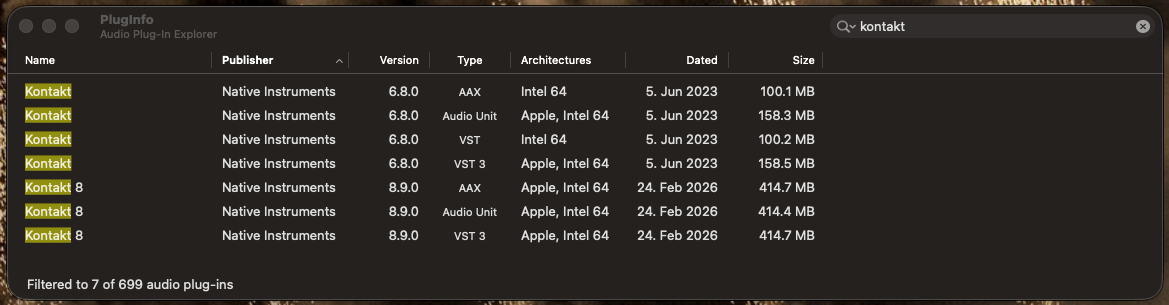
I start the computer. Only the Intel processes from the Roli Keyboard are present. When I start Kontakt 7 Standalone, all the other Intel Kontakt processes appear. When I close Kontakt 7, the Intel processes disappear.
I’ve now deactivated Kontakt 7’s KMS. Now the Intel processes are gone too. I had activated KMS because I thought it would improve memory usage. Is that wrong?
(KxMemServer) is largely considered an obsolete tool designed for older 32-bit systems to manage RAM for large sample libraries. It is not needed on modern 64-bit operating systems or with fast SSD/NVMe drives
More importantly, I already knew that was the case about KxMemServer (i.e, it’s obsolete) because Native-Instruments said this years ago and the only reason I posted this is to repeat what I have said to many:
Yes, that’s true: facts are always good. But people like me (who are just users and have no programming knowledge) have to rely on AI so as not to overwhelm and bother you specialists with such questions.
I’ve already deactivated KMS and will continue to monitor the situation.
Yes, as I’ve already mentioned, all Kontakt instruments have been purged. I currently have 100 songs in a GIG file. My next step will be to play through all the songs so that the Kontakt instruments are filled with the played notes. Then I’ll save it again and see if the 32 GB of RAM is enough for the now-filled notes. Then I’ll add the last few songs one by one. If everything remains stable, then I’ve done it.
Unfortunately, this ends up having the opposite result because
We now have to respond to the misinformation to correct it
We have to then delete that misinformation because (a) we don’t want other users to rely on it causing even more confusion and (b) that misinformation gets picked up by the AI systems and simply reinforces the bad information.
If people want to ask AI for help, then they need to VALIDATE the results and not just assume AI answers are correct — it’s 50/50, often worse.
I quote (from a real source that tracks AI results) from a year ago - and it’s worse now
The December 2024 edition of the monthly report found that the 10 leading chatbots collectively repeated false claims 40.33% the time.
Ah, okay. So PlugInfo can directly identify the plugins even though it’s listed as an AU in the Activity Monitor. That tells us where to start looking. thx
This thread already mentions that mixing AU and VST plugins isn’t a good idea. I’ve already switched everything to AU, except for the plugins I haven’t identified yet.
Personally, I find it better to use VST and VST3 than AU. 5ey seem to be better tested because pretty much every host except hose from Apple support them.
Actually, what is not a good idea is to mix different formats of the same or related plugin or different versions of the same or related plugin.
For example, don’t use Kontakt 6, 7 and 8, just use one major version. But running the VST version of Kontakt 7 and the AU version of Lounge Lizard (say) should be just fine,
Apple only automatically runs Rosetta for Intel-only AU plugins. It does not try to load Intel versions of VST plugins.
Yes, I know your opinion on that. It looks like I’ll be sticking with Apple until I retire from music. Anyone who’s comfortable with both platforms is definitely better off with VST.