hi, I’m reading a midi file from Midi player external (LoopMidi or Midi Omni). With midi monitor,
I see all the program changes except program change 0 (program change 0 is ok with global midi monitor). I thing that GP is using the PC 0 for something but i don’t find it.
I only found one solution to get it working. I changed the “Only accept PC on specific channel” parameter in “Options/Global MIDI” and set it to 16. As a result, I receive PC 0 correctly, but no longer channel 16.
Can you give me a solution so that I receive PC 0 correctly and don’t lose channel 16?
thank you for this old post. I’m already using Use zero-based PC numbers toggle button, but the post doesn’t tell me how I can use PC 0 for my personal use and not for changing setlists, rackspaces, or anything else.
GP interprets external PC messages for use with rackspace/song assignments. It’s a fundamental part of the software. When messages are aren’t in use that way, they can be passed on otherwise (There’s a setting for that in the Options menu). However, PC 0 will be the first rackspace assignment by default if you’re using zero-based numbering.
I use GP to play external MIDI files and be able to modify everything I want within GP (sound, EQ, transpose, etc.). The problem with the internal MIDI player (MIDI file player) is that it’s far too basic (no rewinding, no live sound changes, no .kar playback, no text display, etc.). I’ve tested many external MIDI players, but I’d like to use MIDI Player, which is an industry standard. And I’m stuck with PC 0.
A PC 0 in a general MIDI file is sound 0 of the general MIDI bank (sound 0 is usually the grand piano). So I simply want to filter this PC 0 and send it to my instrument 0 (my piano). If it’s a PC 33, I send it to my instrument 33 (a bass), and so on…
Now, none of this is a big deal because with the “only accept PC messages on channel 16” function, I only lose PC 0 on channel 16, which should be quite rare in General MIDI. Lol
All my plugins are in the same rackspace. I’m using 8 instances for Pianoteq. If i détect PC 0, i heard sound from Pianoteq 0, if i detect PC 1, i heard sound from Pianoteq 1…and so on.
I see …. That’s not the usual way to use GP but OK
I assume then you are just using a single Default variation.
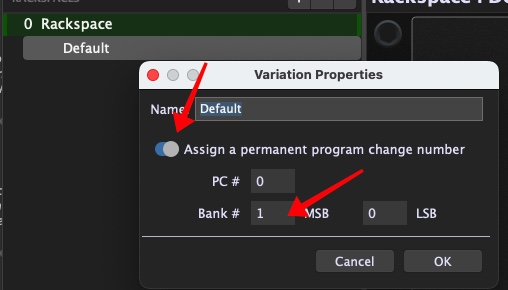
The solution is then simple. For that default variation, simply change one of the bank parameters from 0 to something else. Then since that variation will no longer be using bank 0, all program changes, including 0, will pass through to your plugin
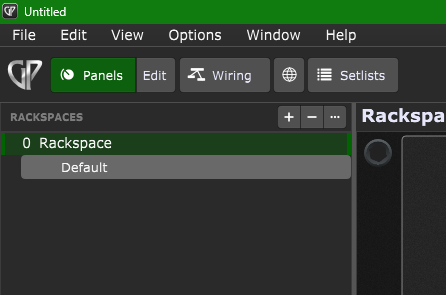
The general concept is simple — Gig Performer passes through to plugins any program change that is not associated with a rackspace. When you have a single rackspace, by default its associated program change number is 0. That is why PC 0 is not reaching your plugins.
However, that’s not the whole story. Beyond program changes, there is a concept of bank selection, the goal being to allow more than the limited 128 choices you get when using a program change number.
If you change the bank number to something other than 0, then Gig Performer will not respond to the PC 0 because it’s not on the correct bank. Hence the PC 0 will be passed on to your plugins.
If you don’t understand banks, then a google search for MIDI bank select will probably help