Make it resilient: block MIDI events you don’t need and anticipate possible undesirable behavior
To create a robust setup, a good practice is adding certain ‘security mechanisms’.
For example, one of our community users reported that his Korg Kronos would (for some reason) occasionally and unpredictably send out CC messages, which then affected his plugins in undesirable ways. His solution was simple: in the MIDI In block, he would simply block all CC events. Problem solved.
Indeed, Gig Performer’s MIDI In block allows for many MIDI operations. Check out this blog article to learn more.
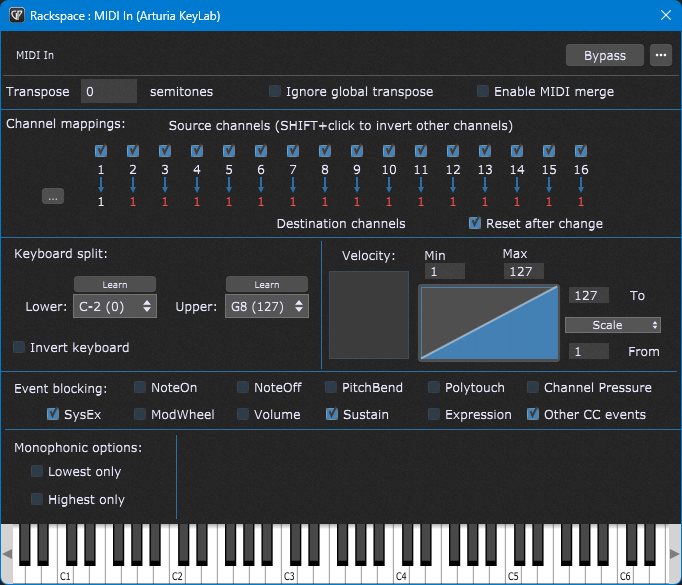
For example, you may know that many plugins respond to MIDI channel 1. So, suppose that you accidentally switch your controller to MIDI channel 2 (or you may use a backline controller that is programmed to use MIDI channel 2), you may not hear any sounds for plugins connected to that MIDI controller. In this case, remapping all the MIDI channels to the Channel 1 up front is a solid ‘fail safe’ mechanism. The plugin will respond normally regardless of the channel that your MIDI controller sends out. However, make sure that your controller is not sending out events simultaneously on multiple channels as this will cause duplicate notes to be produced.
Another user shared with us that he uses MIDI Filter blocks and simply filters out all the messages that he doesn’t plan to use, i.e. allows only Note events, sustain and some ‘safe’ controllers. Following this practice, this user has never had any issues with plugins leaking MIDI or problematic MIDI controllers.
NB: we share many Gig Performer tips every week in our Facebook group and this was the Tip # 41.
–
Tou learn about other tips, make sure to check out the blog article: Best practices for a rock-solid software-based setup