Hi folks,
i ran into some issues while testing the XY-pad script where David helped me with.
I recorded a short video to show you, what i am talking about.
I am sure the problems are not caused by the script - this runs perfectly, except that the “center button” doesn’t react when pressed the first the time (you can see that too in the video i made).
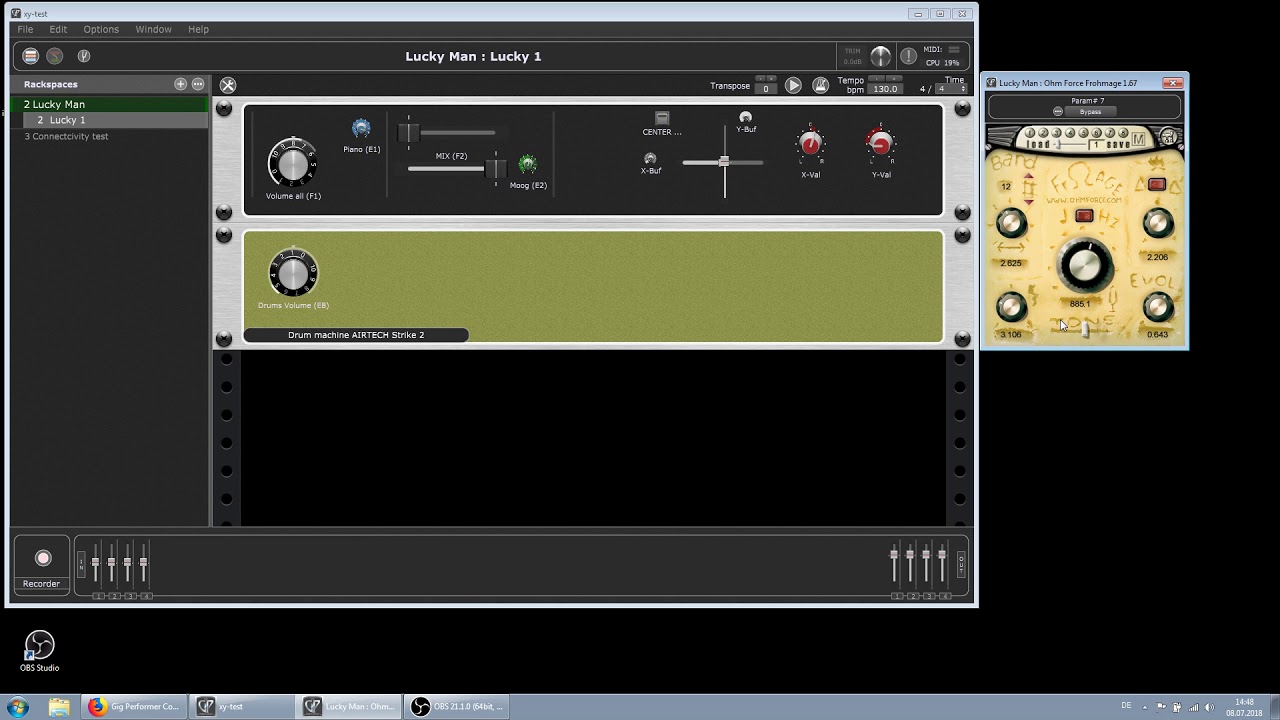
Let me first describe this rackspace in short…
There are two faders for x and y axis (connected to the pad on my keyboard) but not connected to the vst directly. Their values are caught by the script and then recalculated (scaled) and forwarded to the controler widgets “X-Val” and “Y-Val” which are connected (learned) to the VSTs parameters (The big knob in the middle and the “Tone” slider at the bottom).
Moving the XY-faders via Midi or by mouse causes the X/Y-Val widgets to react and they move the corresponding parameters in the VST. Everything fine.
But whe i want to go the other way, say i change the parameters on the VST directly, then the widgets don’t react… immediately. Means i first have to move the VST controls multiple (in fact MANY) times until the widget “snaps” finally to it… but this connection may also be lost again.
When the connection is fully established, the my widgets react to changes within the VST (i.E. when i change to another preset).
I think, this is quite a strange behavior.
BTW: you may build up a much simpler rackspace to check this. Just take two or more knob-widgets and connect them with some parameters of a VST.
First move the widgets so they change the parameter values within the vst (do this a few times with all the widgets) then try the opposite direction and move the knobs in the VST, watch if the widgets move correspondingly…
Maybe anybody can help or at least explain, what’s going wrong here.
Thank you in adavance. 
Here is the video:
(You have to be patient when watching the sliders moving again and again until something happens)