Hi. Im relatively new to GP, really the only things im mapping right now are volume levels, which i can do using midi learn on the plug in without using a widget. Occasionally i need an on / off switch, and then i do use a widget.
My question is this: is it ok to operate this way, or should i set up widget faders for volume control, and if so, why?
Im on Win 10 using 2 boards - lx88+ and novation impulse 61 with a steinberg interface.
Talk about timing – another user just posted a great article on how to do cross fading with widgets
My take on this as a new user is it depends on the use case. I’ll explain so the GP powerhouses here can set me straight if this is wrong thinking.
As a guitarist only needing control over plugins that support midi learn and never faced with the situation of being forced to use someone else’s controllers, the widgets seem to be an unnecessary layer for my use case. Especially given the heart of this use case is to control all foot-switching, amp-sim switching, looper triggering with a single midi file per song played in a media player for the rack space. Using the widgets appears to introduce the need for using a third party midi loopback in order to receive midi CCs from the media player, and all of this appears to be avoidable by just connecting the midi media player output to the relevant plugins’ midi input.
Is this a valid approach? Again, new user, so please be nice if I’m off base here… 
You can use a very simple scriptlet to pass midi messages from Wiring view to widgets or GP System level.
This allows you to do further things from your midi control file, such as changing rackspaces/variations or songs/parts if your midi file player is in the global rackspace.
Nope — a trivial scriptlet attached to your MIDI File player will inject everything into the local GP port
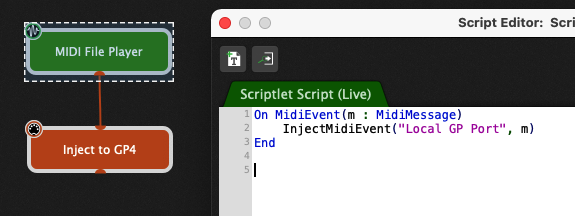
You can then learn a message from MIDI File Player and control a widget with it
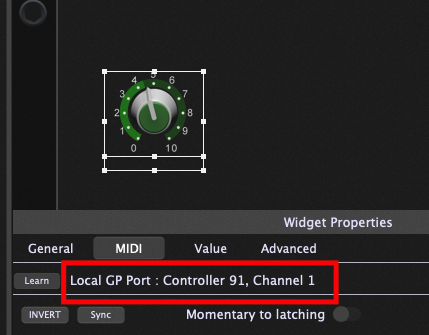
This opens up all sorts of automation possibilities.
Thanks rank13 and dhj for the “approach review” and the code sample. I’ll try it out.
As an aside, I dove into the scripting a little last night an it looks very capable. Took very little effort to script a PC to CC translator capable of doing a defined round robin of CCs based on repeated presses of a PC controller. That exercise did generate one question, once a scriptlet is compiled into a wire-able object, is that object reusable in another rack space or gig level project? Or does the code need to be cut-n-pasted and recompiled for each?
Scripts are context specific.
- Scriptlets exist in the rackspace you created it in. This could be the global rackspace - in which case its actions could be global, but could also influence local rackspaces through various means e.g. if you insert a midi message into the Local GP Port and the local rackspace had a widget mapped to that midi message.
- Scriptlets can be re-used easily by copying/pasting the block from Wiring view between local rackspaces (or having it saved as a Favorite). They would operate independently.
- Other forms of GP Script are also available: Rackspace script, Global Racckspace script, Gig script, Song script. Use of these depends on what you are trying to achieve.
- Certain functions/features are only available in certain scripts/contexts e.g. you don’t have access to song/song part callbacks in the local Rackspace script; widgets can’t be accessed by a Gig script (although there are always workarounds e.g using OSC or MIDI to communicate with widgets).
Many thanks for the detailed explanation. It’s pretty exciting for me to see the light at the end of the tunnel for the “how to play guitar, be on an expression pedal and switch amps and trigger a looper all at the same time without falling down” dilemma. GP has opened up all new possibilities.
Maybe you’ve seen these already, but a few example gig files that use scriptlets to automate things with a single footswitch:
I’m a MS guy that’s in the trial phase trying to decide if I’m going to make the switch. One of the issues I’ve run into relates to this topic. While I totally get why trying to rely on midi mapping via midi learn directly with the plugin isn’t the best approach, I’m wondering if there is a way to create those mappings through GP without having to build out a panel with widgets?
In MS, you can bypass adding screen controls by simply going to the assignments and mapping panel and adding them directly. This is a big plus when using a hardware controller like a Nord stage to control an organ plugin because there are already properly label knobs buttons and sliders for organ controls, so mapping them without using a screen control/widget saves a lot of time and screen real estate.
There is SO MUCH more you can do with widgets than just mapping one controller to one plugin parameter. Experiment a little and see that it really doesn’t take that much time or effort to set up a very functional rackspace.
So the answer is no?
In the newest release of GP 4.5, you can hide the widgets when you aren’t in edit mode. That will alleviate your concerns of screen real estate.
You simply go into Edit mode, drag the widgets you need into the panel(s), map your controller to each respective widget, and select Hide in the Widget Properties screen, under the General tab. This process is barely any more time consuming than what you’re doing in MS. You only have to do it once, so it really isn’t much of a consideration.
Ok, let me explain in a bit more detail what I’m trying to do.
Virtually every knob button and slider on a Nord Stage 3 sends midi. In MS, in a few minutes, I can add every one of them at the concert level without ever having to create a screen control. Once they are all in place and labeled (unmapped) I can connect those controls to whatever I want on a patch-by-patch basis in a matter of seconds with just a couple of mouse clicks.
Building a master panel of widgets containing all of the possible controls on the Nord isn’t feasible, so I’m trying to figure out how I might possible work around that.
Meh - I just created a new video where I demonstrate how I learned 9 knobs on my APRo in seven seconds
Save the panel or export the rackspace and reuse it for all your patches.
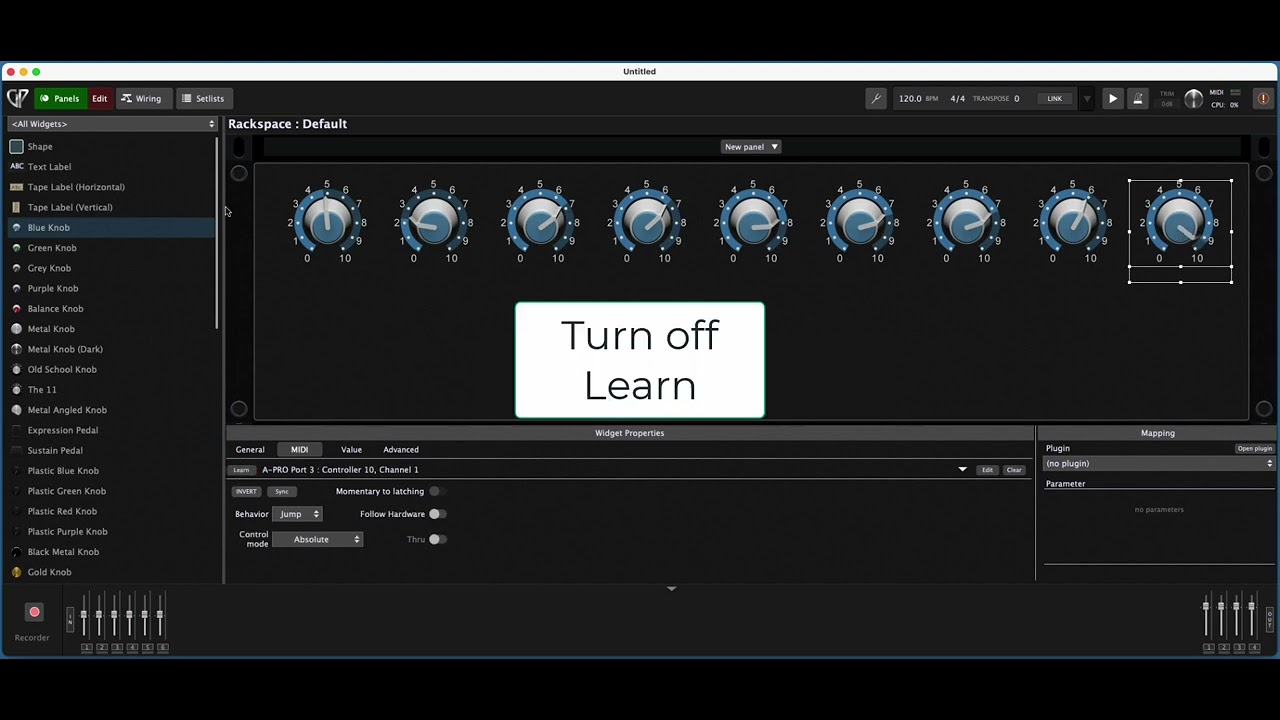
That’s certainly possible in Gig Performer, you can have (say) a 4U panel or multiple panels for all possible controls, but for what reason? My guess is that you don’t need all possible Nord’s controls for every song, you insert widgets that will be relevant for modifying your sound live.
You can then use additional features such as variations, group widgets (for example for a cross-fade effect), link local widgets to the Global ones, use the Rig Manager, use OSC with widgets…
I appreciate the video. It’s still not quite what I’m wanting, but it’s enough to get me going to see if I can work something out. Thanks.
Well, GP is not MS 
Trying to make GP be like MS will not really work very well, the paradigm is different.
But one of the features of rackspaces in GP is that you see specifically and only what you actually need for a particular song. So, for example, if you have a song and the only real time control you need for that song is the cutoff filter of a synth plugin, you don’t need a “master panel” representing all the controls of your keyboard, you just need a single widget in the panel so you map just that to the desired control of your keyboard.
For me there is a main difference between GP and MS:
The workflow in MS is like working with a virtual mixing desk.
The workflow in GP is like working with a modular synthesizer, therefore you have a much greater flexibility.