Why GiG performer takes a long time to load the project file when you have many rackspaces ?
In my case I have a setlist of 21 songs , some Vst are the same used in different rackspace
If I use the same Vst in different rackspaces , does this reduce the loading time or is it indifferent ?
It’s only my specific case or is normal ?
Currently my file is 125Kb is takes 3 minutes to load on a Laptop with these specs
Intel Core i9-12900H,
Ram 16 GB DDR5, 1024 GB SSD,
GeForce RTX 4060 8 GB, Windows 11 Home
MOTU M2 audio or NUMAX piano (internal audio )
Another thing that is a bit annoying is the following:
When I close GiG performer with this project , if I actually reopen it even though the main window closes the process remains in the background active for a while longer. So if I want to reopen the application it actually doesn’t run because it’s waiting for the process in memory to clean resource ( I suppose ) .That’s at first I thought it was a Bug and I was going to terminate
the process manually…
Maybe you could leave a dialog box like that at the beginning indicating that the process termination is in progress
All this is to say that in cases where you have to restart a working session , if for example there was a problem (Crash or any other reason )
The times can reach in my case to almost 5 minutes which is not a few…
This is to say that in cases where you have to restart a working session , if for example there was a problem the times can get as in my case to almost 5 minutes
I have been working for several months with GiG and I have never had a problem only recently unfortunately during a rehearsal before a performance I had a temporary external audio disconnection. The audio had reconnected but even though from the audio properties window the card was present confirming with apply setting GiG went into hang . The recovery time was about 12 minutes ( I rebooted twice ) .
On the reason I am investigating , what I can say is that when the problem happened the power to the laptop had been disconnected .
From the windows event log , I understand that it wanted to switch to a different power plan and maybe something happened there with the USB device
(at least I hope).
In conclusion I say that GiG so far has proven reliable , I wonder if there might be a way in the future to be able to speed up the startup and shutdown of a project
Something like predictive loading but at startup .
If something happens during a performance the timing is very important .
Thanks
Part of this is because one particular Kontakt library (Straight Ahead Samples Big Growlin’ Sax) takes over 2 minutes on its own, which is not related to Gig Performer, but that is another story. Actually, that may be an issue with you too? Does it get hung up on one particular plugin/library? (You can try it on stand alone check).
But, even without that it would take about 6 minutes.
It takes even longer for the ram to unload after I quit GP.
I think if you load the same sample-based plugin/sound in another rackspace it reloads the samples. So, I think this increases ram usage and increases the load in time
This is a reason to try to reuse the same rackspace (using variations) or potentially put that plugin in the Global Rackspace. There are other ways to reduce ram usage (and I would think load time?), like the Kontakt “purge” option and switching to physically modeled plugins (which, I would think take less time to load and definitely use less ram).
When I close out GP, now I go to the Task Manager and after it gets down to about 40% I end the Gig Performer task. This seems to work so I do not get a hang up when shutting down the PC (I would think it would allow you to restart GP faster too).
I think there are other discussions of this in the forum.
The real question to ask is why do plugins take so long to open and there are numerous reasons
Physical loading of plugin code into RAM - that’s mostly just for the first one - subsequent instances of the same plugin share the same code so code doesn’t have to be physically reloaded
Plugin initialization — can be arbitrary depending on what the plugin wants to do. For example, if a plugin wants to connect to its home server, even if just for an update check and you don’t have an internet connection, if not properly implemented, a plugin might wait a significant number of seconds waiting for an IP address to be resolved
Licensing - some plugins do really funky stuff for licensing that might take multiple seconds
Sample loading - if a plugin is loading samples into RAM, it might not be asynchronous and you have to wait.
Are you using WiFi activated?
I had an issue with a WLAN-Acces Point and automatic DNS.
So my Mac believed there is an Internet connection, but it was not.
Loading took ages.
Then I used manual IP addresses, all loading issues gone.
So if I understand correctly the plugin code is loaded into memory only once, so it makes no difference if I use two instances of the same plugin on one rackspace or if I split them into two rackspaces , right ?
This topic has probably been covered many times , but I wanted to see if there was a way to optimize the working project for how GiG works
When GiG is closed , is the termination of the process in charge of the operating system or is it still within the application ?
Would it be possible in the future to indicate to the user that it is terminating ? because this could take some time
Thanks
If I remember well, there was no difference with or without WiFi. I will try again, I always thought it was normal to wait.In GiG except the log generated during a crash is there a log of the application on file, where you can see the time to understand during loading what happens ?
Ive never noticed any difference between on or off line as far as loading goes.
My 58 rackspace gig file takes about 2 1\2 mins to load at home and at rehearsals, although I do use predictive loading at gigs.
I am starting to shift to always creating a gig file from the setlist to use at gigs to speed things up a bit.
My GP “setlist” also includes all the songs that particular band does (I put the additional songs after the songs that made the actual setlist)… So, I should be fine if we go off the setlist.
The plugin code is only (physically) loaded once but separate plugin data will be loaded with every instance.
Define difference. The behavior will certainly be different because in one case you will have two instances active at the same time and in the other case only one of them is active.
GP obviously initiates the termination but each plugin gets to do whatever it wants as part of that termination and then the OS is in charge of releasing RAM (for example)
Thanks for the explanation, I was wondering if you ever had a need to have an application log like for example in Ableton where it was sometimes useful for me to understand some behaviors of the application. I know there is a log that you can enable in GiG, I haven’t really looked into it and I was asking if it was useful for verifying for example how plugins are loaded
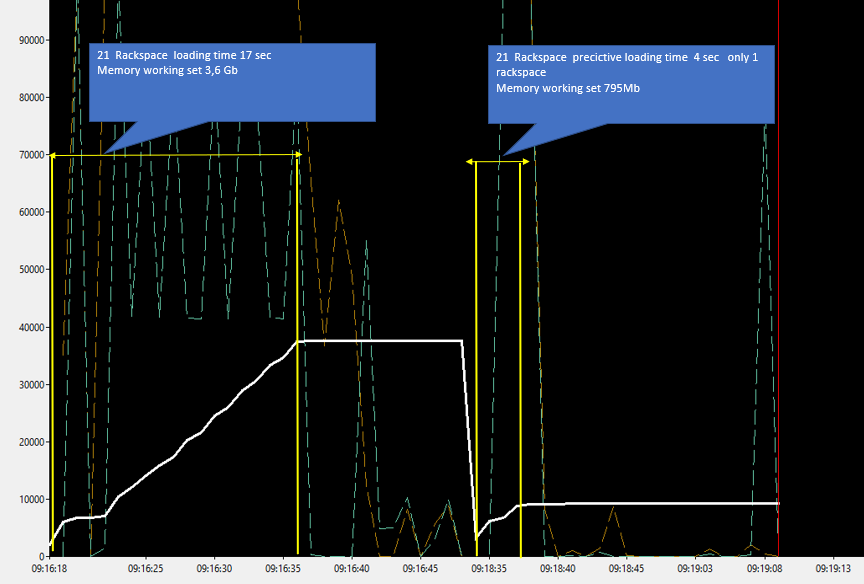
I feel so stupid … I didn’t quite understand that predictive loading can reduce the loading time and of course also the memory because the program loads at startup only the number of rackspaces decided in the Options window.
I did a test with a project of 21 Rackspaces and only one Vst and compared the performance with predective loading enabled
I also did a test with a project of 1 Rackspace with 21 Vst . In terms of memory and time it is pretty much equivalent than loading the full 21 Rackspace project without predictive loading
In conclusion I think that splitting a project into multiple rackspaces can offer advantages. Reduce loading/closing time and memory
Then I saw an interesting thing that in the setlist if I create a song with multiple parts associated with different rackspaces , even if the predictive loading is set to 1 the loading is done for all the rackspaces involved in the song and this is really important.
Powerful tool to use with awareness
Meh - no need – GP has a lot of functionality - it takes time
It can but that is not its purpose and there are tradeoffs involved when you use predictive loading. The major benefit is the ability to use large gig files with smaller amounts of available RAM. But you lose the ability to do instant switching to rackspaces (or songs) that are further away than the value defined by that option.,