This has probably been answered but I can’t seem to find the explanation anywhere.
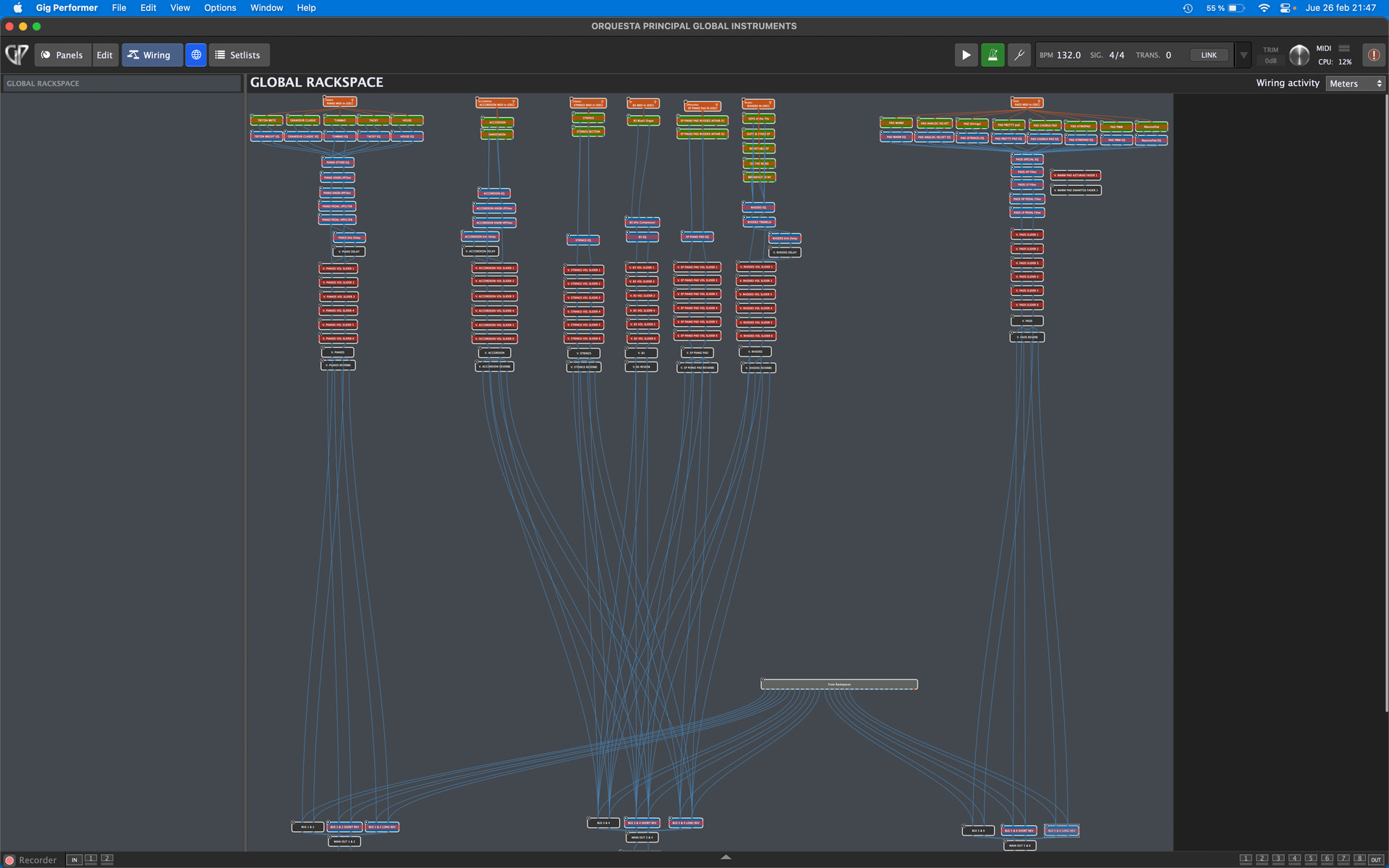
I have spent about a week, nonstop, to place all repeated instruments into global, basically to save team and load time… I control all necessary parameters from the local rackspace via widgets and all works perfectly.
What I have found is that rackspaces that were using about 12 - 15% gp cpu are now using about 30%.
I have set everything up so that every other vst that is not being used in each song is bypassed.
I have the kontakt vsts with waves SSL EQ. Some instruments also have a delay vst available when needed and everything has access to the global reverbs (Valhalla vintageVerb, short and long)
As I say, everything works fine but I’m curious as to why the GP CPU has suddenly risen so much when it’s doing exactly the same as before with the same instruments as before… just because I have placed most Kontakt and 1 or 2 korg Triton vsts in global.
Pianos (5)
Accordions (2)
Strings (2)
B3 organ (1)
Electric piano with pad (2)
Electric pianos (5)
Pads (8)
25 vst instruments with 35 eqs & delays and 6 reverbs.
I assume it may be that not all vsts, although they are bypassed actually STOP processing completely…
Or is there something else I’m missing?
Maybe processing between local and global adds processing needs?
Even though I specifically bypass EVERYTHING I am not using?
So, when is it useful to put things in global?
Up until now I only had the 6 reverbs in global:
1 Short, 1 Long for each of the 3 stereo outputs.
I was using about 27GB ram out of 32GB, so I thought I’d put all kontakt instruments with their eqs in global to save about 8GB of ram… but even bypassing EVERYTHING, the CPU still hovers around 12%..
Yes. I have configured everything so that each rackspace bypasses or activates each plugin in global as needed. If I use a rackspace that does not use ANY plugins in global, they are ALL bypassed. In the image you can see that EVERTHING in global is bypassed and the local rackspace has nothing. It’s a zero content rackspace for when we are on a break, I select it so the cpu is at minimum.
Even then, CPU registers 12% usage with NOTHING active.
I would start deleting plugins one at a time until you notice the CPU usage going down. Then you’ll know what the offending plugin is and can address it.
I just set up a Global rackspace with 14 bypassed B-3X plugins and lots of Gain/Balance plugins—the usage is 2%.
yep … I just re-read what you wrote before : “I just set up a Global Rackspace …….”.. Sorry.
the gain/balance plugins definitely don’t cause any hassle. I think it’s probably Kontakt. I never got round to using decent sampler but, apparently, it uses much less cpu cycles than Kontakt… The problem is converting all my own Kontakt instruments into decent sampler instruments… It’s seems very complex
I added 10 bypassed Kontakt 8 vst3 plugins with a library loaded to the rackspace I showed before—usage is still only 3-4%.
Definitely delete plugins until you see a significant drop.
I think I’m still on kontakt 6 but there are 25 instances and 35 instances of waves SSL EQ. That’s 60 plugins on the go, constantly.
But, then again, I’ve opened my old gp file where I had everything in various rackspaces in local, (except final reverbs which were in global) and I actually have a rackspace with all these plugins together, doing the same function as “everything in global” and there you have it, the CPU is hovering around 20% with everything bypassed except 1 piano… So this proves that these plugins don’t turn 100% off even when bypassed… it’s not a global issue in fact… Silly me!! I hadn’t noticed this before, tbh.
Yeah, that’s a lot.
Are there any issues/changes with CPU when unbypassing/bypassing when you perform as you usually would, as compared to your previous setup?
I haven’t noticed anything strange at all… everything works as expected. It just surprised me that the CPU should be that high constantly. In the other config, with everything in local rackspaces, I sometimes saw the CPU level at about 30 or so but didn’t realize that it was because of the 60 or so bypassed plugins in that one rackspace. Other RS would be about 2 to 7 % and then occasionally a few songs would shoot up to around 30 or so but I never actually thought much of it until now.
Just a biassed guess…
When i read “Waves” there’s always an alarm bell starting to ring in my head, because there’ve been lots of issues reported by users with various plugins from “Waves”.
Try to delete those EQs and see if that could be the cause.
If that lowers the CPU-meter, you could try to use a diffrent plugin format!
I noticed that you are on MAC, so probably you are using the AU-version of the plugin - try the VST or VST3 format, and of course use the latest version!
There is a good chance that diffrent formats of the same plugin behave diffrently!
I never use au version. Always vst unless vst3 is the only option.
I’m actually modifying the gig file to only leave the actual instruments in global and all post processing in each rackspace as needed.
Instead of 20 rackspaces for over a 100 songs, I’ll probably end up with 100 rackspaces but less CPU usage as I will only have the necessary plugins active in each rackspace…
I’ll let you know what THIS option goes.
P.S. I never had any real issues with waves. I’m only using waves ssl e channel in this case although in protools I use a tonne of waves plugins..
Ok… so the deal with this latent CPU usage is with kontakt.
I’ve left only the 25 kontakt instruments and they are all bypassed… CPU reading is 13% constant.
This is an unworkable environment because as soon as I add some awesome synths, even if I don’t use any global sounds, this is just going to catch fire… haha…
Other than decent sampler or kontakt, is there anything I can substitute kontakt with that isn’t so CPU hungry whilst bypassed?
I say other than decent sampler because it’s not as easy as drag samples into it and I’ve got my instrument ready to roll… kontakt is basically drop and run…