That doesn’t make sense. If you bypass a plugin, its CPU usage on the audio thread goes to zero. Are you sure you are looking at the audio thread CPU value in the GP main window?
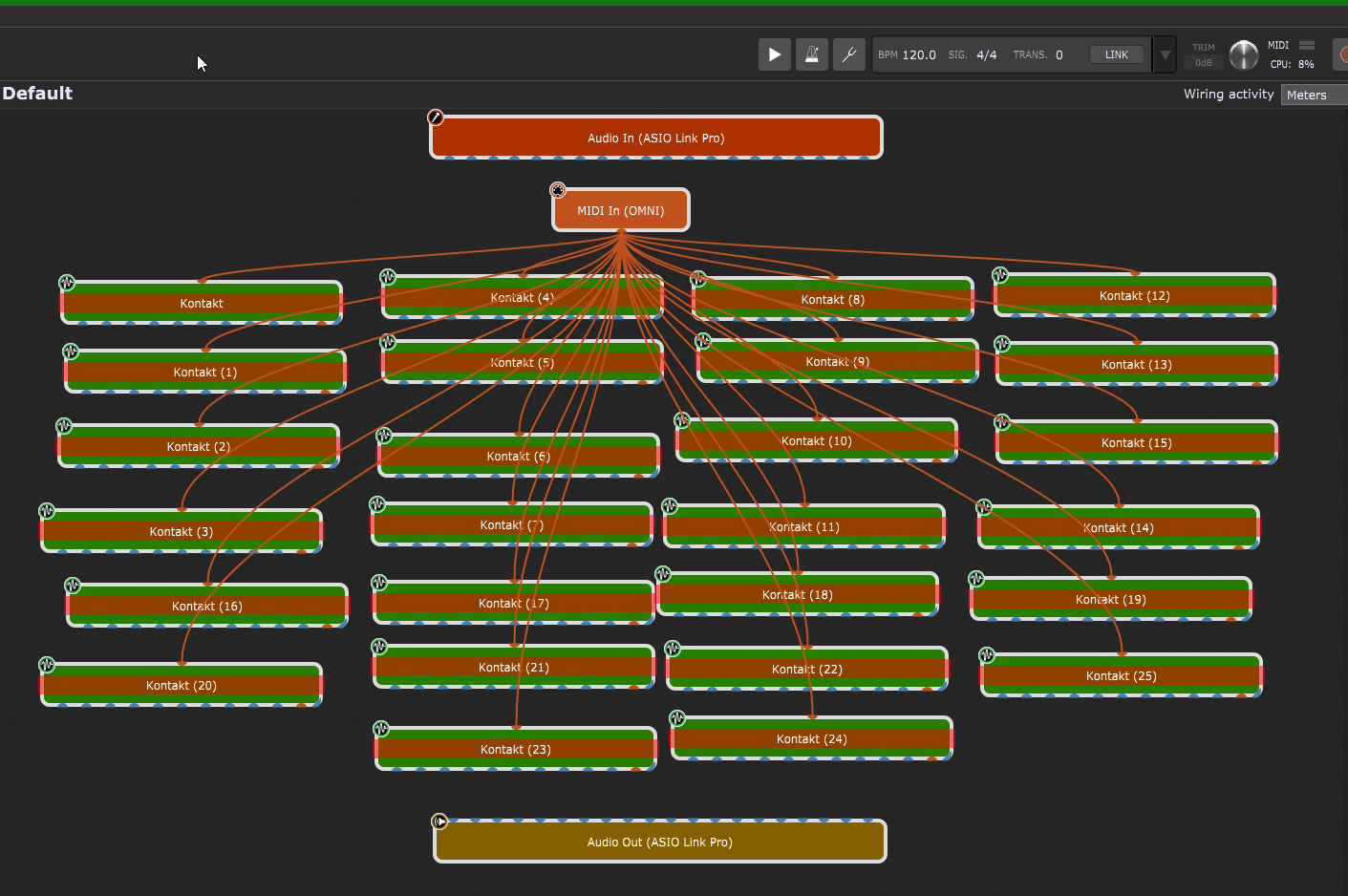
Definitely yes, David…
I have a “silent” rackspace with no plugins at all. Explained earlier, I have it for breaks in gigs where I select it so as to have zero processing during the break..
I have this selected and everything in global is bypassed. CPU audio thread hovers at 12 - 13%. No doubt about it.
As @edm11 also shows, it must be a kontakt issue. My machine is a 2019 intel i9, not as old but shows the same result.
It looks like I’m going to have to create a whole bunch of Decent sampler libraries from scratch. (I hope it’s not too tedious. I’ve never used it before)
I just created a new gig file and loaded and bypassed 25 empty Kontakt plugins. CPU reading 12-13%… not even connecting them to anything… just being there and bypassed is using 12%
I then loaded 25 decent sampler empty plugins and the reading is down to 4%.
Just for your info, guys
I’m finding decent sampler a real pain for creating complete instruments. I haven’t a clue about XML so it’s quite out of my league.
Has anyone had any experience with TX16Wx sampler? Is it reliable for live use?
Other options are sfizz or polyphony..
So I have several observations:
- In your Kontakt options, do you have the “Share data with Native Instruments” enabled?
- I loaded 24 instances of Kontakt 8 and bypassed them. My Mac M4 showed about 6% (with a sample rate of 44.1k and 128 buffer size)
- With those 24 instances bypassed, I just started waving the mouse around inside the main wiring view and the GP CPU percentage dropped to 2%
If I switch to another empty rackspace, the CPU drops to 0
So I’m wondering why you need 20 or so instances in a single rackspace?
I have this disabled since always.
My config is 44.1 and 256.
They aren’t in a single rackspace. I want to place them in global because they are the 25 pianos, pads, strings, ep pianos etc etc that I use all the time. This way, from each rackspace, I can bypass or active as needed without having to create new instances every time.
I’m still using an intel i9 MacBook Pro with Ventura… No Arm for now, I’m afraid
Why not?
Well, basically because I’m using 28Gb of 32gb available and I can’t rely on predictive loading because we don’t have an established list
Have you actually tried? Kontakt should share samples
Alternatively have you tried just creating a single multi instrument instance
Yes. I have actually tried and I found that every time I load the same Kontakt instrument in the same or different rackspace, memory is being allocated to the new instance.
No… I hadn’t thought of that, to be honest. I thought of the independent in block for each sound… so with 1 multi instrument instance, I would have to assign each instrument to different midi channel, right?
Which means that I would have to have 2 instances of Kontakt, each with max. 16 instruments and the other with 7… to have the 25 instruments in 2 instances … good idea
Yes, but that’s virtual memory. The code segment is shared, only one physical chunk of RAM is needed. As far as I know, samples are also shared, so if you have a 2Gb sample set and 5 instances, it should still be the case that only 2Gb is used and samplers are shared.
I don’t know how these things work but I’ve just tried duplicating the same kontakt instrument (grandeur piano) into the same rackspace and using the Mac monitor, I can clearly see the memory used rise with each duplicate.
I mainly use kontakt because I sample everything I can instead of using the original vst.
Kontakt seems very stable so I prefer to sample instead of using Korg products or Roland Cloud etc etc.
It’s partially virtual and partially physical. The point is you won’t be doubling physical memory
Ah, ok.
I still have to find a way to reduce Ram usage and I reckon the single multi-instrument Kontakt instance will be a massive solution.
Thanks again 
Maybe I don’t understand GP well enough under-the-hood, but if you’re bypassing the Global Racks when you’r not using them, why not just make them local racks. I was also using the Global the same way for Horn Stacks, but when I realized I was using them about 40% of the time I just popped them into the local and with predictive loading, no issues. Without predictive loading, I maxed out my ram
-Greg
I can’t use predictive because our repertoire is not 100% predictable.
I use at least 1 of the 25 instruments in every song. In most songs there’s always a piano, pad & strings PLUS other sounds specific to each song.
I tried placing all instruments in 1 single local rackspace but it was impossible because y don’t have enough real estate to fit everything. My chains are quite complete:
Instrument : E channel : LPF : HPF : delay : reverb : 9 fader and 9 knob controls : main volume
So it’s a pretty long chain.
25 times and I run out of space to place other sounds for the whole repertoire.
Next week I’ll start with the multi instrument kontakt option referred to by @dhj because I reckon it’s going to be the best option.
That’s : 1 or 2 instances of kontakt with all 25 instruments. Each output with it’s waves E-channel strip, all controllable from local.
In local, I can then create an independent rackspace for each song, bypassing EVERYTHING I don’t need in global and only loading the extra sounds in local. I can then load the HPF & LPF and the rest of the chain ONLY if I need to. These FX plugins use very little ram, so I don’t really mind loading them a 100 times in each rackspace.
The theory is perfect… let’s see if it’s viable in practice. It probably will be, I reckon.
So. I just tried, in a new gig file, loading 2 kontakt instances, each with 16 instruments assigned each one to a separate midi channel and 32 Waves SSL E channel strips, 1 for each instrument. Also, the 6 Valhalla VintageVerbs (2 for each output).
I can access each instrument from local RS and it’s absolutely awesome! With EVERYTHING active (not bypassed), CPU reading is at 30% but this will never be the case. I will never use all 32 instruments at exactly the same time.
In a very frequent situation, I may have 4 instruments from global plus others in local. The 4 instruments with 4 eq strips and the 6 reverbs active, reads 6-7% CPU… so cool!!!
Coming back to this thread….
Is there any issue if I access ALL global parameters from local RS via OSC?
Just in the B3 panel, I’m using about 53 parameters and what I’m finding is that, If I create a panel for each instrument with osc parameter assignments, I can just recall that panel into another rackspace and everything works straight away. No need to re-assign anything… BUT I don’t get visual feedback of the eq values.
On the other hand, if I use the Global parameter assignment route, I get visual feedback on the local widgets, BUT I have to manually assign every single widget in every rackspace… so.. I’m not sure whether to stick to osc and place a widget to open the VST remotely and see visual feedback on the actual plugin… (Which also has its flaws because visual feedback isn’t 100%. : I can see the knobs move when controlling the widget in local, but in the waves plugin, it doesn’t actually show the value as when I move the knob within the actual plugin. Pros and cons)..
It’s a bit of a dilemma