Gig Performer Cross-Platform Issue & Suggestion

I’ve been wrestling with how to create a single gig file that uses SAFPs for backing tracks that will work on both my Windows PC (where I create and test the gig files) and on my MacBook Pro (that I will use for live performances). However, it appears evident that GPs Streaming Audio File Player hardcodes OS-specific full paths to audio files rather than using relative paths to locate audio files. This obviously won’t work due to OS root path differences—that I don’t believe can even be overcome by using mount points.

So, I duplicated my first song rackspace (e.g., song1 (win).gig), copied everything to the external SSD, connected the external SSD to my MacBook, edited the five SAFP backing track paths to point to their locations on the SSD (e.g., /volumes/Gig Music/…) and then saved that gig file as song1 (mac).gig. The folder structure is the same on the SSD as it is on my Win PC and contains all the same files. This works, but I can see that this is going to be a time consuming and tedious method when I have to edit 40-50 songs, each with an average of 4-5 SAFPs.

My objective is to use GP as my all-in-one software that will stream audio file backing tracks (e.g., drums, bass, rhythm, backing vocals) so that I can play guitar and/or keys and sing along to the backing tracks. I took the approach of using one rackspace per song with each song/rackspace containing the SAFP component backing tracks needed and plugins for guitar and/or MIDI keyboard and vocals. Perhaps using song setlists my be better, but I didn’t need to break songs down by intro, verse, chorus, etc. (at least not at this point). However, I like the idea of songs and setlists so I tried using the “hidden” method of creating songs from rackspaces—and that worked fine for the one song I’m working on to learn how to use GP—but I can see where that method will be problematic down the road since the only option is to create songs from all rackspaces, which I will definitely not want once I start using global rackspaces to create different guitar, keyboard, and vocal setups.

So, I guess my question is: Am I missing something here?

It would be extremely useful if SAFPs would use relative paths for audio files (and make them editable without the need to be on the target platform) as that would save an immense amount of time creating and editing these files and remove the need for near-duplicate gig files per platform.

For example, current issue with SAFP on a primary Windows host might have a structure like:

D:\Gig Performer\Songs\Song1\Song1.gig

D:\Gig Performer\Songs\Song1\Backing Tracks\drums.mp3

D:\Gig Performer\Songs\Song1\Backing Tracks\bass.mp3 :

And the MacBook gigging host external SSD structure might be:

/volumes/Gig Performer/Songs/Song1/Song1.gig

/volumes/Gig Performer/Songs/Song1/Backing Tracks/drums.mp3

/volumes/Gig Performer/Songs/Song1/Backing Tracks/bass.mp3

Using the above example for a potential relative path solution (and SAFP modified to accept relative paths stemming from the gig file location, if a full absolute path isn’t specified):

Song1.gig

Backing Tracks/drums.mp3

Backing Tracks/bass.mp3 :

Alternatively, a SAFP global root path macro could be created that contained a list of potential OS roots that SAFP could try when searching for the audio files such that it would only issue missing file(s) error messages if a specified generated path couldn’t be found.

For example, in Options → Preferences:

SAFP Root Path Name: HostRoot

SAFP Root Path List: D:, /volumes

Then any SAFP could use the root path name to prefix the remaining relative part of the file path. This would work with forward slashes since Windows accepts forward slash directory separators as well as back slash.

SAFP audio player path:

${HostRoot}/Gig Performer/Songs/Song1/Backing Tracks/drums.mp3Full absolute paths could still be specified for those who don’t need cross-platform gig file usage.

Did you use the Locations options to specify where the SAFP should search for files?

More details: How to handle Streaming Audio File Player audio tracks between multiple computers?

I did, but it didn’t appear to work. So, I copied my latest changes on my Windows machine to the external SSD, connected it to the MacBook and magically it remapped all the SAFP paths to the external drive (/volumes/Gig Performer/…). However, it did it on an previous version of the gig files because a MIDI input and plugin that I deleted in the Windows version that was still present in the MacBook remapped version.

Also, I don’t understand how it remapped the SAFP paths because I used G:\Gig Performer\… in the Locations → Audio files search path area which is definitely not a macOS path. Also, you can’t arbitrarily edit search paths in SAFP paths as the file must be present on the editing machine for GP to add it to SAFP.

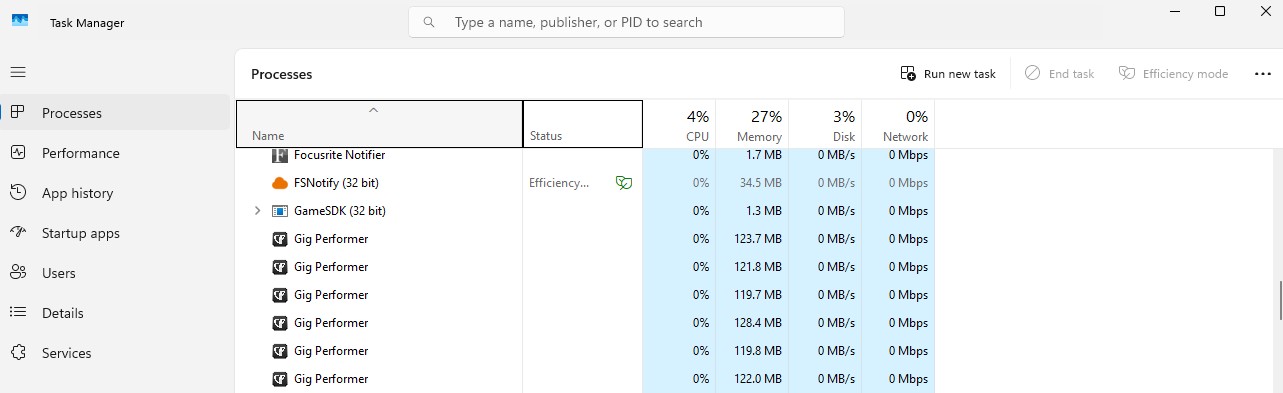
To make matters worse, I couldn’t bring up GP again on my Windows PC and there were 12 Gig Performer tasks in Task Manager Processes that I had to manually kill to get GP to come back up. This is unacceptable as I now have another 5 GP processes in Task Manager. The GP task should die when it is exited and not leave zombie processes around.

I actually ran into this problem yesterday on my PC as well and it took quite awhile to determine that it was caused by a BIAS X plugin. Once I deleted that plugin from the gig file, GP would come up fine again. However, GP is still leaving a new zombie process every time I quit GP.

Twelve Gig Performer processes? Can you reproduce this?

I see only one on my Windows 11.

image

Whenever I quit GP it remains in the Task Manager while it (slowly) releases ram. (I have a lot of ram and my gig files uses a lot of ram).

Whenever I close out GP, I end the GP process in the Task Manager (I only have one process running, presumably because I only use a single instance) until ram use is under 10% before shutting down the computer. (In my case it’s no big deal.)

Thank you. Yes, I saw that in the manual, but it didn’t make sense to me for cross-platform use since “D:\SAFP” is not a valid macOS root path. See my response to @dhj for more info and issues I’ve run into with GP zombie processes.

Yes, I only brought GP up once today and the task manager reports 6 processes so the others are left overs from last night (after I killed the 12 processes it showed before).

@Dadi

Can you please take a look?

You’re on Windows so why would you not expect G:\Gig Performer... to work?

You need to reread my original post. I have two machines: Win11 for GP development and MacBook Pro for live performance. It maps to my D: drive on Windows fine. But why would GP map G:\Gig Performer to /volumes/Gig Performer when on my MacBook? That’s what I was getting at.

Would have to see the entries in the Locations

This is a terrible idea, particularly since you’ll probably require the recursive option to be checked. It will cause GP to search your entire file structure looking for files and can be incredibly slow.

On your Windows machine put (by the way, the program will automatically replace \ with /)

D:\Gig Performer\Songs  (and check recursive)

in locations and on Mac put

/volumes/Gig Performer/Songs (and check recursive)

The SAFP search mechanism first looks for the file in the original location specified. If it’s not found, SAFP will search the folders specfied in locations looking for the song. NB when found, if you save the gig file, the found path will be stored so that GP doesn’t have to search the next time you load that specific gig (technically that particular SAFP if its state is saved)

Consequently I’m not quite sure I understand the problem.

You’re right, you don’t understand the problem. When I create an SAFP for a track it stores the absolute path to that track. That’s fine as long as the path doesn’t change. So, that’s, ostensibly, what the Locations→Audio files search path option is for. However, when I copy the Win gig file to my MacBook, obviously, it can’t find the absolute paths (e.g., D:/Gig Performer/Songs/Song1/Backing Tracks) where they reside on my Win machine. So, it then searched the alternative location G:/Gig Performer/Songs/Song1/Backing Tracks (which is where they’re located on the external SSD for song 1), but for some strange reason it translated G:/Gig Performer/Songs/Song1/Backing Tracks to /volumes/Gig Performer/Songs/Song1/Backing Tracks when attached to the MacBook and it found the missing tracks on the external SSD accordingly. It then proceeded to change all the SAFP absolute paths to the macOS path versions to the external SSD.

Consequently, transferring the gig file back and forth between the two machines is going to cause this remapping to occur every time; thus not reducing load times for SAFP paths. So, it appears, at least to me, that the only solution to this conundrum is to maintain two sets of gig files: one for the Win machine and one for the Mac, which then creates a new set of problems.

Further, a file location change state could easily be implemented to determine if GP needs to rescan SAFP file locations upon startup and a user option could even be provided that enables the user to decide if and when they want GP to scan for new, deleted or modified SAFP file changes.

Also, unless you have thousands of SAFPs with files scattered all over the place, are constantly exiting and restarting GP for a gig, and/or you have a very slow machine, I seriously doubt that an initial verification scan will have a very negative effect.

Could symbolic links be helpful here?

Actually not – we could change the algorithm so that the SAFP keeps both paths for each file so when it hunts for a file on a different platform, it won’t erase the path for the other platform.

Thoughts?

@getdunne

No, due to the different OS root level architectures between Windows and macOS.

The whole point of keeping two paths would be to address this exact issue. Why do you think it wouldn’t work?

@dhj I think he was replying to the comment about symbolic links.

Oh ok

Well, not knowing the details of how the SAFP software works (and having found nothing that provides the details of how it works), it’s possible I’m missing something here. However, why I said I don’t believe symlinks would work is because of the fundamental filesystem syntaxes differences between Windows and macOS.

That is, you can not make a direct symbolic link from macOS /volumes/Gig Performer/Songs → G:/Gig Performer/Songs because macOS has no concept of drive letters. The same is true for attempting to make a link from Windows D:/Gig Performer/Songs to /volumes/Gig Performer/Songs (i.e., D:\ can never resolve to /volumes/SSD). In other words, symlinks cannot unify Windows/macOS root syntax.

This is further exacerbated by the fact that I cannot manually insert a macOS path in the Locations->Audio files search path while on a Windows machine and vice versa when on a mac machine because SAFP must find the files in question on the host system.