Is it possible to use Gig Performer in a live setting with various VST’s without a DAW, and automate changes to an instrument at various points during a song?
Ie:
Clean sound electric guitar for verses of a song, distortion for a solo
or:
punchy vocal during verses, doubled using a VST in the choruses
I use a DAW very much for this in live settings, but latency is a real gotcha for certain VST’s that are processor intensive and thus cannot be used live.
Hopefully someone knows, and thanks.
It sounds like what I use it for (but in my case, I am a keyboard player, rather than using it for effects on guitar and vocals).
What do you mean by “automate”. Do you mean tap a button on a controller (or hitting a foot pedal) to change effects?
Or some type of time-based so it changes by itself based on some type of timeline?
Hey jeffn1. I can see more detail is needed 
I use a mixer as an audio interface that feeds into a laptop with a DAW. That DAW processes 12 channels of musicians with their inputs through VST plugins and “automates” the change of plugins settings during songs. The end result is sent back to the audio interface as 2-challe stereo and out to speakers and monitors. This causes problems with latency when CPU use gets taxed. My hope, is that GP can eliminate trip back to the audio interface all-together, and instead out of the laptop to speaker systems.
Hi. Welcome.
When you’re going to use the same plugins and also the same number of plugins simultaneously, I guess the CPU usage will stay the same. The inbuilt audio is not going to help you, unless the external audio interface has poorly written drivers.
About the kind of usage for GP: At a glance it looks like the kind of usage GP is meant for, but there are always details…
My 2 cents.
From what I’ve read hear, GP is very efficient. So, using it, rather than a DAW, should reduce latency.
Obviously, the audio interface, audio interface settings (bit rate and buffer), driver,
are all relevant.
GP has a free trial period. Give it a test run?
(Caveat, I am only a relative beginner with this. So, others probably know more than me).
@nwcic since you mention you normally use a DAW to automate the changes, does this mean you are running some sort or backing track or click track?
If that is the case, you could potentially export your track into MIDI with embedded CC data and play that MIDI file within GigPerformer and program things to react to the CCs coming from the MIDI file to do the changes you need… you could for instance embed Patch changes (Bank Select LSB/MSB + Program Change) and have that trigger RackSpace Variation changes that set the various different scenes for each part of a song where each variation has the different effect treatments you require.
That could work, but the workflow might not be that great depending on the situation - e.g. having to import a midi file into the player for every change could be a drag.
I use a DAW for the click track (and managing automation events on a timeline, such as DMX and Rackspace changes), and use GP to host the instrument VSTs. Best of both worlds! 
However if processing audio with audio effects that have large latency (e.g. pitch correction) then there is always going be be latency between sound in and sound out… a low buffer size will help, but there will always be latency on top of the audio roundtrip latency.
Are you playing to a backing track?
The examples you gave can be achieved with simple rackspace or variation changes in song parts.
Yes but I think he wants those things to happen automatically rather than by pushing a button or pedal
If using a midi file, couldn’t you just put the PC messages in the midi file itself and assign PC to racks or song parts?
Thanks for all the responses. This is great. More info:
I am using Wav based backing tracks in a live setting, and need GP to activate and change VST settings on a timeline during a song, automated, with no foot pedals or manual control. Ie: A verse of a song has a real electric with a few VST effects. In each chorus, a VST effect changes settings for more chorus effect, then back at the end of the chorus. So the basic question is:
Can GP do timeline based automated changes mid-song? Needs to do it with live inputs like mics, electric guitar inputs, keyboard inputs. Kind of sounds like no, unless, the 12 mixer inputs on the digital mixer go to a pc DAW, then GP serves as the host on each channel, handling the VST’s. But I don’t see a timeline based way to set this up ahead of performances.
The goal, is to eliminate the trip back to the audio interface to reduce latency. Hope that’s clearer.
I do not really understand: do you want to let the output vanish in thin air? I really don’t think so. It will not matter too much in terms of latency whether you use the external interface or the laptop’s internal interface. If you’re on Windows, this approach gets even more difficult, because most daws and also GP can only handle just 1 audio interface. On Mac you can have more luck using IAC (?), I think, but I don’t have a Mac.
Using a daw and GP in a serial fashion (mixer to daw, daw to GP, GP to audio device) will only add latency. (But I’m not sure if that’s what you’re after).
Maybe you can draw a schematic picture of the setup you have in mind? If you do so, please, make a clear distinction between audio routing and midi/osc routing.
Hi, I understand you … I have some songs/performances (in Ableton) where I made change in the timeline like Lights, Videos, Guitar Sounds (Helix), Synth sounds … without a DAW where you can see the timeline I have no solution for that … but I have Ableton in the background for that and Ableton sends the commands now to Gigperformer and back … for me a perfect solution (i do not want to have all the informations in one MIDI file for that) … if anything changes in my performance what is time based → I correct it in Ableton, everything else I do in Gigperformer. The last days i use also session/scenes from ableton - they are not time based but also cool to use … How to play Ableton songs controlled by Gig Performer
With scripting you can easily change variations, send MIDI messages etc.
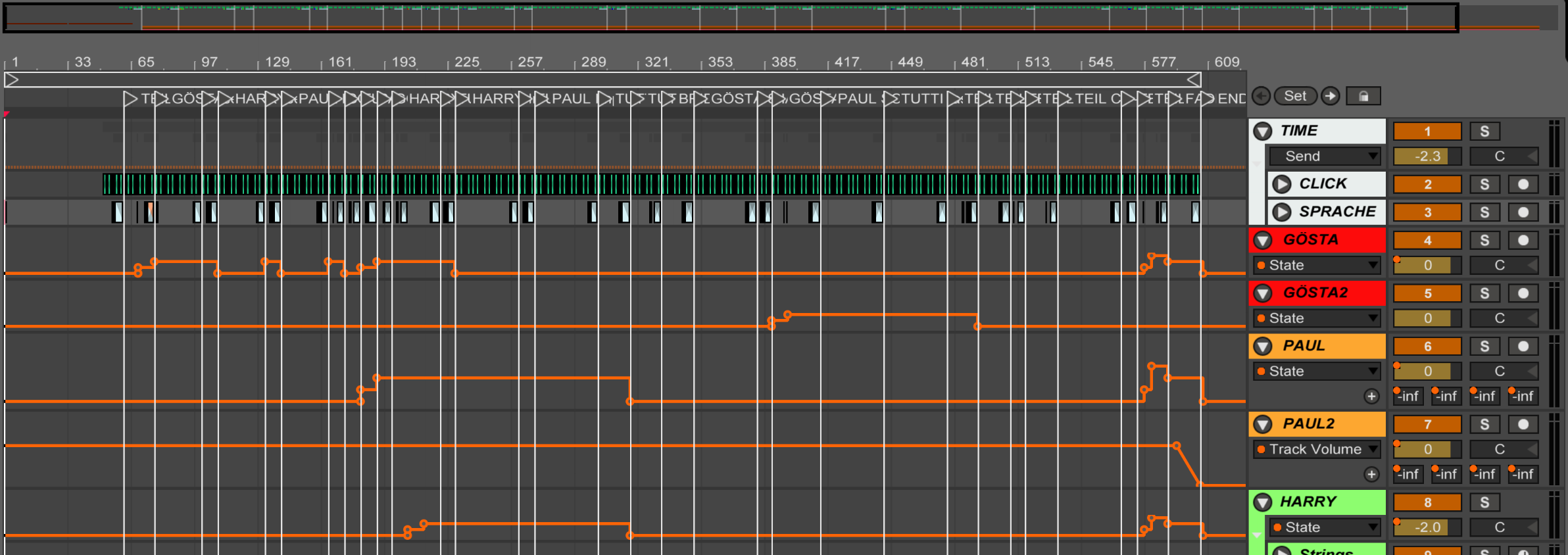
GP can easily handle changing effects mid song using a new rackspace or a rackspace variation. Each rackspace can put various vst effects between the audio in and audio out, so you can swap the effects according to where you are in the song
Changing rackspace happens in response to some event (midi event, or keypress, for example)
There’s no timeline functionality in GP, so you can either:
a) Create a midi track with the midi events to change rackspaces at the right time in a DAW, and use the midi player in GP to play it back, or
b) Playback the midi track in a DAW, perhaps alongside the click track (if your interface allows multiple clients to access it), and control GP from there
If your using VST effects on your PC then there is ABSOLUTELY NO WAY to avoid the combined latency hit of
- The latency of the Analog to Digital conversion of audio from your instruments / mics etc
- The latency (if any) of your VSTS
- The latency of the Digital to Analog conversion from your PC to your audio out
All you can do is bring the buffer down as low as it can go, to reduce the latency of all three elements.
You are right, a timeline is the perfect solution.
Love that screenshot you provided. Nice work.
I’ve had GP for almost 2 years, and love the functions.
Alas, no, there is not a way to timeline automate the functions I’m looking to do:
Take an already active VST running, and change a setting for that VST mid-song.
Additionally, putting GP as a host for multiple VST’s on each channel or an Aux send, only cripples the laptop with overhead. Running multiple instances of GP by hacking the API is problematic and unpredictable too.
I really appreciate the input and getting to a resolution.
Solution appears to be: An even newer Windows laptop than my 1-yr old, with more CPU power and customization. I know what to disable and config on a windows laptop to get max performance from the CPU and handle buffers/etc. But this laptop is at it’s absolute max with it’s 6-core, 64GB Ram and SSD to be able to do what it does. Might switch to a dedicated desktop pc with 12 cores, 5Ghz and 128GB Ram which can handle everything and much more in the studio, and just take it to gigs.
Thanks for the great inputs!
Multiple instances of GP (on the same computer) is a supported feature. No hacking needed.