Change your controller keyboard to send midi channel 16 not channel 1 which is a midi keyboards default. You can do this by going in to your global settings on your keyboard. There is nothing else to change. The channel must be set to 16.
I haven’t looked at this gig file but I’m wondering why you have to change the keyboard controller channel rather than just remapping it in the MIDI in block?
There’s 11 midi in blocks. I have a 2 keyboard setup and the keyboard I play this one on is channel 16. But — someone could change the 11 midi in blocks to channel 1.
Let me rephrase the question. Why are you not always using channel 1 on your controller?
Hi Dhj, Because I have 2 controllers. One controller I have set to channel 1. The other controller is set to channel 16 and that’s the controller where I play this patch on in my band.
I see where this is confusing… and I should have sent a patch that works for channel 1.
I will resend a baba oreilly patch tomorrow that’s all channel 1. Sorry for this.
Thanks Mike:
Will you post the updated patch here??
Best
Ron
How are your controllers connected? Are they on separate USB ports or is one controller going through the other one (via MIDI Thru)? If you have only one port for both controllers then I understand.
I use up to four keyboard controllers, depending on the band, as well as a separate pedal controller and they are all on channel 1
I use midi thru. So my top keyboard can play sounds in my bottom keyboard and vice versa — as well as VSTs in my computer. In my case my top controller is a Korg nautilus (61 keys— not too heavy)—- and my bottom keyboard is an 88 key Korg Krome (88 keys but easy on the back).
Thanks for the lively discussion as hopefully this has clarified a few things for others as how keyboards are setup and/or chained together.
I will send a gif file with all channel 1 later so no modifications needed. This was my bad - sorry for the confusion.
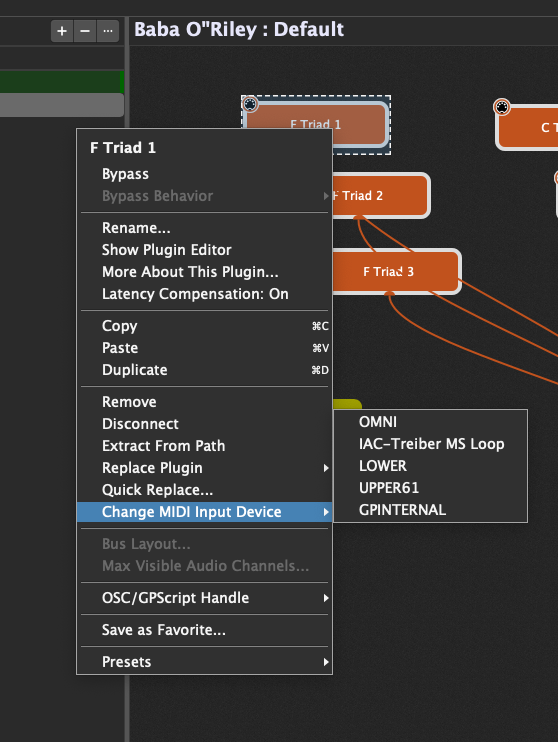
Well, there are always some minor modifications needed, like assigning valid/availabvle MIDI inputs 
But you can do that by routing MIDI In to MIDI Out inside of Gig Performer, which will give you a lot more flexibility - for example, your top keyboard could be playing a split (or layer) consisting of part of your bottom keyboard as well as some octaves of VSTs and as you change variations or rackspaces, that stuff would change automatically.
Obviously whatever works for you is fine but I think many people are unaware of the flexibility one gets by simply using a single channel 1 on every controller, disabling Local On (if the controller is actually a synth) and then letting GP handle all the MIDI routing.
Thanks for the clarification though. It’s always good to know how people are using GP
Before GP was around, I used a hardware routing module (DMC midi patchbay MX-8). So my routing (in/out/merge) was accomplished in there using unique send channels on my controllers. I”ve carried that routing forward. Thankfully GP replaced and solved that problem.
I see what you are saying… but need an example. Whenever I’ve tried using the same midi channels on both keyboards, I haven’t been able to split the sounds. Could you post an example gigfile? Thanks!
Baba-O-Riley all channel 1. Gig file and Korg Triton patch included. Replace Piano vst with your favorite piano vst.
baba-o-riley-all-channel-1.zip (731.6 KB)
How are your keyboards connected to your computer? Are they physically on separate ports?
My midi outputs from my 2 keyboards are merged into a pocket merge device— then the midi output from the pocket merge is sent to my focusrite 4i4 Scarlett sound device as input and connected usb-c to my computer.
FROM my focusrite Scarlett, the midi out is sent to midi in of my Korg nautilus—- and then midi thru to my Korg Krome. This has worked well for me as any keyboard can play the other.
Like you’ve stated, I have midi local control set to off.
If there is a way I can accomplish the same all on the same midi channel I’d prefer that route.
Ah - then you can’t do it all on one channel — Gig Performer can distinguish devices but there is no way to distinguish between two MIDI devices sending on the same channel on the same physical device.
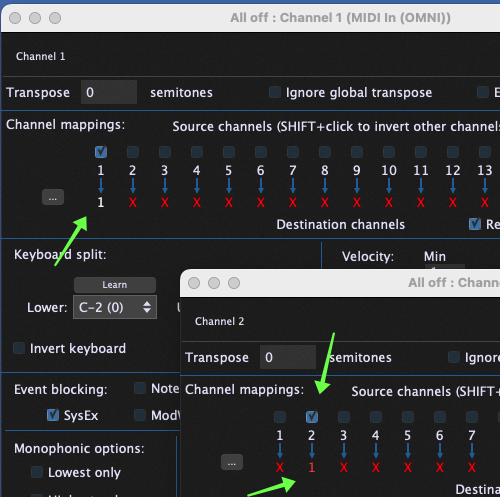
That said, you could still accomplish what we discussed by setting one keyboard to channel 1 and the other to channel 2 (say) and then using MIDI In blocks that only receive on one or the channel but not both. Map the outputs of them all to channel 1 then you’re good to go with your VSTs (first image).
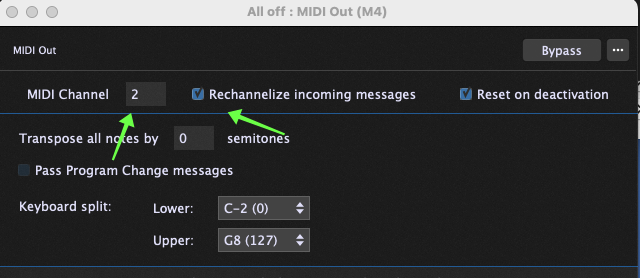
When you want to send something back to your external keyboards, you just use a MIDI Out block with the target channel for that controller (second image). Inside GP itself, you don’t have to worry about that stuff any more — which of course is the main reason to just use a single channel and let GP handle any multi-timbral stuff, etc For example, if your synth supports different sounds on different channels, then just create different MIDI Out blocks, one for each channel, or even easier, just have a bunch of channel constrainers going into a single MIDI Out block - whatever works better
See attached image.
@tripleB - thanks so much for this tip - this was what fixed it for me! I had to reassign each of the 11 blocks individually to my midi keyboard (in my case its a hammer 88 pro). Then I saved the file, closed down gig performer and reloaded it and hey presto! Im out here in the fields!
Thanks a mill for solving the problem and a huge thanks also to @mikelupo for a great patch. Now I just need to convince my band to play it! 
Just a little foot note here. You can change ALL midi in blocks by making a change in 1, and then follow the UI dialogs through.
When I rehearse w/my band - I have a totally different hardware and sound card setup. I use the same GP gig file. With a couple of clicks within a rackspace, I can switch everything over to different controllers.
You should definitly think about using rig manager…