Hi,
i search for information if its possible to use a bluetooth AirTurn to switch a variation for and back
I can connect it via Bluetooth to my windows PC but no interaction with the Global MIDI to learn this behavior.
Don’t know if this is possible.
Hope that this is possible in a friendly way
Yes i changed the mode to 7 (MIDI Mode) and AirTurn is connected with bluetooth
i installed loop midi and added port, then MIDIBErry and i get the MIDI Interface as output
Going to GP in my Rackspace i get a hint line with “Page UP” left panel and ““Page Down” with right when pressing the paddel
This without any configuration
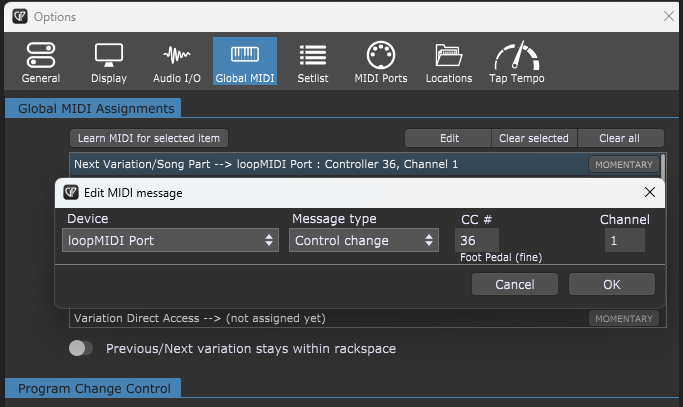
In Global MIDI i try to edit the Next Variation (loopmidi Port | Control Change | 4 | 1) but i get set what i want and even learning gives me no other results.
Do you know how to trigger this event…??
I have this pedal that I used to turn the pages of my iPad, which displays my sheet music.
During a gig, I turned a page with my foot and it turned several pages in all directions.
I’m the keyboardist and lead singer of my band, and when you turn a page and your page-turning pedal flips through your sheet music in the middle of a song, it makes a strange impression.
I kept my cool and continued the song, but I also swore to myself that I would switch to something wired.
I still use this device for rehearsals, but in concerts… that’s over now!
The band is new and we organized an audio-video recording session during a gig with several cameras, but unfortunately the A&H Avantis console we had for this gig didn’t record anything on the USB stick. We will try do organize this kind of session again in the summer.
I have an Airturn Duo500 that I’m trying to connect to Gig Performer. Is it necessary to also use something like loopMIDI so this Bluetooth pedal can talk to Gig Performer, or can GP inherently “detect” the pedal? I can’t find anything online that shows someone connecting an Airturn pedal to Gig Performer. Has anyone done this, specifically with the purpose of advancing through a set list? Instructions would be very much appreciated.
Thanks @jeffn1 . I did see this and read through it as well as other articles on the AirTurn Support site. What I can’t figure out, however, is how to get Gig Performer to recognize the pedal. I have it paired to the computer running GP, but I feel stupid that I can’t figure out where to “see” the pedal in GP.
This seems to be referring to inserting a Bluetooth transmitter/receiver between device (keyboard) and audio interface. I can do that with my Panda MIDI device on my Roland AX-1. The AirTurn can only connect directly to the computer’s native Bluetooth. I know it’s not recommended but I’d still like to educate myself on how it’s done and try it out for myself…..if it’s even possible.
Yeah, I saw that post from David-San. It was part of the thread I originally started. I was hoping someone had actually successfully connected an AirTurn pedal to Gig Performer (fairly simply) using the computer’s native Bluetooth. I’m really looking for fewer cables to connect and since my original wired pedal finally bit the dust, I’m entertaining the AirTurn as a replacement.
I guess, you’re using Windows. Most of the time Bluetooth-LE is used (as far as my experience goes) and it surfaces as a MIDI-device without the need for third party drivers, BUT (sorry, there is a but) the MIDI-device won’t show up in the older Windows multimedia api (which most DAWs and also GP use). I wrote a kind of router, but then you’re gonna need loopMIDI or something like that to bridge the gap between the router and GP…
It means that the AirTurn is sending keyboard commands to GP, which is it’s default behaviour.
You can actually use a simple GP Script to convert these keyboard commands into next/previous variation.
Open the Gig Script Editor (via the Window menu item).
Paste in this script:
On Keystroke matching "PAGE DOWN" Description "Next"
    Next()
End

On Keystroke matching "PAGE UP" Description "Previous"
    Previous()
End
Press the Compile button at the bottom of the script editor
Close the script editor
Now try the AirTurn. The one caveat with this type of keyboard control, is that GP must be the active application, or those keyboard commands will be sent to the other active application.