I’m creating a rackspace that has some standard items I want on every rackspace. I’d like to group all the wigets so I can do a copy and paste into the other rackspaces. I don’t see a way to group graphical elements together. What am I missing? Some standard things I want on every rackspace is left and right meters of the output, master volume, individual volumes for specific plugins and some purely graphical stuff so it looks nice.
Part of the problem is that it is way too easy to move one wiget while wanting to move all the wigets on the rackspace. Seems like this should be a standard feature but I can’t find a way to do it.
Sorry I mispelled widget. I also don’t see a way to edit a post on this forum.
As @npudar noted in the other thread you posted this in, there is no graphical grouping feature as of yet. It has been requested before, so I am hopeful that it will be addressed in a future edition.
Until then, you can create/save/load panels of widgets and that should help with some of the re-use issues you described.
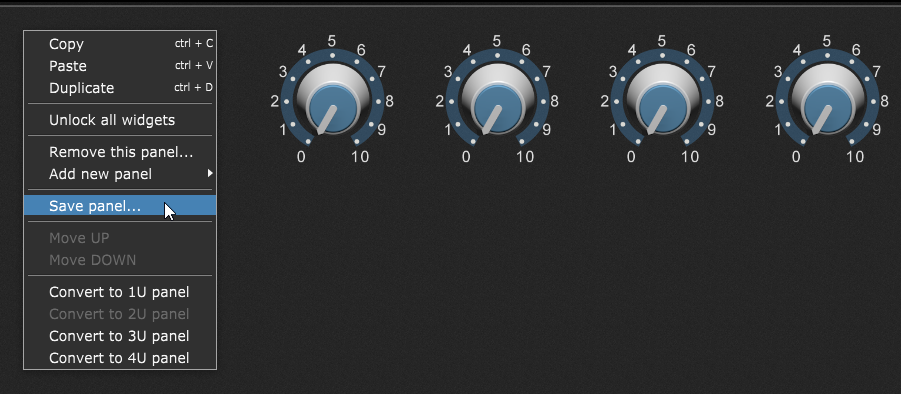
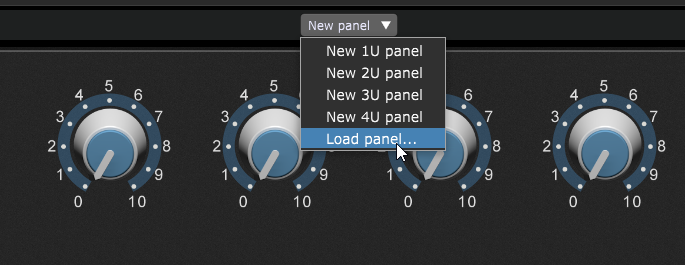
1 Like
You can save a panel as a template, and load that into new rackspaces.
For selecting multiple widgets, I use the click+drag selection rectangle as a way to select multiple widgets. It’s then quite easy to move them as a group.
Otherwise, a formal ‘group’ of widgets is not a current feature…
1 Like
But if you right-click (Windows) I think I can copy all the widget icons as a group and paste them so they are situated the same way relative to each other. (If course, you still have to connect them to parameters in the new rackspace, but that’s a different issue).
I “think” I do this all time. (Maybe I am missing something ;))
Hey Jeff,
That’s what I’m doing now, but occasionally, I end up moving one element while draging to copy all of them. Fortunately, there are workarounds. I didn’t realize there were templates. I will look into saving them that way. It will speed up the process.
BTW: I used GP5 last night for the first time. Not a single problem. It worked flawlessly… other than the fact that it didn’t fix the wrong notes I played… 
2 Likes
You can use the ChordMapper for that 
3 Likes