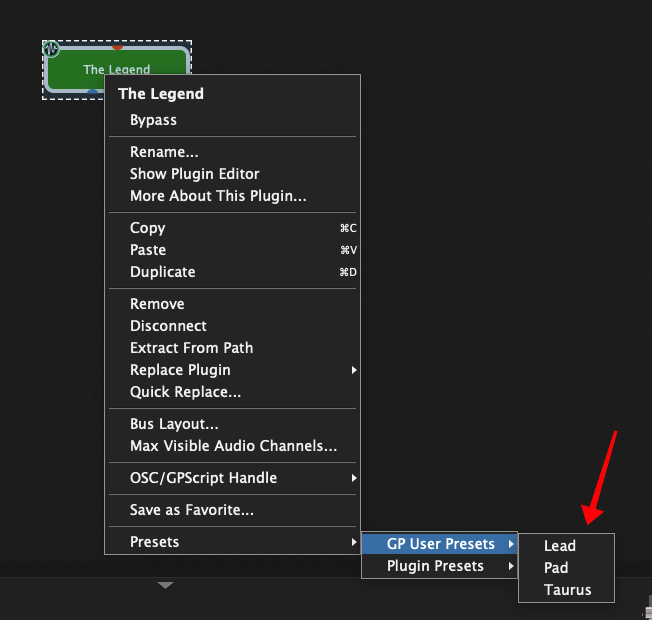
Yep, that easy! bring the associated plugin editor window visible.
In the past I made the suggestion that there could exist a widget with this functionality (opening/closing the plugin window right from the rackspace)…
Yep, that easy! bring the associated plugin editor window visible.
In the past I made the suggestion that there could exist a widget with this functionality (opening/closing the plugin window right from the rackspace)…
We did it both ways — there’s a little button to the right of the plugin list that will open the selected plugin and of course if you have a widget associated with a plugin, double-clicking on the widget opens it as well.
Yeah, that one I know from the beginning 
And what I’m referring to is, it would be nice to have a widget outside edit mode, close/open plugin windows.
Do you mean like a menu with a list of all plugins in the rackspace? Or do you want to be able to double-click on a widget associated with a plugin even if you’re not editing?
Thanks David for staying on the idea:
I want to associate a widget (on/off) to open/close a plugin editor window

This in Performance view and possibly Midi mappable?
I’d be curious as to the use case for this feature. I’m not sure why I would want/need to open a plugin from my keyboard in the middle of a performance.
I like to use GP so much that its a part of my studio work day by day!! not only live performances;-)
Use case: well besides making it easier to open close windows ahhh and flashing windows all over the place; no just kidding.
Maybe you recall this one with the Eigenharp Alpha
I’m actually opening/closing windows at the same time playing!
Analogie to real live; sound modules racks, putting “things” on the front as much as possible? patchbays, on/off controls, so less going to the back.
Anyway its just an idea, don’t know if other users fell the need of, or if its difficult to implement.
This old topic is close to the Feature Request I was about to write …
Yes, I do!
Well, from my POV, “performance” is a relative term. For me, it most often means “live in studio performance - quite possibly being recorded”. Could also be a “house party”, or a “live from studio video cast”.
Widgets certainly let you winnow and select from the near-infinity of plugin parameters to create a focused and non-extraneous set of performance controls. When you are playing a stadium (not me!) or even a cafe (occasionally) this is likely exactly what is desired.
OTOH, for daily use in the studio, incl. recording, sometimes a particular feature of a plugin (say, a soft-synth or FX unit) has not been pre-identified-and-widgeted. Nevertheless, you find an in-the-moment need/desire to access the plugin’s UI in order to do something right now.
“Right now” doesn’t mean a) open the wiring diagram, b) search for and find the plugin, c) click to open it, d) leave the wiring diagram to go back to your performance panels. “Right now” in this case just means “open the plugin”, and change nothing else.
So, to summarize, being able to dbl-click, or right-click on a widget and have it’s associated plugin “just open” is indeed much-to-be-desired (IMO).
Thanks for considering this POV.
One specific use: Simply to change preset on a soft-synth.
Unlike most hardware synths in the old-days, many (most?) of today’s soft-synths do not organize their presets for access via MIDI messages using the Bank/Program paradigm. This is unfortunate, IMO.
Nevertheless, if you open the soft-synth UI, access to all the presets is immediate (or nearly so). Wanting to go right there is a very common “thing” (at least for me).
Hi.
When I say presets, I mean the presets of a specific soft-synth, as offered by its UI, not GP User Presets.
In any case, I’m talking about access from Panels, not from Wiring.
We discourage the use of plugin specific presets as a general mechanism. You should save your sounds using the unified GP User Preset mechanism. That has two significant benefits
Yes, I know, and I know this will be repeated when it seems applicable. It’s good info, for sure.
For the example I gave above, to be clear, I was not talking about using “plugin specific presets”. Yes, I want to open the plugin and use its UI, but not (specifically) for the purpose of calling up a plugin specific preset.
I probably should have said “patches” instead of “presets” in what I wrote above. That would have been clearer.
Simply put, the goal I’m advocating for is rapid access to the plugin’s UI (for whatever reason!) from the GP Panel view.
One reason is for switching patches, as the plugin UI will offer all the available patches, perhaps for random access, perhaps nicely categorized by type of sound, perhaps with a user-defined setlist filter.
My point re: patch-access is no different than if I were writing about filter access, envelope access, FX access, etc. etc. - that point being that there are times where the user (any user) may want fast (instant) access to the plugin UI starting from the GP Panel display.
Fast access to the plugin UI is a good thing! A “mere” convenience, perhaps, but still a good thing, not a bad thing!
If you think this would be somehow dangerous, I suggest to make it a config option that can be enabled/disabled - and ship GP with it disabled by default.
That’s why there’s an option to map a widget to the Open/Close Plugin Editor parameter, thereby giving you the ability to open the plugin UI while in Panels or Setlist mode.
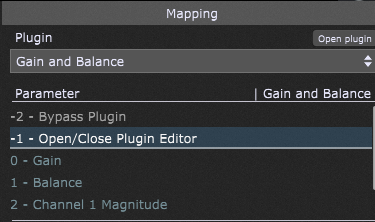
The thought of having a plugin UI open with a double click of a widget when not in Edit mode seems like a terrible idea to me. Far too easy to have that happen by accident, which could easily cause spikes, audible pops etc. during performance.
Thanks for your comment Ed.
As I wrote:
If you think this would be somehow dangerous, I suggest to make it a config option that can be enabled/disabled - and ship GP with it disabled by default.
Only pointing out that the need to avoid “accident” has been anticipated and addressed. Nothing more.
I often wish for single-click actions rather click-navigate-click again actions. For me, these kinds of efficiencies add up significantly for improved productivity (and in some cases, allow for realtime stuff that wouldn’t work out otherwise). Not all my suggestions along such lines are accepted!
And as I wrote:
So, either map a widget to the parameter, or perform literally one extra click of the Edit button and then a double-click on the widget.
Considering how easy either of those things are, why would you want the developers to spend time on adding that functionality to non-Edit modes, and then adding a menu option for enabling/disabling?
Developer POV (was one for years) is often: Can the users do it already, in a way that I consider sufficient? If so, save precious developer time and proceed no further.
User POV (also one, still) is often: Is this absolutely as efficient and productive as possible? If not, can it be made so with reasonable effort (5m, 5h, a day?)? If so, do it, to save the precious time of any and all users, every day, from now and forever forward.
This is the eternal tension …
Sure, but the context of the software matters.
This is a plugin host based on live performance. It’s in the very first paragraph of the main website.
So when it comes to performance-based improvements, I absolutely agree with the User POV you described. And generally, the developers here are mainly concerned with those very things. Efficient and productive performance.
When it comes to housekeeping type improvements, or ones that more involve editing tasks—there is certainly room for improvement here and there of course. Time and attention, however, are finite resources. So long as there are reasonable ways to accomplish the ‘behind the scenes’ tasks that happen when not on stage, then improving the efficiency of those tasks can hardly be a priority.
All of the long term users here have a very long laundry list of things we’d like improved upon (there are years of suggestions in this forum), but most of the ones that matter most in the context of the software–performance based live host–those are the ones that get addressed first, and we’re all thankful for that. I for one am glad we have GP Relayer in GP 5 instead of a bunch of editing improvements for things we already have ways of accomplishing.