Not sure what limits you’re talking about? You want to avoid clipping? No need to use wlm for that.
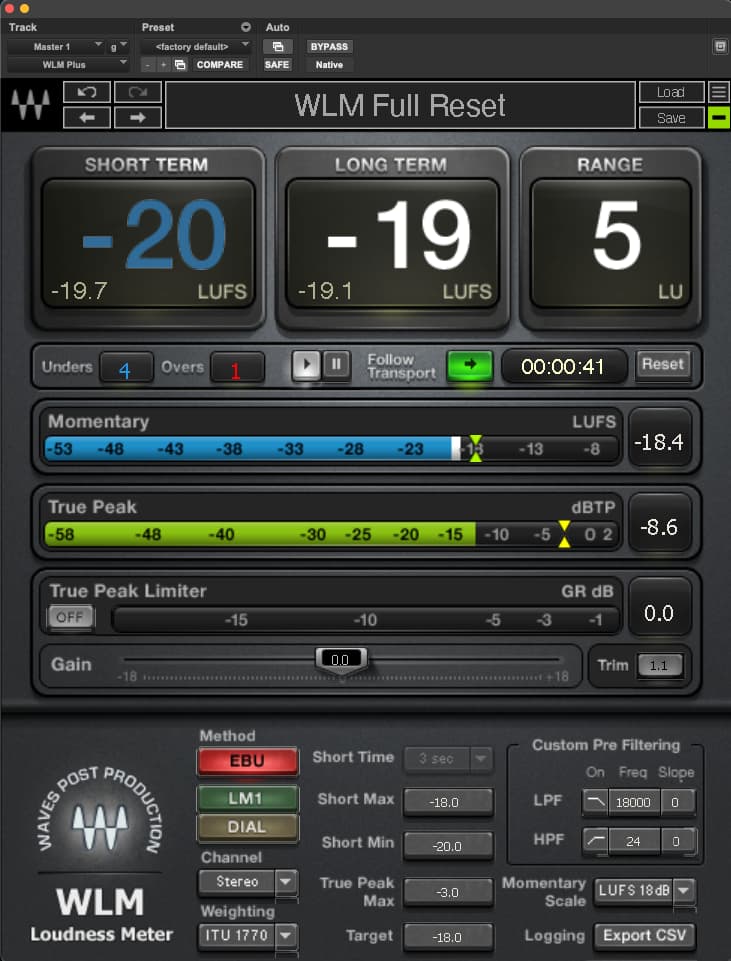
Sounds like I don’t really need mvmeter - just the WLM as a guide and a tool.
Wondering if it makes sense to create some volume knobs for each part in the event that I need to make changes on the go. One other thought is once Im able to get the general volume set - I can always add presets to bring the volume up for solos etc…
I just change variations (actually song parts with new snapshots) for solos.
But, I only have 3 usable buttons that transmit midi, so pretty much every change is a new song part (with snapshots).
I record the band using gig performer. The tracks come off the pre of each channel before eq, fader, eft, compression. I then listen to a few songs and make a compromise mix. I take notes on what levels are off and make adjustments on mine and send notes to others. You MUST hear the level in context.
not really because WLM has the true peak level and I have the max set to -3dB. In percussive piano (Latin music) I set the level so that the loudest parts never pass that -3dB level.
I have each rackspace with faders to set the level for each sound and in SONG mode I set the levels accordingly and take a snapshot. Solid method
Hi there
Great post and responses, thank you to all above!
I’m just about to embark on leveling all my backspaces with Youlean. Do we have a consensus on udeal values for the following (which I believe are the metrics to look at):
- LUFS value (e.g. -14 integrated)
- Peak DB (e.g. -2db)
Thanks
I use waves WLM and set Lufs at-18 and max peak at -3.
These are the levels required by our FOH engineer.
Thank you Miguel! Do you happen to know whether that LUFS value is Momentary (Instantaneous), Short-term, or Integrated?
I look at the long term for pads and sort term for percussive sounds.
I take special care with pads because they can start in the short term range but end up way above -18 in the long range.
I wait for them to fully evolve to make sure they don’t go way above -18. If they do, I lower the volume and work with a compressor to lift the lower end.
Integrated value doesn’t have any use case in this situation because we’re not evaluating an overall mastering track, just individual “momentary” sounds within a mix.

Last question (I hope) to you and everyone else on this post… for each rackspace, are we just playing ‘anything’ for say 5-10 seconds, I.e. no consistency between rackspace measurements, or say, the same default scale / chord sequence for each, or something else? Given this is all about consistency across many sounds, I’d expect there to be some consistency in our inputs?
My view/technique is a bit different (just ear, not much in terms of metering, etc.) see above.But, I think you want to play what you are going to play in in the next song/song part. The point is you want the volumes in the performance to sound right to the audience so when you switch songs/songparts, the levels should be what you want, performance-wise (for example, if I am playing pads in a a guitar-based rock song (e.g., Hit Me With Your Best), the pad should be lower in the mix then my pads in Take On me (Ah Ha).
That makes perfect sense @jeffn1.
I’ve started with this approach (with visual feedback from Youlean, in addition to my ears), playing about 20 seconds of what I would normally play for each rackspace and then adjusting to reach -18 LUFS.
Let’s see how it sounds in rehearsal tomorrow evening.
My take on this is much like Jeffs.
Last Saturday I had one of the first gigs with GP where I felt rather confident in my volume settings.
In my preparations for this my prosess was;
-
Started out with a widget in the global rackspace for the Master Trim, learned to a knob on my keyboard. Set at 50%, and meant to be touched only in an emergency.
In my rackspaces I have volume knobs for each of the actual plugins used, eventually a mixer plugin to set their volume relative to each other, so my process from there on is
-
start with a rackspace that have the plugin that you most often find to sound to weak compared to the others. For me that often is an organ, like B3-X. Set it’s volume so that you have headroom to both turn it up and down. Click the Save snapshot button.
-
then set the volume for the other plugins so that their level goes well with the volume level of the plugin you first set up. Click the Save snapshot button.
You often don’t get the chance to do this for all your rackspaces during a rehearsal so then it’s time for some homework;
-
Walk through the rest of the songs in your set list and set their levels by ear so they compare well with what you set during rehearsal. Click the Save snapshot button.
-
Walk through every song/songpart in your set list and set the levels for the song parts the way you want them to be compared to each other. For each songpart; Click the Save snapshot button.
When arriving at the gig, you now have a very good starting point for some adjustments. Walk through what you have time to with your band, do adjustments and remember to Click the Save snapshot button.
The chances for a relatively smooth gig should now be good

On my hardware keyboards I’ve been used to work the volume knob during songs. Up until know I’ve been rather causious doing it in GP.
This time I took the chance and it worked great for me  A new level for me in being comfortable with the possibilities of GP.
Exactly.
In setlist, I mix and take a snapshot for each song… but the main sound has to be at a “normalised” level and you have to mix the rest “by ear”. … Thus, -18 Lufs and -3 peak. This is my normalized levels for the main sound and everything else is mixed accordingly
The ear test is certainly important, I’m finding. Most sounds are levelling nicely with just LUFS visual monitoring, but there are some that just don’t for some reason - e.g. certain Hammond organ registrations, and distorted guitar patches. Those need to be set ‘by ear’ to sound consistent as you change rackspace.
Organs, strings and bright synths, I usually look for 3db to 6db below the -18 Lufs.
That makes sense. I think bright trebley sounds cut through even though metering shows lower levels.
Good to know it’s not only me having to give organs special treatment.
There IS I science to all these statements.
Certain sounds have their own levels. A kick drum doesn’t have the same volume adjustment as the snare just like a piano doesn’t have the same volume level as a violin.