Hi I Want to set up a vocal effect chain for my vocal group.
My hardware is a macbook pro M2, Behringer umc 18/20 audio interface, plugins from Native instruments komplete.
I have tracks playing from ableton and some sample instruments.
What i want to do with Gig performer: 8 singers with the same vocal chain for a good basic sound.
I want to be able to add some more expressive plugins like delay, reverb but also some guitar plugins on the vocals. I want to controle these with a midi controller.
I’ve managed to set this up in ableton, but I prefer having to vocals and 1 or 2 instruments using gig performer for more stability.
Can you please direct me to usefull video’s on how to do this or I’ve already watched a lot but not found the answer to how to best set this up.
I especially want to know hou i can route the multiple singers, the ‘send’ effects and the midi.
Thanks
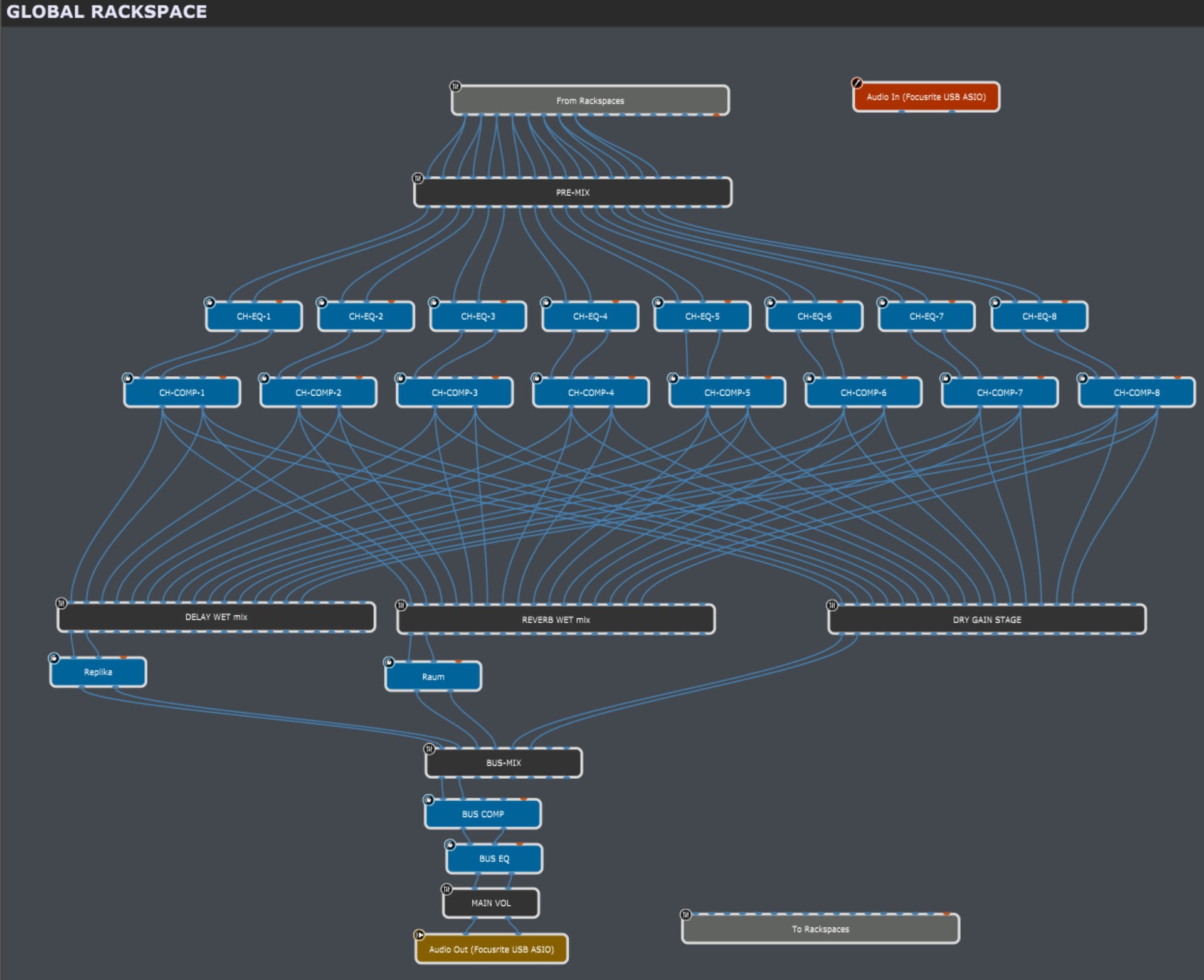
I would try to put the most into the global rackspace, using the local rackspaces for the input of the microphones and additional instruments and audio player. Then passing all audio channels via “to global rackspace” block over to the global rackspace, where the voice processing for each of the 8 mics is done.
First i would use a chained EQ and compressor on a “per channel” base, then going from the separate outputs to separate mixer blocks to do a parallel FX-processing.
Means all outpuits from the compressors go to
a mixer to set the amount of delay per channel - the sum then would go into one delay plugin
a mixer to set the amount of reverb per channel - the sum goes into one reverb plugin
a mixer to set the dry levels (if needed)
then use another mixer where you feed the output of the delay, the reverb and the sum of the dry mixer into, to be able to adjust the overall amount of each of the component streams.
After that, feed the main sum into another EQ and compressor, just to be able to finalise the sound and “glue” everything together. Maybe a limiter would be good as well.
At the end of the chain, a final gain block for the overall main volume.
I actually started to build that with plugins from Native Instruments, just because i was curious about the CPU consumption of such a construct - and of course if it would work as i hoped, but haven’t finished it yet… still lots of widgets to be connected to all those parameters.
But as a first impression, the CPU meter of GP only climbed to ~14% for the whole vocal processing stuff in the global rackspace (8 mono channels going stereo into 8 “Solid EQs”, then 8 “Solid Dynamic” compressors, having an additional “Raum” reverb and a “Replika” delay, plus another “Solid EQ” and a “Solid Bus Comp” in use)… that’s all in all quite moderate.
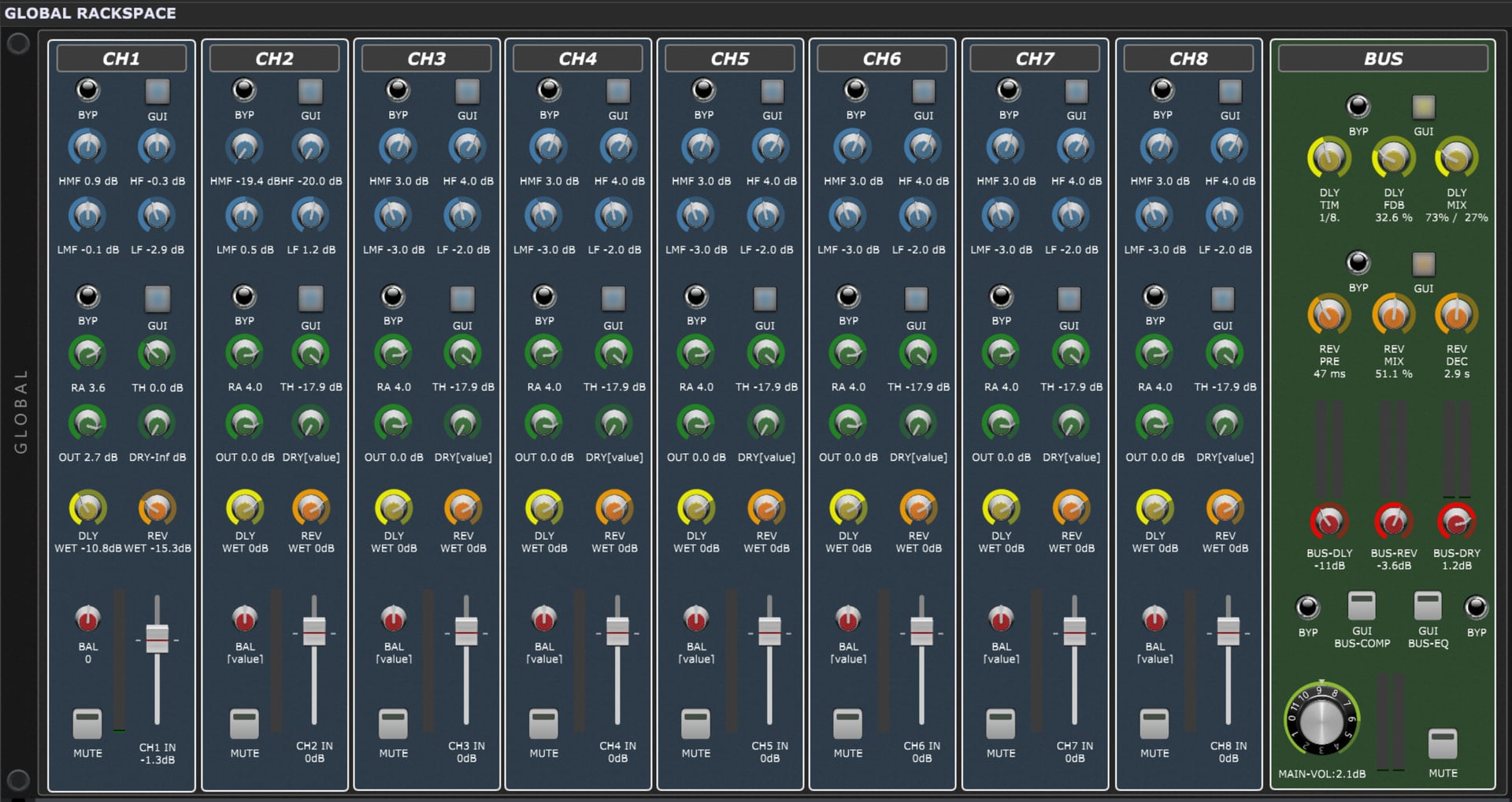
Channel strip
blue button/knob section is the channel EQ (NI Solid EQ):
Bypass/Open plugin window/Low gain/Low-mid gain/Hi-mid gain/Hi gain
green section per channel is the channel compressor (NI Solid Dynamic):
Bypass/Open plugin/Ratio/Threshold/Out-level/dry mix
yellow knob: Channel FX-send for delay (NI Replika)
orange knob: Channel FX-send for reverb (NI Raum)
balance/mute/gain: input mixer channel
Bus strip
yellow section is for the delay settings:
Bypass/ Open plugin window/ Delay time / Feedback / Mix
orange section is for reverb settings:
Bypass/ Open plugin window/ Pre-Delay/ Mix / Decay
red knob mixer section:
separate sum-level settings & VU-meters for delay, reverb and dry sum
“master” section:
bypass and plugin window open for bus compressor (NI Solid Bus Comp) and bus EQ (NI Solid EQ)
main volume knob (“the 11”), main VU-meters, main Mute
After all it was quite a bit of work for “just trying something”, but hey… you’ll never know, maybe the day will come when i’ll need exactly this.
…or someone else might be happy with it.
I hope this is useful for one or another… have fun, and be creative to change things to your own needs. And if you do… please share your result!
Cheers!
Erik