For a little side project I’d like to use my damper pedal as a kick drum trigger. The pedal is a Yamaha FC4A, it gives a value between 0 and 127 depending how far it is pressed.
Ideally I want the pedal to behave as a velocity sensitive pad. I suppose I’ll let the kick sound trigger when the pedal reaches 127. But is there a way to sense the velocity of how fast the pedal is pushed down?
I think the issue with a damper pedal could be that first a message is sent when the pedal is pressed and then when the pedal is released.
When this is the case then there is no chance to detect how fast the pedal was pressed.
It behaves more or less like an expression pedal, so it will constantly send values while the pedal is moved.
Actually I just found out that my audiofront midi expression box should be able to process the pedal as a high hat or kick trigger, so I’ll look into that as well. However I would prefer a solution inside GP.
Processing a pedal press as a kick would be pretty simple, with the caveat that you just have to pick a threshold to trigger the kick and there’s no good way to sense velocity. You would also have to have a “reset” point. For example, you could make 120 the value at which the kick is triggered, and not allow it to trigger again until the pedal value goes below 10.
Detecting some representation of velocity with a script or program would not be terribly difficult, but I’m not sure it would be useful. If you wanted to approximate velocity you would track the different positions that GP receives and how far apart in time they are. But you still have to pick a threshold for when you decide to trigger the drum. I don’t think it would work particularly well, but you could make the algorithm for that as complicated as you want.
AudioFront devices are very nice, I’ve used a few of those myself.
map a widget to your pedal
Connect the widget to the CC or Note Number of your choice in a MIDI In block
Click the graph to open the curve display
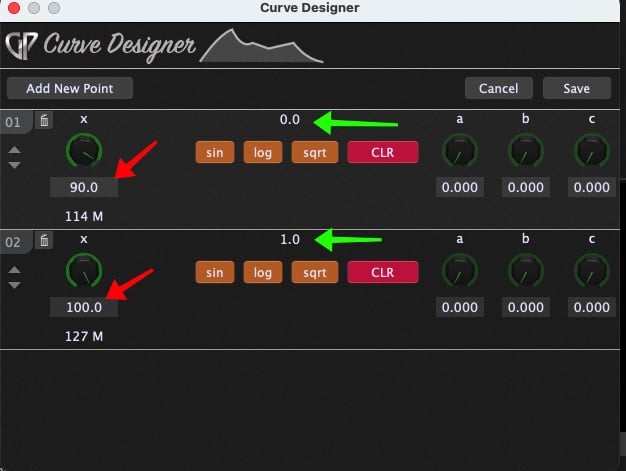
Click on the EXP button to bring up the Curve Designer, add two points (using the Add New Point button at the top) and then set the values as shown here by the RED and GREEN arrows