Due to the weight of my Arturia Keylab 88 MkII, I now have a much lighter second keyboard (M-Audio Keystation 88 Mk3) which I will use for rehearsals only.
On the Arturia, I have the Forward and Backward Transport controls mapped to Next/Previous Variation/Song Part, and the Controller 11/Expression pedal mapped to a Gain and Balance widget.
I am currently remapping all of the above each time I move between house and rehearsal studio. I’m sure there is a better way, and I’m pretty sure it’ll be via Rig Manager, but I’m struggling to get it to work.
With both the Arturia and the M-Audio keyboards connected, the following appear automatically under ‘MIDI Device Aliases’
Keylab mkII 88 DAW
Keylab mkII 88 MIDI
Keystation 88 Mk3 (Transport)
Keystation 88 Mk3 (USB MIDI)
Clicking the Transport buttons on either keyboard makes either the DAW or (Transport) aliases flash green. Moving my expression pedal makes the USB MIDI alias turn green.
The first hurdle I am stuck at is: The instructions tell you to create a new MIDI Device Alias for each of my two keyboards, and then associate the appropriate MIDI device with each. The trouble is, both my Arturia and my M-Audio are represented by TWO MIDI devices (one for the keyboard, and another for the transport controls on the top). So I can’t associate a new MIDI Device Alias with the ‘entirety’ of my keyboards (apologies, can’t think of a better word).
You can not map an entire instrument - there’s a layer in between: create your needed MIDI controls in Rig manager and map them in seperate rigs to your Keylab and Keystation
I’ve watched that video and made it work for widgets. However, the MIDI Control Aliases (little white down arrow) does not show up in the Global MIDI Assignments (e.g. for Next Variation / Song Part).
@pianopaul - If the little white down arrow doesn’t show up, how can I assign a MIDI Control Alias to a Global MIDI Assignment?
In the Global MIDI Assignments Window you press the button “Learn MIDI for selected item”.
Then you press the control on your MIDI controller and it is mapped.
When you have a MIDI Control Alias defined for that learned message, it is shown by the name.
When not then the device and cc Nummer etc is shown.
Create a Rig for each controller (e.g. one for Arturia, another for M-Audio)
Note: He does not seem to create any MIDI Device Aliases??
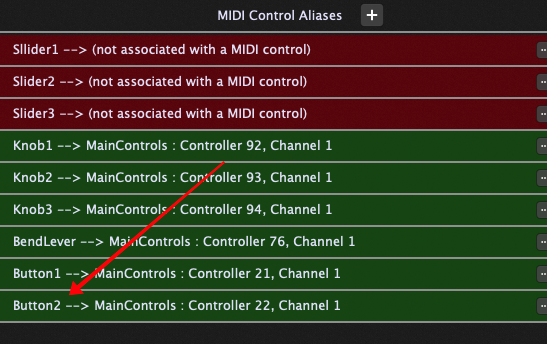
With Arturia Rig selected, defne MIDI Control Aliases (e.g. EXPRESSION, LEFT, RIGHT) for each button / pedal you wish Rig Manager to manage
Map those controls using MIDI learn to the respective Arturia physical controls
Now with M-Audio Rig selected, re-map those same controls (which have now turned Red again) using MIDI learn to the respective M-Audio physical controls
Save
In my Global Rackspace, I then remapped my Gain widget control to the MIDI Control Alias I created for EXPRESSION (Pedal). I did this by choosing the little white dropdown to the right. (If I tried to do this using MIDI Learn, it mapped to the Keylab only, not the MIDI Control Alias.)
Switching between Rigs works for my pedal now. Partial Success.
BUT - in the Global MIDI Assignments, there is no little white downdown, and if you try to map them using MIDI Learn, it just hard maps them to one controller - ignored by Rig Manager.
Control aliases are for widgets. The Global MIDI Assignments system does not know about widgets.
The modern approach is to use a Systems Actions plugin for such things.
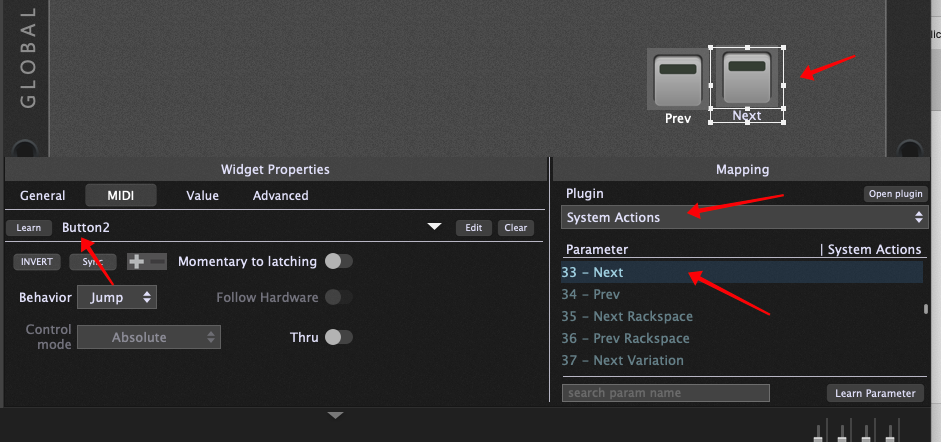
Insert a System Actions plugin in your global rackspace, add button widgets to the global rackspace and map those button widgets to control aliases. Here’s an example using Button2 mapped to Next
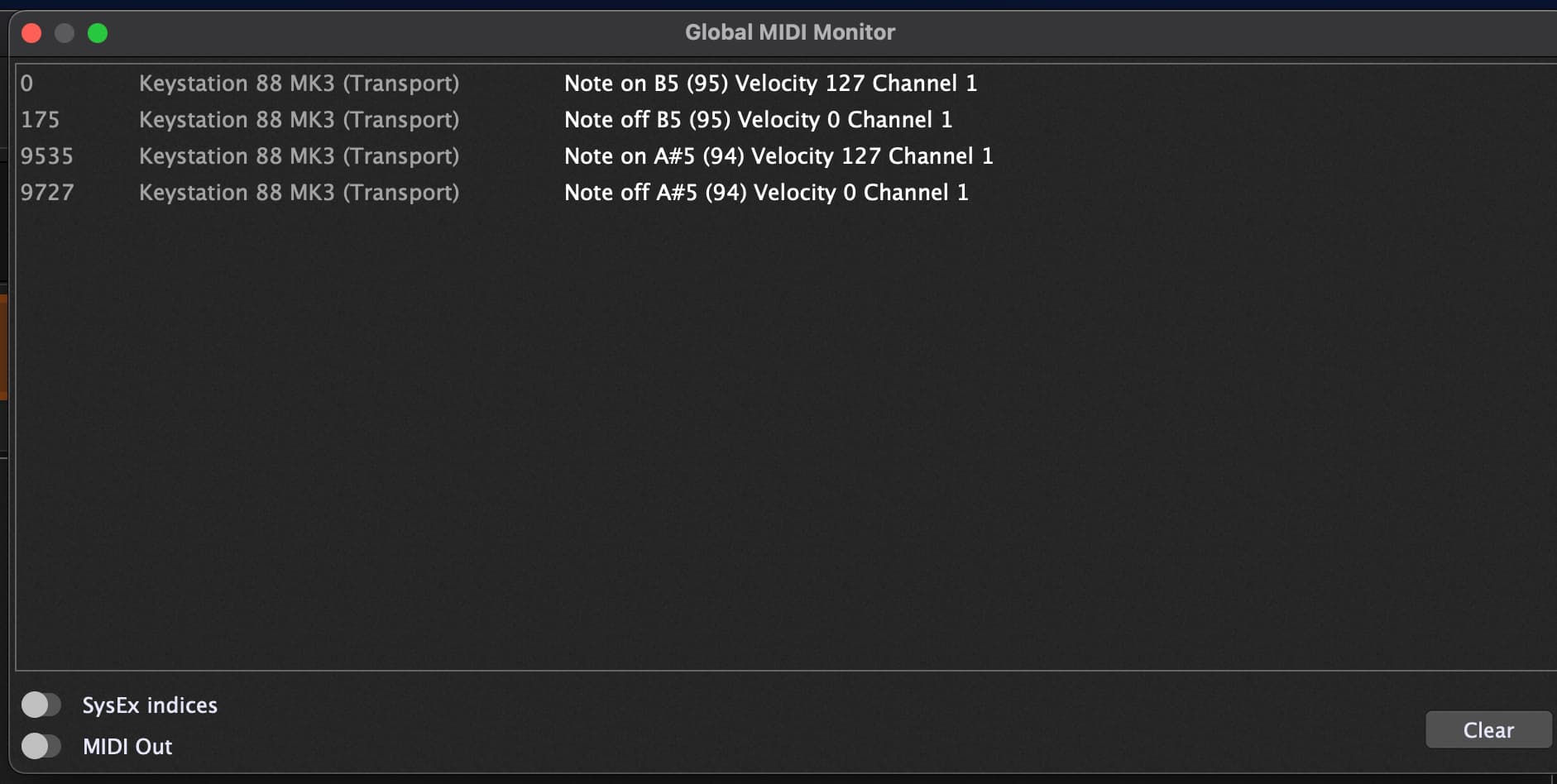
Thanks dhj, I’m almost there. Only outstanding issue is that when I press the FORWARD button, it skips forward TWICE. Same with BACK button. I’m guessing that’s because the transport buttons are outputting an ON followed by an OFF note message on a single press. Any suggestions?
Thanks schamass
I did try that but unfortunately it didnt work. I have however discovered that editing the mapping from note on to note off fixes it. In other words, you can’t always rely on MIDI Learn to get the value you need.
So all working now, thanks all for your help.
I have difficulties to understand this. Could you please open the GP Global MIDI Monitor and press the button used for FORWARD on your controller and post a screenshot of it ? I you don’t have twice the same MIDI message when you push the button and when you release it, I don’t see why FORWARD should be triggered twice…
In particular this doesn’t explain why your FORWARD/BACK buttons were triggered twice. In fact the only way to use Note message to control a widget is to use the momentary to latching option which requires the users to push one time to activate the widget and another time to release it. The exact inverse of a double triggering. Without the momentary to latching option the widget can be triggered, but not released anymore. So, I really don’t understand neither why it didn’t work before nor why it could work now…