I’ve been using Reaper recently to access my VSTs live in a performance setting. I have several different types that I’ve custom mapped as MIDI CC information so that I can turn them on/off at will.
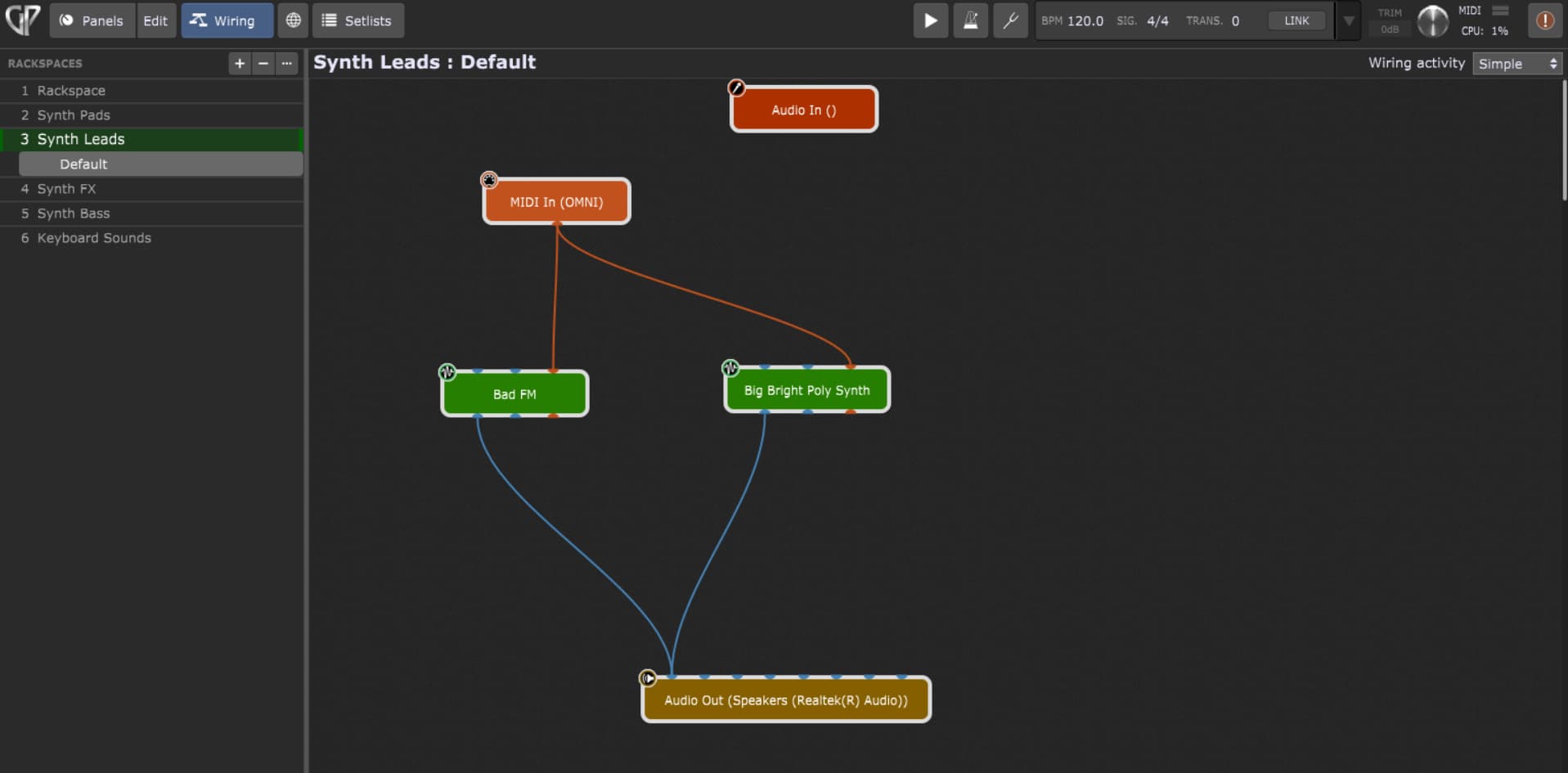
I’ve looked into Live Performance Apps as I heard that these are better to work with and have downloaded the trial version of GP today. I figured out how to wire my sounds up and have a basic idea of how to make panels.
I want to be able to, within any given song, switch my VSTs on/off that are related to that song. Is there an easy way to do this or do I need to do scripting? Normally, I would push a button that I mapped on my controller to do this in Reaper so I’m wondering if there is a similar way in GP and if there can be an explanation on how to do it.
I’m attaching a screenshot of one wiring diagram right now of a song that uses 2 sounds. I start with 1 and then add both later.
If you want to do it manually you can map button widgets to the bypass parameter of a plugin
But I wonder why you need to do this. When you switch from one rackspace to another, the plugins in the previous rackspace will be automatically bypassed anyway
Thanks for responding! I don’t intend to switch rackspaces in the same song, just in between each song. I don’t want to have all the VSTs for one song to be activated all at the same time. I want to push a button on my controller to say “Okay, this VST is activated” and later on, push a different button to say “Okay, now this VST is also activated”.
I’m guessing that whatever widgets I map, they would have to be some sort of mute/unmute function???
I hope that this is a clear explanation of what I’m trying to accomplish. I moved over to Gig Performer because the audio on my DAW has been glitching/crashing mid-performance and is very jarring.
You can map a widget to a plug-in, and then to the bypass parameter.
The widget can be learned to a MIDI message form a controller, e.g. any button.
Or use a built-in multichannel audio mixer, and map widgets to this mixer to mute a channel.
If you are a keyboarder, a better way would be:
Use a separate MIDI In block for the different plug-ins.
Then, use widgets mapped to the MIDI In blocks, switching the MIDI note-on blocking on and off.
Thus, hold note are not cut, and no hanging note occur because note-off still pass to the plug-in.
Any method can be combined with different widget states in varations of the same rackspace.
Or a song using this rackspace, and song parts with the respective variations.
Why don’t you want them activated? Are you trying to reduce CPU load? Or you do not want to hear them (because you do not want to hear the sound when you hit the particular note on your controller?)
Also, note, there is a difference between “muting” something and bypassing it. I think generally when you bypass a plugin, there should be no CPU generated from it (if it is coded correctly).
Also, there is the issue of whether you are bypassing a “Midi In” block or the plug in generating the sound. (There are issues of stuck notes related to this, but no need to go into that at this point).
But, we definitely need to know exactly what you are thinking and what you are trying to accomplish.
In a live set, I’m operating multiple different sounds but not all of them simultaneously. For instance, in one of the songs, I’m start with a Synth Lead VST. This patch will persist for the rest of the tune but half way through the tune, I add another patch on top of this but I don’t want to hear that patch until that specific moment in the song. Is this clear? I know there is a thing in the “set list” where there are different sections of whatever tune you’re doing but I don’t know if this applies to my situation.
I don’t want the sounds “activated” because I’m not using in that moment but will be at some point in the tune. Once everything is set up properly, I don’t want to mess around on my computer and rather operate from my MIDI controllers with pushing buttons to “activate/deactivate” VST patches per song.
Please check my post, or the attached example. SoundSwitchDemo.gig (52.8 KB)
Use a button on your controller, either switching widgets to “mute” or “unmute” a plug-in, with the methods I described. Or use a button on your controller to switch variations (song parts in setlist mode) with different widget states.
Yes, we all understand what you’re trying to do - it’s not any different than what many of us do. But there are many ways to do what you’re trying to do and a lot depends on how the music is to be played. There’s a big difference, for example, between playing a song from beginning as end with the parts “predetermined” and a more of a “jam” model where one might go back and forth between verses and choruses, with extra solos and so forth.
The right approach really depends on the need.
For example, if I’m playing a song that starts with one sound and then has another sound that gets layered in later in the song, then while I might use widgets to either bypass the plugins or block NoteOn events or to just set the volume levels to 0, I would then use variations that control those widgets and not bother with using controls on my keyboard – just a single button (or footpedal) to step through a sequence of variations that sets or resets multiple widget values.
BlockquoteYes, we all understand what you’re trying to do - it’s not any different than what many of us do.
Great! I’m glad that you understand. Somebody asked to know “exactly” what I’m thinking so I needed to dive deeper.
The approach that Angel suggested works for me, as of now. If I find something better or if somehow what your example is works more efficiently, I will of course try it and share about it.