Strange behavior using Xpand!2

This is going to be a long one as I try to articulate the strange behavior I am seeing.

I use Air Technology’s Xpand!2 a lot!

I generally use one rackspace for each song and have a gig file with about 50 songs/rackspaces and just under half have an instance of Xpand!2 and I have never had any “visible” issues.

I recently added a new rackspace/song and included an instance of Xpand!2. The only other instrument in the rackspace is one instance of Pianoteq 7.

For those not familiar with Xpand!2 it has four instrument slots that can receive input from midi channels 1-4 independently.

In this song I needed a string part, a horn part, and a tambourine part.

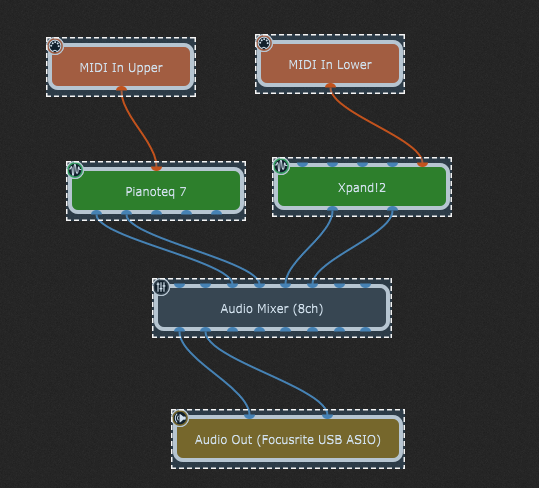
I included two midi in blocks split so the lower octave of midi channel one went to the Xpand!2 instance with strings and horns and the higher octaves went to Pionoteq.

Here is the basic layout:
image

My controller has a 5x4 array of “pads” that are programmed for a range of note values on midi channel 2.

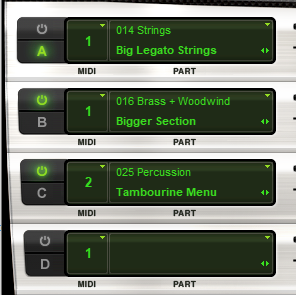
This is the Xpand!2 layout
image

So the MIDI Lower sends one “octave” range of notes to Xpand!2 on MIDI CH1 which trigger Strings and Brass sounds. The controller “pads” are sending a range of notes on MIDI CH2 to Xpand!2 for the Tambourine sounds.

Pretty straight forward and worked perfectly. I practiced this song dozens of times over a one week period with not a single problem. I shut everything down, set up for a show and when this song came up everything went WRONG!!!

Sorry for the long intro but it is necessary to understand that the setup is not at all complicated and worked as expected until it didn’t!

So here is what is happening:

At some point for unknown reasons one channel of the Xpand!2 plugin kills all audio output for 10-15 seconds. At first I thought it was the Tambourine CH2 but during my exhaustive testing it actually moved to CH1.

What I mean is I can play the upper part of the keyboard and Pianoteq works fine, I can play the strings/brass on the lower keyboard works fine. I hit one note on the CH2 tambourine section and there is no tambourine sound and Pianotaq and the strings/brass are killed for 10-15 seconds.

Here is what I know:

  1. When whatever happens that triggers this fault it kills the gig file. Nothing I have found will make the gig file perform normally on this song after that, all the other songs are fine.

  2. If I export all my songs and import them into a blank gig file everything works fine until the fault occurs and then the gig file is done for this song.

  3. After the fault Xpand!2 is not dead only SOME of the hundreds of presets no longer work and kill the audio interface for 10-15 seconds if played.

  4. There is no obvious reason for this, no errors, no crashing, nothing except things just stop working.

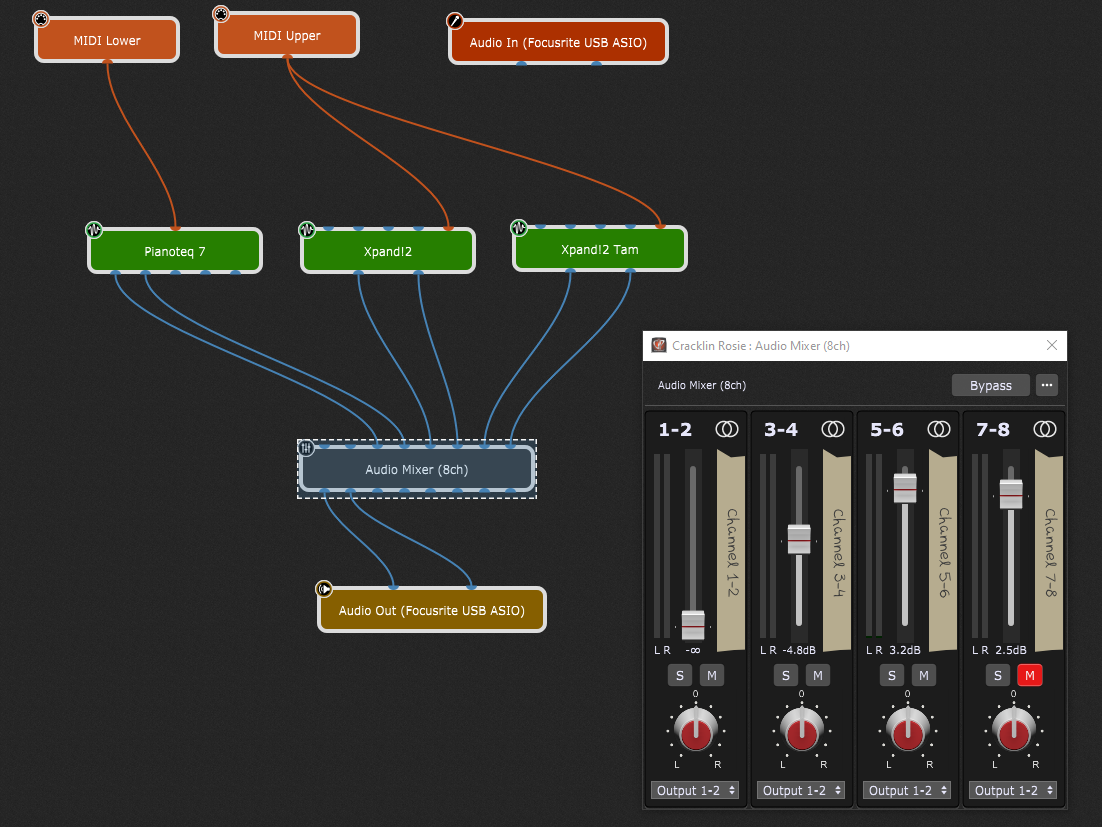
  5. I inserted a second instance of Xpand!2 for the tambourine and sent it to a different channel on the audio mixer. If I play a note on that instance it kills Pianoteq and the other Xpand!2 instance audio for 10-15 seconds unless I mute that channel on the mixer, then it does not affect the Pianoteq or the other Xpand!2 audio.

Most baffling to me is how can playing one note on a plugin kill the audio of other independent plugins? It is obviously somehow affecting the audio output device itself. I inserted a meter and oscilloscope plugin on the output of the plugin to see if there was some sort of large spike that would kill the audio interface for 10-15 seconds but did not see anything no blip on the scope or peg of the meter needle.

All also I’ll add it is not CPU overload as far as I can tell because the CPU usage never goes above 25-30%.

I know this is very long but this is just totally baffling behavior to me!
  1. Are you using Rig Manager?
  2. Have you looked at the Global MIDI Monitor and also inserted Local MIDI Monitors after the MIDI In blocks to see what is actually being sent to the plugins?

It is not a midi issue, the plugin is getting the midi data. The question is what can a plugin emit on it’s audio outputs that would cause the audio interface to shut down all audio for 10-15 seconds?

I’ve isolated it to the audio output of the plugin because muting the output in a GP mixer prevents it from disrupting the audio interface output for other plugins.

And what is GP saving in the gig file to make the issue persist across restarts of GP?

I can import this song and all the other songs into an empty gig file and it works for awhile, I have saved the gig file, opened, closed, reopened, but at some point something causes the plugin to start this behavior and nothing seems to resolve it except starting over with an empty gig file and importing all the songs again.

Just something that could be related. I also used a lot Xpand. But when I switched to a M1 Mac that plugin started to make strange things, usually shutting off its effects random. I stopped using it and turned everything to Korg Triton.
Every now and then I check again and detect same strange behavior.

Hi David, I know you get frustrated when people don’t answer your direct questions when you are trying to help… so yes I do use Rig Manager, and yes, I did look at all the MIDI data to verify. It was later after many test scenarios that I reached the point where I have no more tools to diagnose.

As I mentioned something from Xpand that makes no audible sound, does not show on a VU meter or O’scope plugin kills my audio interface output for several seconds.

Thank You!

I am almost at the point of finding an alternative but Xpand is so versatile and integrated into my setup that seems quite daunting.

I have had occasions where a plugin will cause all audio in the rackspace to stop, and I get a loud click from my interface (similar to what I hear when it’s first connected).

It is the plugin, and on one occasion I provided feedback to the developer for a few test versions until it was fixed. It often helps plugin devs take more notice if you can replicate the issue in a DAW.

I see you’re using a Focusrite. Me too, 4i4 3rd Gen.

1 Like

You could upload a stripped down gig-file with that problem-song in it… since i have both Xpand!2 and Pianoteq available, i probably could test if this issue comes up on my system too?
BTW: I dont trust the AIR plugins anymore (i am on Windows) it occurs more and more to me that this is actually some kind of abandon-ware… (not really but almost).

Not so much frustrated — rather, it is really impossible to even begin to diagnose the problem without having certain information available.

Plugins can do anything they damn well want — and if one of them (hopefully due to a bug, not deliberately) screws up the audio processing thread, they can stop the whole system. We’ve seen some plugins put locks in their audio processing that just holds everything up…

Sigh

What I find hard to understand is if the plugin was affecting threads/memory how could muting it via the mixer downstream stop the problem? Would the plugin not keep doing what ever it is doing and not be aware it’s output is muted by another plugin?

If I break out the tambourine patch into a separate instance and send the output to a separate channel on the mixer as shown above. If the second instance of Xpand is not muted in the mixer and receives a Note event it kills the output of Pianoteq and the other Xpand instance. If it is muted in the mixer it does not affect the output of the other two.

Which suggests that what ever is coming out the outputs of the tambourine instance travels through the mixer and kills the Audio Out device. When muted the mixer is blocking whatever is coming out and it does not make it to the Audio Out device. As a side note, unmuting the channel and setting the slider to zero also stops the output dropping but setting the slider to any level above zero kills the output device when any note event is sent to the plugin.

Originally I thought some kind of signal spike was overloading the Audio interface and the interface was protecting itself by muting itself for some period, but again using visual tools to measure the plugin output before the mixer shows nothing.

Can’t get into a deep technical discussion of how these systems work but basically the audio buffers are shared and so seen by all plugins in the graph.

You should report the problem to xpand developers.

This is a VERY dumb suggestion on my part, but you might want to look in Windows EventViewer.msc at near the time that this problem happened. This may give you either error or info messages that indicate what is happening. Heavy emphasis on may. Like @dhj said, totally depends on the VST code.

But there might be clues to be seen, and time stamps plus sequence may suggest if different code (ie Xpand, Pianoteq, GP, Focusrite… Windows - you don’t mention ASIO/Windows audio… lotta moving parts there) are somehow tangling, and what STARTS that particular tango. As a longtime user, I’m going to go out on a limb and guess Xpand!2.

It also may be a more practical solution (and better for your sanity?) for you to just find a KONTAKT instrument with a tambourine you can adapt and see if that changes anything.

I seem to recall over the years that I’ve experienced Xpand!2 has some percussion patches that act “weird” as in occasional clipping that is not gracefully handled. Also I’ve seen that gain settings in its mixer(s) above 0 can become hit & miss as far as these possible clips go. That’s strictly guessing on my part, but I seem to recall certain weirdness in percussion patches going away by never exceeding 0 on an Xpand!2 fader.

Another thing you might want to try from the “gee I wonder if this might help” department… try making a slight alteration to the “smart faders” at the top of the tamb (or other) Xpand!2 patches, or maybe alter the default FX sends even an infinitesimally small amount. It feels to me like this can cause Xpand!2 to do some internal processing or resampling that might evade that clipping weirdness I’ve experienced.

Also if you really just need THAT tambourine patch from Xpand!2, maybe run another instance of Xpand!2 in the rackspace just for the tambourine patch. Bigger hammer for sure, but might kill the problem…?

Super easy to test at least, hope that helps.

Or just record it and throw it into Kontakt :slight_smile:

You know, you fancy Comp. Sci. PhD guys… :rofl:

My point being @dhj may have there a best solve to stay on MUSIC and evade nuts and bolts.

1 Like

Well, I suppose we’re not as nerdy as we look :slight_smile: