I have a question, not sure if it’s related to GigPerformer or Native Instruments.
When I switch to a new song, sometimes when pressing keys of a sound that has not been used before, it plays with gaps (like with latency problems). After playing one or more notes with that sound, the sound is normal.
I think the samples are loaded at the time the keys are played the first time, but this is a bit odd, as even switching to a new song, I would expect all samples to be loaded (not sure if this is the actual problem).
Is there a way to prevent this ‘problem’ ?
My current workaround is to play before a song starts, at least all sounds once for one key with the volume off. I could ’ automate’ this by sending a note on-message to all keys and both keyboards with volume 0 but this would feel strange.
You could do experiments with the settings in Kontakt, Options, Engine:
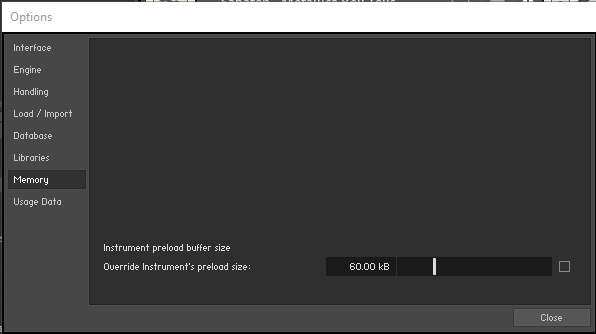
and Memory:
which is only effective globally when the box would be checked.
Otherwise, preload memory is set in the options of each Kontakt instrument.
It also might depend on energy settings, high performance, ultimate power whatever recommended.
I think that reduced the problem for me, to almost only a very few cases, hardly notable.
Thanks for this info … however, you didn’t check the box 'Override Instrument’s preload size). Is that on purpose?
My settings are the same (except for the 0/-6dB but that’s probably irrelevant for this problem).
Unfortunately I can give no clear advice.
The problem is not that bad for me. There are only some few sounds with a slight inital clicking noise in the attack phase for the very first note, then gone for next notes.
I think it was worse before I fiddeled around with the Kontakt options and Windows Energy settings. Maybe even BIOS settings, maybe even audio driver buffer size.
I also should get later to get some more experience in using SampleRobot or any other sampler (Bliss I also heard) … I need to check what convolution means :-), and how to turn it off.