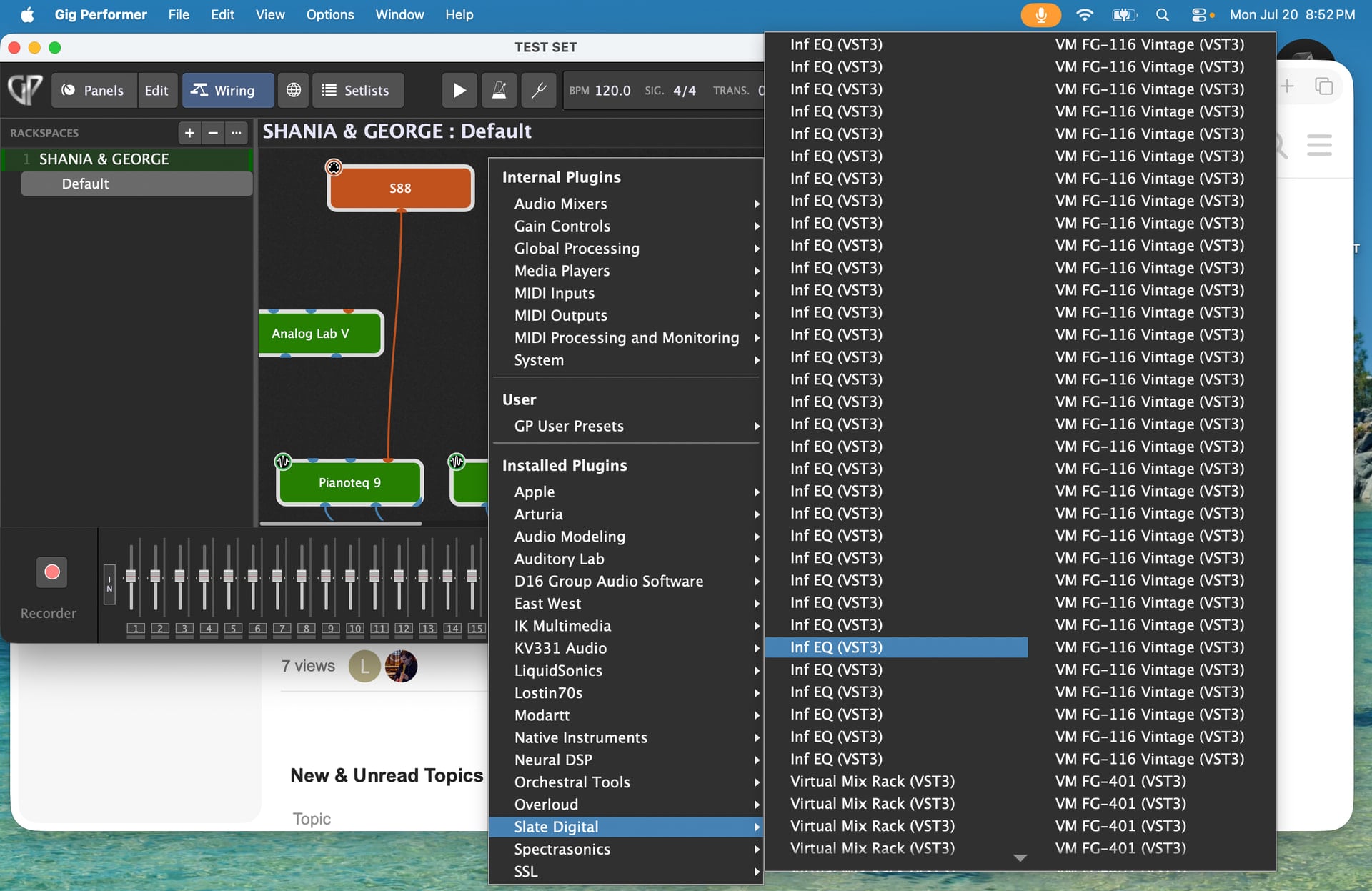
Happy Monday. I did a rescan to make sure everything was uploaded. It scanned just fine. It did a couple scans that didn’t take too long. On the 3rd time it too like 45 minutes. But it did the scan. So I pulled up a vst and right clicked. It was there. Multple multiple times. Over and over. Same format. Same title. Cleared the memory and trie it again. Same thing. What is it seeing and how do I fix it? Appreciate the help. Thanks Lanny
Windows? Mac? Which operating system? What version of GP?
What does it mean to pull up a vst?
From where did you “pull” it? The plugin manager window? The Quick Insert dialog? The popup menu that has all plugins in it?
Is it always the same vst or are lots of plugins showing up as duplicated?
If you actually delete the settings file and then rescan everything, what happens?
I right clicked on the wiring page. Example : right click on Modartt . Shows Piano vst3 like 20X. I noticed while it was doing it’s scan, whatever library i was on at the top of the progress bar, it was showing vst3 vst3 vst3 vst3 vst3 vt3 etc etc etc. Never had problems before
yes duplicated many times. I cleared the memory 3 times and scanned from scratch. results the same.
macbook pro M5
Ok then what changed such that this issue started happening?
Got it. Thanks for listening
Wait, what? Did you solve the issue? If so, please share the solution so that others can benefit.
Sorry. Yes. After digging I found a short cut folder in the library/application/vst folder.(I probably didn’t list that correctly) But basically it was in the folder where all the vst’s were. So when the scan started, it saw the short cut folder and took the short cut. Which took it to the vst folder. Where the short cut folder was. It cycled over and over.Once that short cut folder was deleted, everything went back to normal. Now juat have to find out who the dummy was that somehow put that short cut folder in the vst library. 
Thank you.