Smoothly fading variant parameters in GP5 - state of the art recommendations?

Hey folks, I’ve been playing around with quite a number of setups lately in search of a good basis for a keys rig. I need mainly the usual stuff that most things can do (host a bunch of plugins, layers, various midi tools like arps/sequencers, parameters and midi mappings), but one big thing that has really separated a bunch of the solutions so far has been ensuring uniformly smooth transitions on everything including songs/snapshot/plugin/variant/parameter/whatever-you-want-to-call-it changes.

GigPerformer is currently the solution I’d love to base this on because my experience with the trial was very positive. It was super stable, everything worked naturally and it was quite intuitive. Routing flexibility and the various MIDI tools made it really easy to set up arbitrarily complex sets of layers and arps and sequences and so on. Literally the only place I’ve struggled is trying to find a scalable way to do smooth transitions of various parameters and while I’ve found some posts about this in the past I figured I’d reach out here to see if anything has changed in the past few years.

GigPerformer does a good job of rackspace transitions - I can definitely live with this for song changes, together with some careful global rackspace setup. The place that I’m having more trouble with is smooth transitions between variants. In almost all cases I want things like the mixer faders to smoothly interpolate, not jump to the new variants. Furthermore in many cases I also want to change VST parameters (macros, etc. that I’ve set up) and have them smoothly interpolate. Variants seems to definitely be the most scalable way of setting up the endpoints that I want (i.e. they are a collection of all of these parameters), but I’ve struggled with making the transitions seamless.

I’ve played around with various scripts to do a slower transition, often using a dummy control that can be scripted to go from one end to the other, but there are significant limitations with this setup. First, there are not just two endpoints here… many songs might have 3-5 different variants and I need to be able to jump to each of them in arbitrary order and have the parameters smoothly fade from “wherever they are” to the new target. The scripting language doesn’t seem flexible enough to do something like gather all the relevant before/after variant state up front, then do a smooth transition on a timer. It seems like you would have to modify the script for each song/rackspace which is not really a scalable solution. Please correct me if I’m wrong here - if there’s some way to have a global script that interpolates arbitrary variant parameters I don’t really mind any level of global complexity as long as it doesn’t need to be baked into each rackspace.

I’ve played with a few alternatives like having external tools drive MIDI CCs to do the smooth interpolation but they run into a lot of the same limitations as the scripting… i.e. this logic really needs to live in a place that knows both the before and after variant values, which seems to be only Gig Performer itself at the moment.

I’ve seen some scripting for this in Mainstage that works, but I would prefer not to use Mainstage for other reasons. I can make it work in Reaper/Playtime as well (you can pretty much make anything work in reaper if you want to…) but that approach is even less scalable than the Gig Performer scripts as it’s pretty hard to make fully general to any song/layer setup.

The one tool that I recently found that does pretty much exactly what I want is LiveProfessor. It has the notion of “cues” that set trigger “snapshot” changes (roughly like a variant for our purposes here) but critically on those changes you can add a “fade time” that it will apply to all of the parameters that are being changed (which can additionally be filtered if desired). There’s some details with trying to interpolate arbitrary plugin parameters of course but for my purposes that system works great, as I can just set up whatever continuous parameter/macro values I want, take a snapshot, then let it smoothly interpolate on cue.

That said, I’d still rather use Gig Performer for this as it is otherwise a more full-featured and capable tool and I’ve run into a bunch of quirks with LiveProfessor that I would need to find other workarounds for as well.

Thus I’d love any suggestions on how to best handle this in Gig Performer, or any insight into if this is something that might be supported natively in the near future or not. I know there are no guarantees or public feature roadmaps but it would be useful to know how best to proceed in the short term.

Thanks in advance!

2 Likes

Automatic widget movement: Scrolling lyrics using a timer

This is a great post.

The problem is that it gets complicated to define a generic behavior. E.g. each widget might want custom value range and also different timing. Users might want to smooth only specific variations on specific rackspaces. Song parts are also option for having specific settings.

Another issue is with widgets that has discrete values (like buttons, some knobs, …). They cannot be smoothed but rather jump to the next value.

I’m sure having such option is powerful.

2 Likes

I can imagine how each widget could have a “transition to next variation” switch and a box to define an amount of time.

1 Like

This is probably not easy to implement. Maybe you can take my thoughts further; otherwise please ignore.

  • Every button and knob/slider widget could have an additional per-variation parameter: “Variation Smoothing Time.”
    This should be settable in milliseconds, or in beats if an option “Sync to global tempo” is checked.

  • After switching to another variation within a rackspace, the widget should move so that it reaches the new position within the specified time.

  • Different value ranges would result from the widget’s scaling.

  • The fact that a button cannot be faded is fine. You could still define that it toggles, for example, 4 beats after the variation change.

  • On a rackspace change this feature should be ignored.

2 Likes

Introducing a per-variation or per-song-part transition time for each widget within their properties could nicely make this Introducing a per-variation or per-song-part transition time for each widget within their properties could effectively resolve the issue. While this behavior can already be achieved using GPScript—by employing a helper widget to store the target value and a script to handle the smooth interpolation of the real widget—it would be great to have native support for smooth widget transitions. :innocent::nerd_face:

2 Likes

Thanks for the replies! It looks like we lost a few of the early replies unfortunately that has some good information. I can repost from the email notifications if desired but I’ll leave it for the moment in case the authors want to repost themselves.

I need to play a bit more with some of the posted scripts. I’ve done some of the ones where you have a second widget control a first one and do the interpolation but as I alluded to in the original post, having a script per-control, per rackspace and effectively losing a lot of the UI around variants because you are now hard-coding the endpoints inside custom scripts doesn’t seem scalable enough in the long run.

There may be a world in which I can make this work with a global script that has some fixed number of parameters that can be changed, but I need to explore how much control you have in terms of querying variant-specific endpoints from a global script. Having one big global control script is fine as long as the values themselves are still set on variants. Not sure how possible this is though.

This definitely feels like something that needs to live somewhere between the knob’s actual setting, and setting the VST parameter, but I’m not sure if there’s a way to inject any scripting at that point specifically.

In terms of a theoretical native implementation, I could imagine a bunch of ways to do it. Having a per-widget transition time work work. Keeping it simpler and avoiding any issues with binary widgets though we could also just have a new “Smooth dial/fader” widget or something that includes a transition time parameter. The advantage of this method would be you could also have some nice UI for the “set” value vs. the current value. I’m thinking something like the knob goes right to the new endpoint, but then there’s like an LED ring around it that moves smoothly to the value over time and is the actual value set in the VST. This is similar to how this works in a bunch of synthesizers with modulation parameters.

For my purposes this doesn’t need to be super-granular though. Putting the transition time on the variant itself or even the rackspace and have that apply to all of the smooth widgets would be totally fine. Obviously it’s more flexible if you could set a per-widget time (and even curve) but as long as there’s some way to avoid things just jumping to new values that would be totally workable for me.

Alternatively if we had GPScript hooks at that point I mentioned above - i.e. between the widget value and the VST parameter setting - it would be a lot easier to do arbitrary things on the scripting side.

Thanks again for the replies so far! I’ll post back again when I get a chance to play with a few more scripting ideas.

I suppose you wanted to write variation…

Yes, having it at the variation level il probably the key. But, we could imagine having it at an higher level like the Rackspace level or even a default behavior. But once defined at variation level, this level should have the priority.

1 Like

I can imagine linking a widget to the active tempo (at System Actions plugin) and smoothing it between variations/rackspaces.

Our band playing with a click track that my GP produces and for medleys this will help connecting adjacent songs that has different tempo.

What do you mean by “variations/rackspaces”?
Do you mean variations within a single rackspace, or also when switching from one rackspace to another?
If you mean the latter, it becomes more difficult, since you can’t simply take the value of the new variation as the widget target value — the widget probably doesn’t even exist in the new rackspace.

We play without a click. It should also work when global play is off.

As i mentioned in my previous (but meanwhile vanished) posting, i see this kind of behaviour only happening within a standardized environment with a fixed number of parameters/widgets that always stays the same (also the sort of widgets).
I.e you could do that with rackspaces/variations which all have the same bunch of widgets on their panels, like 8 knobs and 8 buttons.
Most probably, the parameter transition had to be controlled from the Global Rackspace.
Thus you could use the “Global Parameter” assignment between the Global Racksace and the local ones (and their variations)… i already started to play around with this idea, but had to interrupt it for other naggy things (work :wink: ).
Maybe someone else has a diffrent approach to try…

1 Like

Both.

A widget in the global rackspace linked to the tempo of a system actions plugin that is also in the global rackspace.

If one song-part is linked to rackspace A, and a second song-part is linked to rackspace B, then this widget can smooth the tempo transition between those rackspaces.

You only talk about Widgets in the Global Rackspace? I think about “normal” rackspace widgets here:

I’m not sure whether I expressed myself correctly, or whether I’m missing why this shouldn’t work in principle. (Apart from the fact that it’s useless when switching rackspaces.)

I just gave a specific use-case for smoothing the tempo using global rackspace.

Of course the whole feature discussed here is for all rackspaces and variations.

Ah. Now I understand, thank you. Yes, that would also be one of very many good use cases.

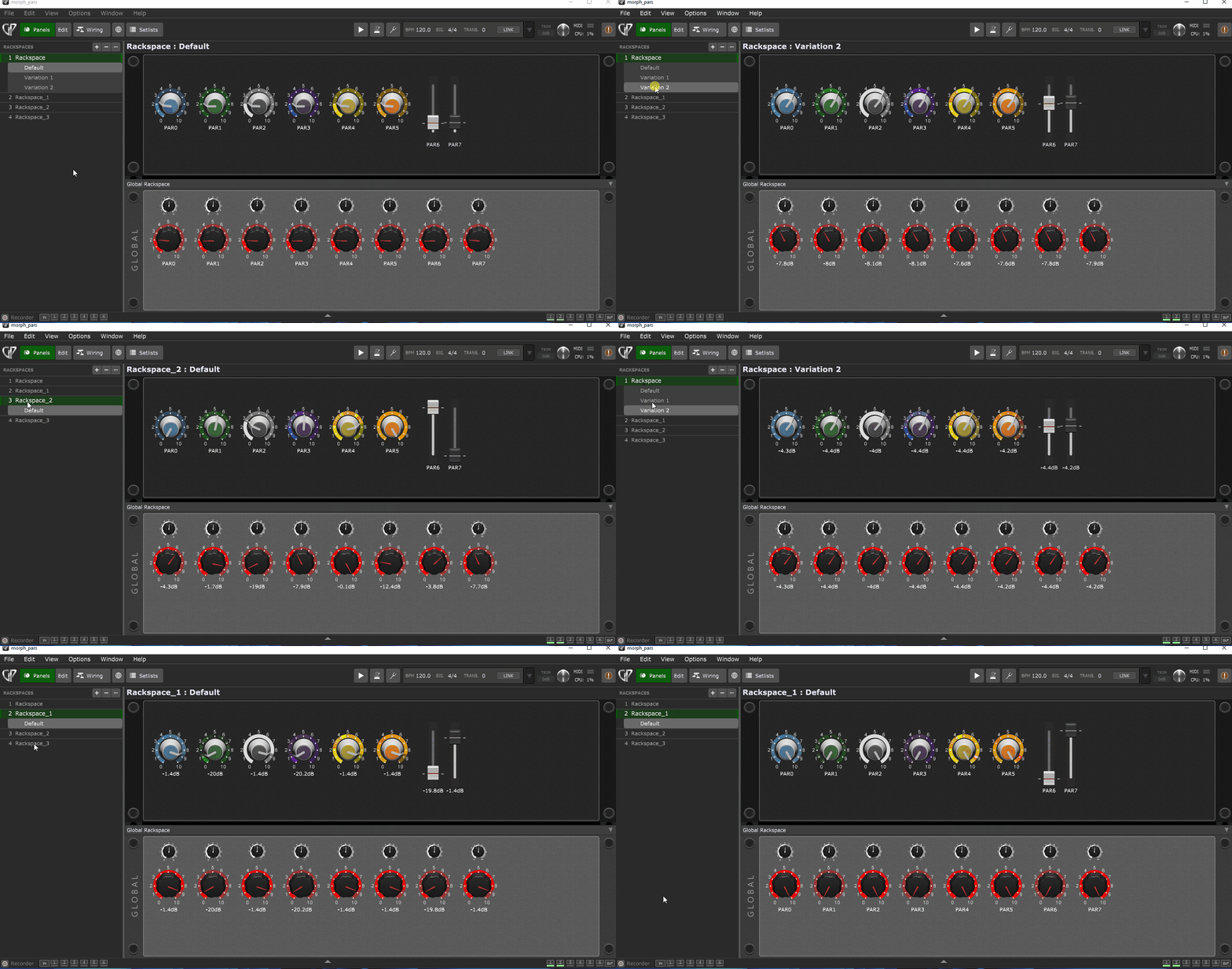
Alright.. i finished my “playing around” and i actually was successful in creating a script which does a morphing between 8 diffrent parameters on a rackspace or variation change.
The morphing time for the paramater transition is set in the script (to 2 seconds) and can be changed at will - maybe it would have been nice to set it via a separate widget, but whoever needs this, can implement it quite easily.
Like i said in my previous posting the script has to be run from the Gloabal Rackspace because only from there it can “supervise” the local rackspace changes.
There are two rows of knobs on the global Panel:
The big red ones are bound to a “Global Parameter” each (see manual for this!), so those can be accessed and set from any local rackspace which has a “From Global Rackspace” block in its wiring view.
The upper row of small knobs are used to “store” the previous values of those “main” parameter bound widgets… there is a GP-Script function which allows to read the “previous value” of a widget before it gets altered… and that’s what my script mainly does:
On a rackspace or variation change the widget settings in the Global Rackspace will be changed according to the widgets in the local rackspaces, but before this changes take place, the script buffer the previous values (of the settings before) with those small knobs.
That way we have a before/after comparison and we can calculate a the needed step-width per widget to realize that value-transition within the desired morphing time, and while the timer ticks, the script adds or subtracts those value steps, so taht in the end all the widgets reach together their target value, just in time!
This is how it looks like:
parameter-morphing
You can see the widgets do a sudden jump on each change, but as far as i can tell this is only a visual flaw, because i couldn’t hear any sudden changes in the separate volumes (i guess the graphics is just not fast enough to stay in pace). For my tests i used the audio file player and played an 8-track recording while i switched through the rackspaces and variations…

Those little “buffer knobs” can also be hidden, so they won’t distract the look.
So here it is:
morph_pars.gig (647.4 KB)

Have fun with it!
Cheers!
Erik

7 Likes

Ook that’s looks great! I spent a couple hours yesterday trying to accomplish something similar but being entirely new to Gig Performer and the scripting in it… it was slow going :smiley: I’ll for sure give this a look on the weekend! Thanks a ton for taking the time!

1 Like

Aaaight schamass at it again :heart_hands: this is awesome stuff

1 Like

This was my main concern - that the plugin parameter change would occur before you could read the new widget value and override it. I’m actually surprised by this.

Here’s how I think I’d approach it…

  1. set all the widgets you want to fade this way to “Ignore variations.” That way we can be confident they won’t instantly jump on a variation change.
  2. give the widgets a specific name format so that a script/extension knows how to find them.
  3. create a separate similarly named text widget corresponding to each widget you want to fade. The label would be something like, “[target value], [fade time]”
  4. on variation change the script/extension reads the values from each of those text widgets and ramps to that value over the specified time
  5. if the label doesn’t include a specified time the fade will happen over a default period that can be specified in a different text widget

As an example, if we had three knobs we want to fade we could give them GPScript names like “fade_knob1”, “fade_knob2”, “fade_knob3”. We would then create corresponding text widgets named “fade_knob1_p”, “fade_knob2_p”, “fade_knob3_p” with the “p” indicating it’s the widget that will store the relevant parameters.

When the rackspace is entered for the first time the script/extension would scan for all widget names starting with “fade_”. Upon variation change it would look for each of the associated “_p” widgets and fade each of them to the new values over the specified time.

If one wanted to get fancier the parameter list could be extended to include things like whether you want a linear fade, a curved fade, a fade over a specified number of beats, an ongoing sin oscillation between two values, or whatever else one might find interesting.