I am experimenting a bit with controlling volume with an expression pedal. I now have a ‘Gain and Balance’ in the Global Rackspace between the ‘From Rackspaces’ and ‘Audio Out’ and I’m controlling the Gain parameter with the Expression Pedal widget. Instead of a proper sweep, I can hear the individual steps. Is there a way to smooth it out?
Ps. I also tried assigning the Master Trim in Options->Global Midi Assignments, but here’s the same issue. Is it my expression pedal? It is a EHX dual expression pedal.
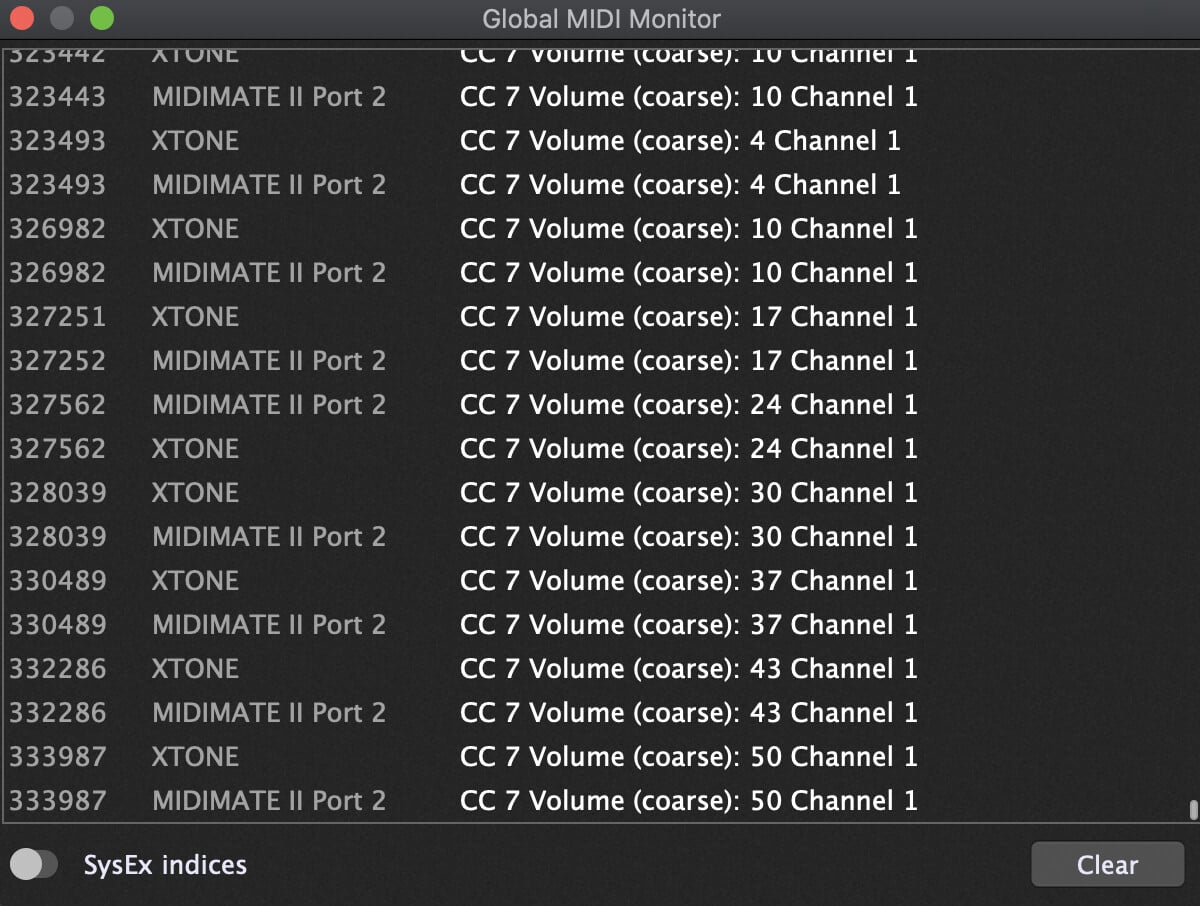
If you open the Global Midi Monitor (via the Window menubar item) and move your expression pedal, does it show it moving through every value, or is it skipping values?
Ooh, yes, it skips, like every other 6 or 7 values. I tried a Yamaha FC7 which has the same behaviour, strange! I connect them through the Xtone Pro audio interface, could that be the issue? I’ll see if I can troubleshoot from there.
I also tried both pedals through AudioFront’s MIDI expression device and there the values looked smooth. Unfortunately, I need that hub for something else.
It must be, if the AudioFront was fine. Disappointing about the Xtone - I’ve always had my eye on those.
I have a cheap M-Audio pedal connected via a Nectar Pacer - no issues with that - very smooth.
I take it you’re using the usb only for the Xtone? Wonder if the audio+midi is struggling? Maybe using the Midi out (to usb cable) will be a better option?
The MIDI delay between two events is huge, which is not correct.
Why does two different MIDI interfaces have the same CC7 messages? Can you test them separately?
This was in reply to rank13. The interface transmits MIDI over USB but it has a separate MIDI in/out as well, so I made the test. If I test them separately, the issue remains.
No, I’m on a Mac. And as I wrote earlier, if I hook up the expression pedals through the AudioFront hub, everything is smooth. So it seems like a Xsonic issue, I’ve asked in their user group for help.
Thanks, Hermon. The setting for TRS on the EHX pedal is ‘in’, this gives the ‘best’ result. Range is full indeed, it reads from 0-127 but with larger increments, like 0 8 15 21 28 35 etc.
From the manual:
TRS +/- Button – Reverses the polarity of the TRS jack for expanded compatibility with other devices. In the OUT position: the internal potentiometer’s wiper is connected to the Tip of the TRS cable and the potentiometer’s maximum setting is connected to the Ring. Press IN TRS +/- to connect the wiper to the Ring of the TRS cable and the maximum setting to the Tip. The Sleeve of the TRS cable is always connected to the potentiometer’s minimum position. For EHX pedals, set this button to the OUT position. If you find the Dual Expression does not achieve a smooth sweep over the full range of the foot pedal, try changing the TRS +/- setting.