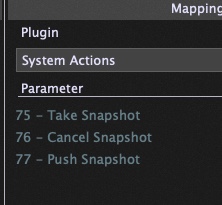
When I go through songs and songparts in setlists view I often want to adjust some sounds like for instance volume and brightness of the sections next to each other. And sometimes it’s not very easy to go back and forth between setlists and panels in order to save those changes.
It takes even longer to click ‘capture’ and then right-click on a songpart and choose ‘push songpart changes to rackspaces’.
Maybe there are other people like me. And it would be helpful for us to either have some keyboard shortcuts for ‘capture’ and ‘push songpart chnges tp rackspace’. Or to have some auto-saving mode which we could switch on and off in setlists view. When it’s switched on - the changes would be saved automatically like in panels view.
Thanks for your great product! And allowed me to move from processors to my mac with all the sounds that I could dream of.
I do what David has suggested all the time, quite often during gigs when I might find levels aren’t quite right. Probably two of my most used buttons on my controller other than song and part select.
I also have those buttons hidden as I have no need to use them on screen.
When I’m in a song part, the widget panel is displayed.
I just change the volume (faders widget) and hit the snapshot button to save it and the tweak is saved to that song part.(Of course I do need to save the gig file before I exit).
For me yeah, i want it saved back to the Rackspace unless it’s just for one specific part of a song.
The way i look at it is I’ll use the above for getting, say a balance, write that to the Rackspace, and then possibly make tweaks on a song part if needed. It’s also not just for volume, i sometimes mess about with different plugins and so when i get the right combination I’ll also write that back.
It’s more part of the creation process than anything. What works at home might not work with the band, so it’s a quick way of fixing that to get where I want it, and then tweak each song part as needed.