Hello,
may it is a trivial question, but I guess I do it wrong since years .
I use the Behringer XR18 mixer to
a.
take the analog signals from Mic’s, guitar and bass guitar into the XR18, send it through GP (via USB) and back to the XR18 and then send it to the speakers
b.
receive signals out of the vst’s (Keys and E-Drum) in GP via USB and then send it to the speakers
I do that since years and it was working “fine” (if correct I do not know). Since some time I have now the problem that, after a song change (in GP), the level of the e-drum and or of the bass guitar is extremely loud, it’s not reproducible and I can not evaluate where it’s coming from.
As I cannot image that it’s happening inside GP I thought to set up the XR18 new. (I directly bought a new XR18, to be sure it’s no hardware problem).
Now the question to the ones whom are working with a similar set up.
How do I have to set the routing for a mic (a.), as I just want to hear finally the through GP processed sound? I currently have the mic USB Sends set to “A/D” “Analog” and the USB Return on “Post Fader”.
I think this is not correct as I hear the “Mic Gain” and just can “mix” the “USB Trim” in addition, but I do not have the clean processed signal.
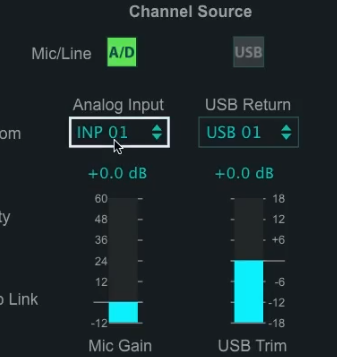
I hope the explanation is understandable.
Thanks
Flodder