Possibly small computers with high end CPUs often suffer from insufficient cooling from my experience. This is why I’m sitting here using a Mac Mini with small i5 from 2018. This enforces clever usage of the limited resources, especially by setting preload to 1.
While waiting a bunch of seconds to load the next rackspace between songs is not that big of an issue, skipping though the entire set because singer decided to change the song order on the fly actually is.
The Arturia Keylab I am using has a configurable “rastered” encoder with included push button. I think most Controllers have something like that.
I created a global rackspace script and a bunch of widgets to conveniently scoll trough setlist and loading the song on button press. It updates dynamically to the current setlist.
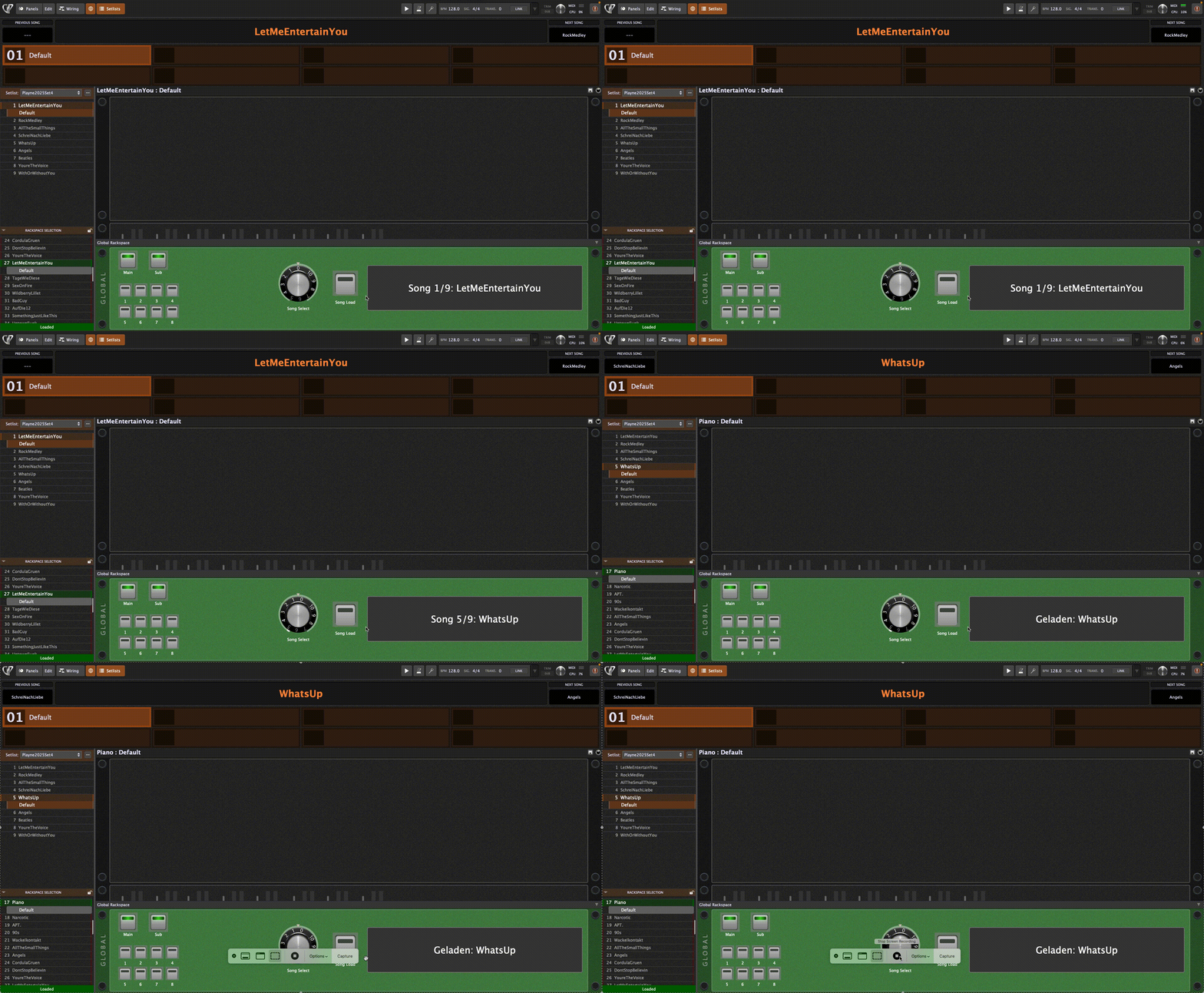
Just create a Knob with script handle “KnobSelect”, a button with handle “BtnLoad” and a label with handle “LblSong”.Map the encoder turning to “KnobSelect” (for my hardware mode must be relavive offset) and the push to the button. Ensure to “lock” and exclude these from Variations to avoid loops or manipulation with the mouse. Post the script in the global rackspace script editor. Sorry for the German texts and comments. The script does not break when not in Setlist mode. However, I think I remember it throws an error the very first time, just ignore 
Var
   KnobSelect : Widget
   BtnLoad    : Widget
   LblSong    : Widget

   songCnt    : Integer
   selIndex   : Integer
   ok         : Boolean   // für SwitchToSongByIndex-Rückgabewert

// Hilfsanzeige, wenn nicht im Setlist-Modus
Function ShowNotInSetlist()
   SetWidgetLabel(LblSong, "Not in Setlist-Mode")
End

// Anzeige aktualisieren (nur wenn Setlist aktiv)
Function UpdateSelectionLabel()
   If InSetlistMode() Then
      If selIndex >= 0 And selIndex < songCnt Then
         SetWidgetLabel(LblSong,
            "Song " + IntToString(selIndex+1) + "/" + IntToString(songCnt) + ": " + GetSongName(selIndex))
      Else
         SetWidgetLabel(LblSong, "Empty (" + IntToString(selIndex) + ")")
      End
   Else
      ShowNotInSetlist()
   End
End

Initialization
   If InSetlistMode() Then
      songCnt  = GetSongCount()
      selIndex = GetCurrentSongIndex()
      If songCnt > 0 Then
         SetWidgetLabel(LblSong, "Start: " + GetSongName(selIndex))
      Else
         SetWidgetLabel(LblSong, "No songs in setlist")
      End
   Else
      // Keine Setlist-Funktionen aufrufen!
      songCnt  = 0
      selIndex = 0
      ShowNotInSetlist()
   End
End

// Knobwert (0.0..1.0) direkt nutzen -> 0..127, nur in Setlist erlaubt
On WidgetValueChanged(newValue : double) from KnobSelect
   If InSetlistMode() Then
      songCnt = GetSongCount()                   // falls sich die Setlist geändert hat
      selIndex = Round(newValue * 127)
      UpdateSelectionLabel()
   Else
      ShowNotInSetlist()
   End
End

// Laden-Button: nur in Setlist laden
On WidgetValueChanged(newValue : double) from BtnLoad
   If newValue > 0.5 Then
      If InSetlistMode() Then
         If selIndex >= 0 And selIndex < songCnt Then
            ok = SwitchToSongByIndex(selIndex, 0)   // lädt Part 0
            If ok Then
               SetWidgetLabel(LblSong, "Loaded: " + GetSongName(selIndex))
            Else
               SetWidgetLabel(LblSong, "Error while loading")
            End
         Else
            SetWidgetLabel(LblSong, "No valid song (" + IntToString(selIndex) + ")")
         End
      Else
         ShowNotInSetlist()
      End
   End
End
