Hi.
I have a large gig with an SAFP in the GRS. There are 11 songs loaded in the SAFP, and there are corresponding songs in the setlist. So long as I select my next song in the SAFP, I observe no problem with playback started from the global playhead with SAFP synced to that. I use the global playhead to trigger the starts so that I can have a script operate my MRecorders. This all works.
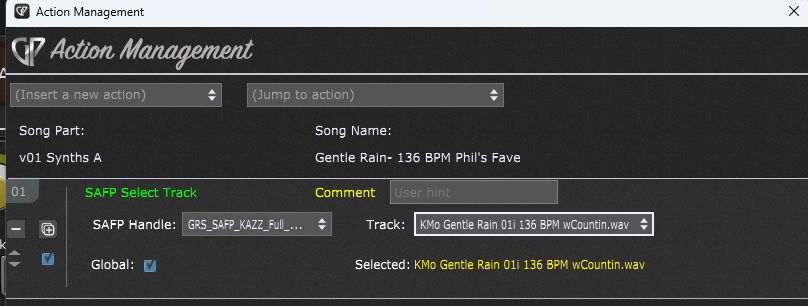
Now, if I put a song part action in the first song part of any of my songs, with the goal of selecting that song part and having the SAFP set itself to the corresponding track, then the next time I start playback via the global playhead GP’s UI becomes unresponsive, and the audio output becomes nothing but a very nasty buzz. This is reproducible, every time. GP does not crash, but I’m given no choice but to End Task and restart GP.
Why/how could a song part action selecting an SAFP track produce such a horrible outcome on the next start using the global playhead?
What happens when you do not sync the play head and start play directly in SAFP?
What happens when you do not sync the play head and start play directly in SAFP?
The selected track selects and the audio waveform streams into it, and then GP’s UI becomes unresponsive, and the audio output becomes nothing but a very nasty buzz.
IOW, basically the same.
I did nothing else but add the action and then use it.
Did you test the audio files with a different audio player standalone?
Where are the audio files located ?
I made a small gig file with 1 rackspace and a song with 2 Song Parts.
in the Song Parts actions I select the tracks.
Play is synced
I do not face any audio issue when I press global play.
What Audio File Types are you using?
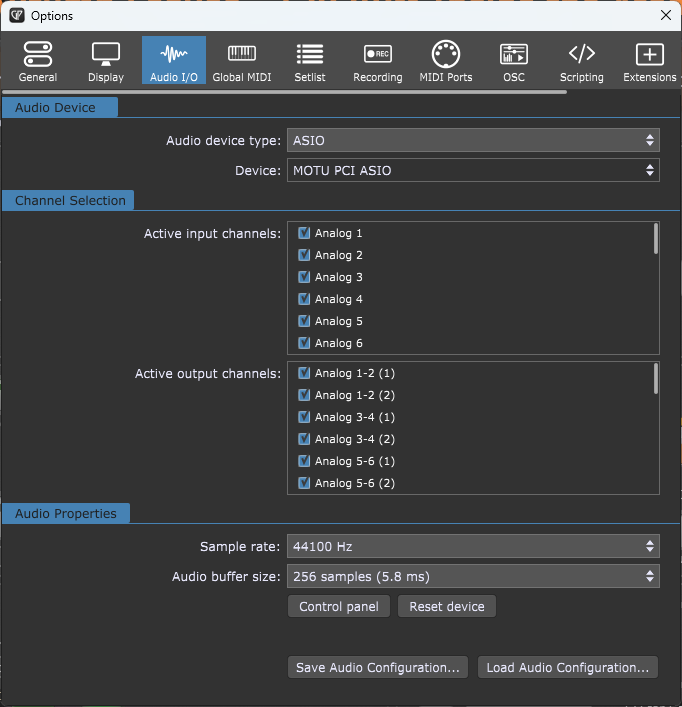
What are your Audio Settings?
What is your interface?
The files are .wav files.
They are located in a subdir under Gig Performer.
…\Documents\Gig Performer\Audio FIles for GP\KAZZ Audio Files
They all play fine in any DAW, or with Media Player, or inside GP’s SAFP.
.wav files
Interface is MOTU 2408 Mk II, via PCI-424 card.
When you remove the action and select manually the track and press global play, then all is fine?
I can add the action, do other things, then remove the action, and so long as I have not executed the action then all is well. If I actually execute the action at all then BUZZ and lockup!
On Mac I cannot reproduce.
Did you try with the inbuilt sound card?
Can you upload a small gig file and the wav files to show the issue?
I can check with my system.
Sound card? Sounds like something from the 1990’s 
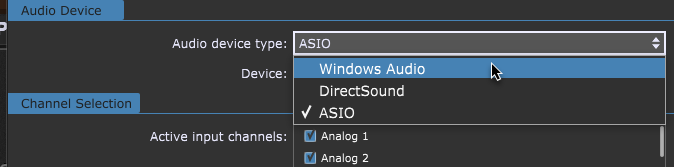
Here are the choices I have:
Is it Windows Audio you are interested in?
Or DirectSound.
Your internal Hardware should be used to test.
OK, switched to Windows Audio.
Confirmed SAFP .wav files played OK
Defined the action, but did not execute it.
Re-confirmed SAFP .wav files played OK
Executed the action. Result: BUZZ and lockup
Is there a debugging version of GP that I could run that might shed light?
Can you upload a small gig file and the used Audio Files?
Right now, I cannot.
Can someone who knows the internals of the Systems Actions and the SAFP reason from how those internal work to create one or more hypotheses about what might be happening?
Without reproduce nobody can.
Can you reproduce with a small gig file and other Audio Files?
Reproducing, all by itself, won’t do anything other than confirm I’m not making it up. I could show you that in a video.
I appreciate your attempt to reproduce, and your dialog here, but I wish you would also answer my direct question:
Is there a debugging version of GP that I could run that might shed light?
It is my experience from software development that some problems need to be troubleshot on the machine where they manifest.
How can I answer, I am a regular user as you.
1 Like