Not with USB 3.0, I don’t think so.
No no bottleneck at al with USB3.
Why RME Dante? Because I’ve been burned too many times with Dante Virtual Soundcard. For big channel count mission critical recordings the RME is a dream- no networking nonsense, no clashes etc.
Don’t get me wrong for £30 DVS is incredible, I used it for years, but the RME is next level.
Oh no- today I unplugged my Macbook from the Dante interface and this evening on reconnecting it’s come back with 128 inputs and 128 outputs…GP does forget the unticked sockets in Options.
Yeah, we need to extend the Rig Manager to support audio devices as well as MIDI so that this kind of thing can be remembered.
However, there is a workaround - I just tested it and it should work for you.
-
Configure those settings the way you want them (just one more time, sorry)
-
Click on Export All Options…
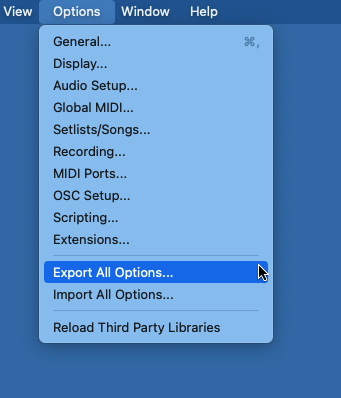
- Save those options to a file — call it Dante64 (for example)
Now - later, when you run into the problem again, click on Options and Import that settings file back. Restart Gig Performer and the inputs/outputs should be correct
Caveat: when you export settings, you’re exporting ALL the settings and preferences and list of validated plugins so if you have changed any other preferences in between exporting and importing, those changes will be lost.
There may be short term ways to improve this - have to think about it
OK I’ll try shortly. If that works I can live with the issue…Standby…
Needless to say I cannot get the forgetting scenario to happen now! I’m sure it will so I’ll report back. I have exported the Options file.
Thanks
OK the problem happened just now (I can’t figure what causes it mind) but I imported the settings file and all good, it works with my 256 channels of i/o!
Ok, glad that worked for you.
right ,i checked it is usb 3…
How are you making out with the RME Digiface Dante? I’ve been thinking about getting one for my keyboard setup. Would you recommend it?
hey
must be a misunderstanding i do not have a dante digiface but there is a user around having one, i did not go for it as it (sadly)does not have midi, and rme s midi is the imho best on the market
Hi,
I just tried out GigPerformer, seems great!
However, I also have an audio interface with hundreds of I/O channels, so the initial setup was finger cramping, having to click through all the unnecessary inputs / outputs one by one. (all were selected by default, but I only want to use a few with GP)
Also, when switching to another audio interface or wanting to tweak things without the interface connected, the settings are reset, and I have to do all this clicking all over again. The normal quick select buttons should really work on these kinds of lists. (I mean the ‘click on first to select, then hold shift + click last to select a range’, or ‘cmd+click’, to select several here and there.)
A ‘select all’ / ‘unselect all’ button would be convenient too, of course.
Oh yeah, and I’m on Mac in case there’s a difference on how this works on different platforms…
You can save and load the audio setup. Might save lots of extra/unnecessary clicking…
Shift-click accomplishes that.
You can save and load the audio setup. Might save lots of extra/unnecessary clicking…
Ah yes, just noticed, that’s great!
I still think it would be a no-brainer to add the other easy select functions there too.
Shift-click accomplishes that.
Even more good news. For some reason it didn’t work for me on the first try, but now does.
Go figure…
Also, I think it would be more intuitive for the shift+click to work as it does systemwide, so that it would select a range between the first and last selected.