my main live laptop rig is using
keyboard upper transmits on chan 2. upper has analogue expression pedal plugged into it.
in rig manager midi device upper is mapped to alias “EXPRESSION” in the midi dropdown in all my rackspaces.
keyboard lower transmit on chan 1.
channels 1 and 2 are fixed in all my rackspaces.
my home static pc rig is using a yamaha two keybed set up and has
chan 1 on upper level and
chan 2 on lower level,
these are merged on a fixed one midi output.(merged on board)
these channels are fixed and cannot be changed.
also this yamaha uses a usb expression pedal.
problem 1 for yamaha home static pc rig
how do i set up in rig manager one midi input to goto upper keybed when its transmitting channel 1 to goto chan 2 in rackspaces and chan 2 to goto chan 1 in rackspaces. (without editing every single rackspace)
problem 2 for yamaha home static pc rig
this yamaha RIG uses a usb expression pedal.(FBV EXPRESS)
every rackspace has now lost the “EXPRESSION” assignment (no midi assignment yet)
Yes, I would use a gig script to remap your Yamaha Keyboard channels to match your main rig. Then it would just be a matter of using Rig Manager to map the devices.
I can change upper lower wiring on Yamaha keyboards so upper transmits on 2 and lower transmits on 1, but it messes up the octaves, eg top becomes F1-C5 and lower becomes F2-C6, I would then still have to edit all my rackspaces. Cheers
Got it — I think this is such an unusual issue that the only reasonable solution is to use a GigScript that could examine the channel of incoming messages and reinject them after changing the channel if necessary.
The only issue is determining on which computer your gigfile is running. This could be done by having your gigscript “include” a file that lives on your machine rather than in the gigfile with a function (or initialized global variable) that would let the gigscript know whether it needs to do that channel swapping.
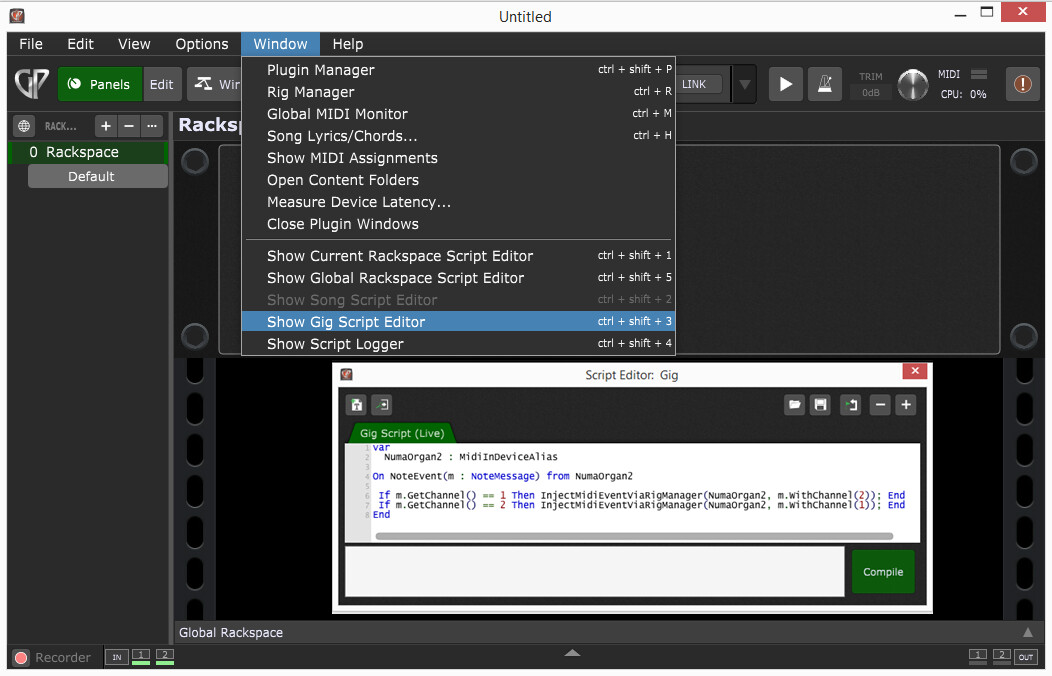
I like the idea of @pianopaul from the very beginning, I think his idea was to add this to a gig script (in this example NumaOrgan2 is the alias of my keyboard controller in Rig Manager:
var
  NumaOrgan2 : MidiInDeviceAlias

On NoteEvent(m : NoteMessage) from NumaOrgan2

 If m.GetChannel() == 1 Then InjectMidiEventViaRigManager(NumaOrgan2, m.WithChannel(2)); End
 If m.GetChannel() == 2 Then InjectMidiEventViaRigManager(NumaOrgan2, m.WithChannel(1)); End
End
This exchange channels 1 and 2 for my NumaOrgan2 before it enters the rackspace.