OK, so I tested it at home (1 external and 1 laptop screen), and it works fine.
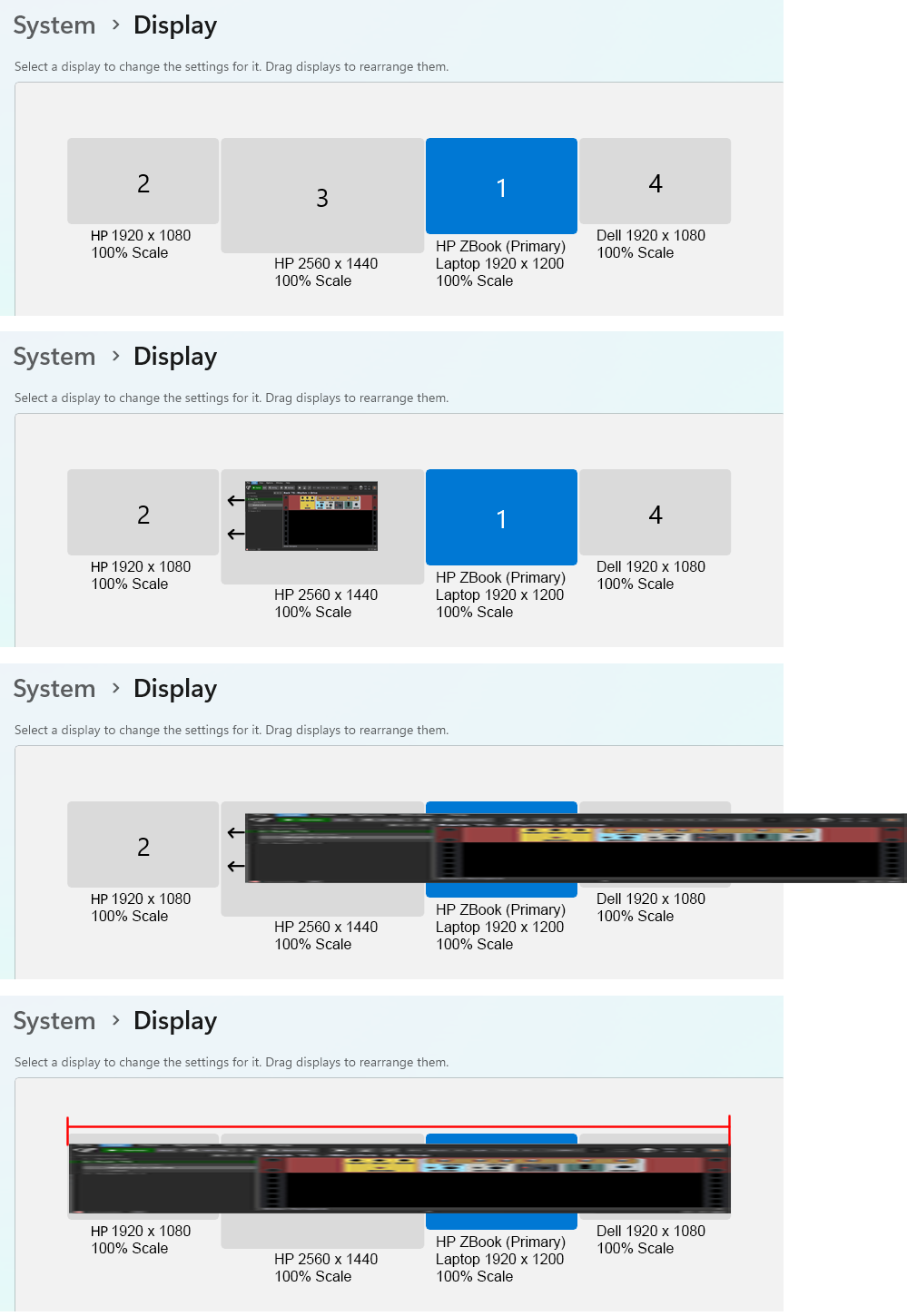
Where it was acting up (consistently), was the same laptop plugged into the same dock model, but with 1 laptop screen and 3 external monitors. This was bugging out in both essentials and pro.
At work, 2 of the 3 externals are 1080 but the 3rd is 1440.
When I am back at work, as a test, I will force the built in Intel video card and then force the internal Nvidia, and see if they yield the same results. That would rule out video cards and video drivers.
System Details:
OS Name Microsoft Windows 11 Business
Version 10.0.26200 Build 26200
Other OS Description Not Available
OS Manufacturer Microsoft Corporation
System Manufacturer HP
System Model HP ZBook Studio 16 inch G10 Mobile Workstation PC
System Type x64-based PC
System SKU 894D5UT#ABA
Processor 13th Gen Intel(R) Core™ i9-13900H, 2600 Mhz, 14 Core(s), 20 Logical Processor(s)
BIOS Version/Date HP V99 Ver. 01.10.00, 8/26/2025
SMBIOS Version 3.4
Embedded Controller Version 86.54
BIOS Mode UEFI
BaseBoard Manufacturer HP
BaseBoard Product 8B8F
BaseBoard Version KBC Version 56.36.00
Platform Role Mobile
Secure Boot State On
PCR7 Configuration Elevation Required to View
Windows Directory C:\WINDOWS
System Directory C:\WINDOWS\system32
Boot Device \Device\HarddiskVolume1
Locale United States
Hardware Abstraction Layer Version = “10.0.26100.1”
Time Zone Eastern Standard Time
Installed Physical Memory (RAM) 32.0 GB
Total Physical Memory 31.5 GB
Available Physical Memory 16.3 GB
Total Virtual Memory 36.8 GB
Available Virtual Memory 16.3 GB
Name Intel(R) Iris(R) Xe Graphics
PNP Device ID PCI\VEN_8086&DEV_A7A0&SUBSYS_8B8F103C&REV_04\3&11583659&1&10
Adapter Type Intel(R) Iris(R) Xe Graphics Family, Intel Corporation compatible
Adapter Description Intel(R) Iris(R) Xe Graphics
Adapter RAM 2.00 GB (2,147,479,552 bytes)
Installed Drivers C:\WINDOWS\System32\DriverStore\FileRepository\iigd_dch.inf_amd64_af91ad0f2b80669a\igdumdim64.dll,C:\WINDOWS\System32\DriverStore\FileRepository\iigd_dch.inf_amd64_af91ad0f2b80669a\igd10iumd64.dll,C:\WINDOWS\System32\DriverStore\FileRepository\iigd_dch.inf_amd64_af91ad0f2b80669a\igd10iumd64.dll,C:\WINDOWS\System32\DriverStore\FileRepository\iigd_dch.inf_amd64_af91ad0f2b80669a\igd12umd64.dll
Driver Version 32.0.101.7077
INF File oem213.inf (iRPLPD_w11_DS section)
Color Planes Not Available
Color Table Entries 4294967296
Resolution 1920 x 1200 x 60 hertz
Bits/Pixel 32
Memory Address 0x000000644C000000-0x000000644CFFFFFF
Memory Address 0x0000004000000000-0x000000400FFFFFFF
I/O Port 0x00005000-0x0000503F
IRQ Channel IRQ 4294967241
Driver C:\WINDOWS\SYSTEM32\DRIVERSTORE\FILEREPOSITORY\IIGD_DCH.INF_AMD64_AF91AD0F2B80669A\IGDKMDN64.SYS (32.0.101.7077, 60.25 MB (63,174,520 bytes), 12/3/2025 8:54 AM)
Name NVIDIA GeForce RTX 4080 Laptop GPU
PNP Device ID PCI\VEN_10DE&DEV_27A0&SUBSYS_8B8F103C&REV_A1\4&2EF31DC&0&0008
Adapter Type NVIDIA GeForce RTX 4080 Laptop GPU, NVIDIA compatible
Adapter Description NVIDIA GeForce RTX 4080 Laptop GPU
Adapter RAM (1,048,576) bytes
Installed Drivers C:\WINDOWS\System32\DriverStore\FileRepository\nvbli.inf_amd64_def2cdb0ce2d3368\nvldumdx.dll,C:\WINDOWS\System32\DriverStore\FileRepository\nvbli.inf_amd64_def2cdb0ce2d3368\nvldumdx.dll,C:\WINDOWS\System32\DriverStore\FileRepository\nvbli.inf_amd64_def2cdb0ce2d3368\nvldumdx.dll,C:\WINDOWS\System32\DriverStore\FileRepository\nvbli.inf_amd64_def2cdb0ce2d3368\nvldumdx.dll
Driver Version 32.0.15.7688
INF File oem207.inf (Section174 section)
Color Planes Not Available
Color Table Entries 4294967296
Resolution 1920 x 1080 x 120 hertz
Bits/Pixel 32
Memory Address 0x0000000085000000-0x0000000085FFFFFF
Memory Address 0x0000006400000000-0x0000006401FFFFFF
IRQ Channel IRQ 4294967240
Driver C:\WINDOWS\SYSTEM32\DRIVERSTORE\FILEREPOSITORY\NVBLI.INF_AMD64_DEF2CDB0CE2D3368\NVLDDMKM.SYS (32.0.15.7688, 106.50 MB (111,668,848 bytes), 7/1/2025 8:32 AM)

 What’s happening
 Workarounds people have found
 Bottom line