At my last gig I had 3 songs produce no sound. I had no idea at the time why this was happening. I have been using the same set up and songs we always play. When I got home and opened the gig file, those songs still had not sound. I traced it to the Midi In Blocks not passing midi through/to the plugin. I have a gig in two days. I opened the gig file for this gig and discovered some songs have the same problem. I made a video demonstrating this. I do not know what to look for. I tried replacing the plugin with a new midi in block and still it doesn’t work? Any thoughts?
Did you enable the MIDI ports in the options window?
ive had this happen to me a few times. Ive always put it down to user error but could never see what the error was. I replaced the midi in block with a fresh copy and its worked fine ever since.

I tried replacing the midi in block, but I get the same result; nothing. I even copied and pasted a midi in block from a working rackspace, in the same gig file and still it is not working.
Are the MIDI In blocks using the same channel?
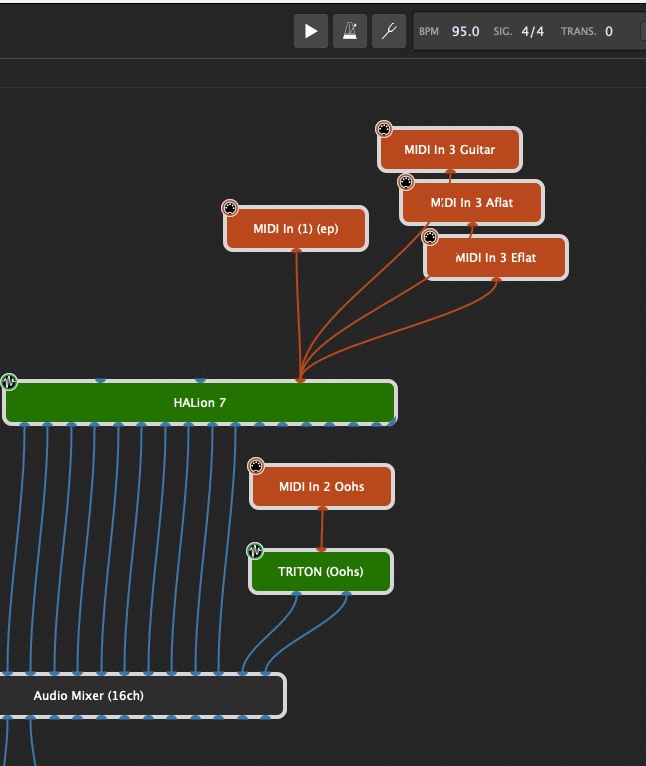
The Midi In Blocks are not using the same channel. In this rackspace I have 3 Midi In Blocks using, Midi In Dim 1, Midi In Dim 2 and Midi In Dim 3. The Midi In Dim 3 has 3 different channels. The only one working is Midi In Dim 2. I have 3 rackspaces in this gig file not working (Midi In Blocks). If I close this gig file and open/import each rackspace/song file in other gig file they work. The last gig I played, 3 rackspaces/songs did not work. In this gig file those 3 are working and now I have 3 others that are not, very strange.
My keyboard (StudioLogic NumaX Piano) is connected to iConnectivity MioXL. There are 4 zones on the keyboard. Zone 1 is Dim 1, Zone 2 is Dim 2, Zone 3 is Dim 3 and Zone 4 is Dim 4.
I have a Netkar Pacer, Donner StarryPad connected to iConnectivity MioXL as well. They work fine.
What can you see in the global MIDI monitor windowwhen you play on your controller?
Some things I would check.
Is your controller sending midi data on the same channel the MIDI IN Block is accepting data?
Do you have any filters set up in the MIDI IN Block?
Are you using set list mode?
Is it possible, you have a widget set up that is blocking something? Maybe you did a snapshot change in a song part (I have done that).
Just throwing stuff out.
Jeff
Well, let’s first confirm this.
Please put a MIDI Monitor block after the MIDI In block and lets see what it displays when you press a few notes
At the same time, please have a global MIDI Monitor window open so we can see exactly what’s coming in and from where.
Recognize that if the MIDI Block itself was really failing, we’d have thousands of reports, so it’s extremely unlikely that the MIDI Block itself is the issue.
1 Like
The MIDI monitor shows the note activity. I see the Midi In block, the note on/off, velocity and channel.
Awesome. Uh, could we see it too, please?
Midi In Blocks to Midi Monitor
What GP Version Are you using?
Midi Monitor and Global Midi Monitor
GigPerformer 5
OK – then the MIDI In block is working just fine! I’m seeing output from all four of those MIDI In blocks!
I use set list mode when playing. I use it to send program changes to forScore. I do not use variations. I use the 4 Zones in StudioLogic to control sound changes. For example, I will have an organ on Zone 1, a bell sound on Zone 2 and a lead sound on Zone 3. I can turn Zones by press a button on the StudioLogic or a pedal on the Nektar Pacer. I use the Donner StarryPad to step through the songs, control the over all volume, start or stop a backing track (if there is one), for two songs I use the slider to change the key of the song.
@dhj is correct. The MIDI monitors show that the MIDI In blocks are receiving and sending the correct messages. So, the problem seems to be inside that particular instance of Halion 7. Is it setup up to receive messages on more than one channel?
Have you tried replacing that instance of Halion 7 with itself—or copy/pasting a version of it from a known working version?
Or he is basically just sending the message on the wrong channel