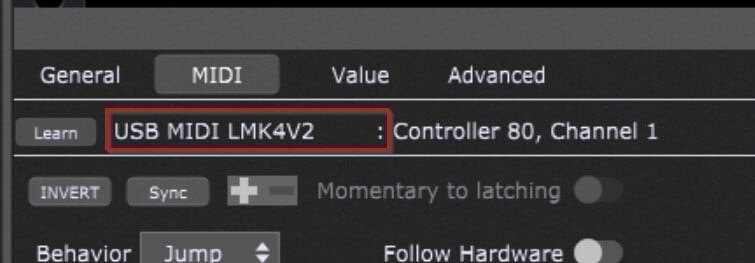
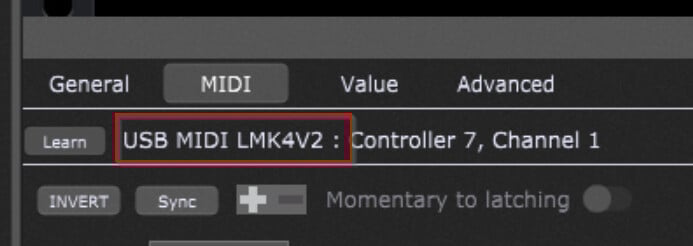
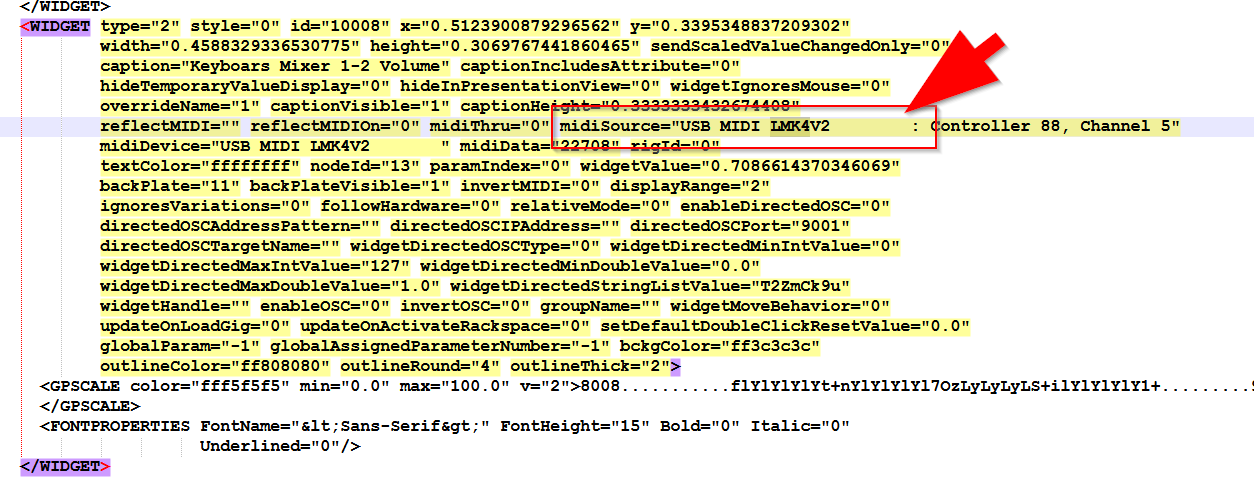
You see : there were some blank spaces at the end before and that never gave me a problem.
I had to reassign the MIDI rig to the new USB input name : no problem.
But it seems that the learn function of the widget MIDI tab did not use the "rig alias” but the physical port name (the one that lost the leading spaces).
So now ALL the controller assignments seem to be gone.
A desaster !
I tried to create a MIDI alias in trhe rig manager but here its not allowed to add a name with leading spaces (they are trimmed on save).
How can I reassign the widgets to listen to another physical port oder alias name ?
Reassignign about 100 racks manually will take me for hours !
Since editing files relating to GP in a text editor is not supported, I would suggest making a copy of your gig file before making any changes.
Hopefully you are able to make the appropriate changes and your assignment issues get resolved.
How were these blanks set in te first place, were they part of the standard published device name?
Did you see the blanks also with other 3rd party applications/DAWs?
This can be a dangerous step but you can try it along with a proper backup up of the gig file.
Can you please update back?
First of all : meanwhile I did the “mouse.click-party” and adapted my rigs to the the new device name. Much work, but this time I created MIDI controller aliases in the rig manager, so hopefully this problem will never occur again.
So there is no more need for experimental xml editing.
Your question :
Yes, I could see the curious blanks in other DAW (and a tool that verifies connected USB MIDI devices on startup) too, but they never made a problem for me, all tools worked with it.
If I remember correctly the accidental change to the blank-free device name came after a BIOS update of my Lenovo ThinkPad. Before that it was WITH ending spaces “USB MIDI LMK4V2 “, after that it was trimmed.